Liquor License
What Is a Liquor License?
A liquor license (also called an alcohol license, liquor permit, or ABC permit) is a government-issued authorization that allows a business or individual to sell, distribute, or manufacture alcoholic beverages within a specific jurisdiction. Liquor licenses are issued and regulated at the state level by agencies commonly known as the Alcoholic Beverage Control (ABC) board, the Liquor Control Board (LCB), or a similar regulatory authority.
There are many types of liquor licenses, and the exact categories vary by state. Common types include:
- On-Premises (On-Sale): Authorizes the sale of alcoholic beverages for consumption on the premises (restaurants, bars, hotels, clubs)
- Off-Premises (Off-Sale): Authorizes the sale of alcoholic beverages in sealed containers for consumption off the premises (liquor stores, grocery stores, convenience stores)
- Beer and Wine Only: Permits the sale of beer and wine but not distilled spirits
- Full Liquor (All Beverages): Permits the sale of beer, wine, and distilled spirits
- Manufacturer/Producer: Issued to breweries, wineries, and distilleries for production and distribution
- Wholesale/Distributor: Authorizes the distribution of alcoholic beverages to retail licensees
- Temporary/Event: Issued for specific events such as festivals, fundraisers, or catering functions
- Caterer: Permits alcohol service at off-site events
Who needs a liquor license? Any business that sells, serves, or distributes alcoholic beverages must hold the appropriate license for its operations. This includes:
- Restaurants and bars
- Hotels and resorts
- Nightclubs and entertainment venues
- Liquor stores and package stores
- Grocery stores and convenience stores that sell alcohol
- Wineries, breweries, and distilleries
- Event venues and catering companies
- Private clubs and membership organizations
- Sports stadiums and concert venues
How to obtain one: The application process involves submitting an application to your state’s ABC or liquor control agency, along with required documentation (business registration, zoning approval, floor plans, background checks, and financial disclosures). Processing times range from 45 to 90 days or more depending on the state and license type.
Cost: Liquor license costs vary dramatically by state, license type, and location. Initial license fees can range from a few hundred dollars to tens of thousands of dollars. Annual renewal fees also vary by jurisdiction.
Validity period: Most liquor licenses are valid for one to two years, though the exact period depends on the state. California, Washington, and Indiana require annual renewal. Pennsylvania and Kansas use a two-year renewal cycle. Some states, like North Carolina, issue certain permit types that remain valid indefinitely with annual registration.
Why Liquor License Compliance Matters for Your Organization
For any business that generates revenue from alcohol sales, maintaining a valid liquor license is not just a regulatory formality — it is a fundamental condition of doing business.
Legal authority to sell: Without a valid liquor license, you have no legal right to sell or serve alcoholic beverages. Period. Selling alcohol with an expired license is a violation that can result in fines, license suspension, or permanent revocation, depending on your state.
Revenue protection: For many restaurants and bars, alcohol sales represent 20 to 30 percent or more of total revenue, often with higher profit margins than food. Losing the ability to serve alcohol — even for a short period — can significantly impact cash flow and profitability.
Fines and penalties: States impose substantial penalties for operating with an expired license. In California, late renewal within 60 days of expiration triggers a 50 percent penalty on top of the standard renewal fee. If the license is not renewed within 90 days, it is revoked. Other states impose fines ranging from ,000 to ,000 or more.
Business reputation: An establishment that loses its liquor license — even temporarily — faces reputational damage with customers, partners, and the community. News of a license suspension can spread quickly, undermining customer confidence and affecting future business.
Insurance and liability: Operating without a valid license can void your liquor liability insurance. If an alcohol-related incident occurs while your license is lapsed, your business faces uninsured liability exposure, which can be catastrophic.
Multi-location complexity: Businesses operating multiple locations (restaurant groups, hotel chains, franchise operations) must track separate licenses for each establishment, often in different states with different renewal cycles and requirements. A single lapse at one location can create problems across the entire organization.
Common Scenarios for Tracking Liquor License Expiration Dates
Restaurant Groups and Hospitality Companies
A restaurant group operating 15 locations across three states must manage a different liquor license for each establishment, each with its own renewal date, fee structure, and regulatory requirements. The corporate compliance team needs centralized visibility into every license to prevent a renewal from being overlooked at any single location.
Hotels and Resorts with Multiple Outlets
A large hotel may hold several separate liquor licenses — one for the lobby bar, one for the rooftop lounge, one for the banquet hall, and one for the retail wine shop. Each license may have different renewal dates and requirements, and the property’s general manager must ensure all are current to avoid disrupting any revenue stream.
Franchise Operations
Franchise organizations in the restaurant and hospitality sector must ensure that every franchisee maintains a valid liquor license. While the responsibility typically falls on the individual franchise owner, the franchisor has a brand interest in ensuring compliance across all locations. A license lapse at one franchise location can reflect poorly on the entire brand.
Event Venues and Catering Companies
Event venues and caterers that serve alcohol at weddings, corporate events, and festivals often hold a combination of permanent and temporary liquor permits. Tracking renewal dates for permanent licenses alongside the application deadlines for event-specific permits requires careful planning, especially during busy event seasons.
Convenience Stores and Grocery Chains
Retail chains that sell beer, wine, or spirits at multiple locations must manage off-premises liquor licenses across every store. A single expired license means that one location must immediately stop selling alcohol, resulting in lost revenue and potential regulatory action. Corporate compliance teams need automated systems to track renewals across dozens or hundreds of locations.
How Liquor License Compliance Benefits Your Company and Employees
For your organization:
- Uninterrupted revenue: A current liquor license ensures your highest-margin product category stays available to customers without interruption.
- Regulatory standing: Consistent compliance builds a positive history with your state’s ABC or liquor control board, which can be beneficial when applying for additional licenses or resolving minor issues.
- Risk avoidance: Preventing lapses eliminates the risk of fines, penalties, and the far more costly consequence of license revocation.
- Operational confidence: Managers and staff can focus on serving customers rather than worrying about whether the business is legally authorized to sell alcohol.
For your employees:
- Job security: Alcohol-related positions (bartenders, servers, sommelier staff) depend on the business having a valid liquor license. A lapse that shuts down alcohol service can lead to reduced hours or layoffs.
- Legal protection: Employees who serve alcohol under a valid license are operating within the law. Serving alcohol without a valid license exposes individual employees to personal legal risk in some jurisdictions.
- Professional environment: Working for a business that takes compliance seriously creates a more stable, trustworthy, and professional workplace.
For your customers:
- Consistent experience: Customers expect to order their favorite beverage when they visit your establishment. An expired license that forces you to stop serving alcohol creates a poor experience and damages loyalty.
- Safety and trust: Licensed establishments are subject to regulatory oversight, training requirements, and operational standards that promote responsible alcohol service.
- Quality assurance: Compliance with licensing requirements often goes hand in hand with responsible beverage service training, which contributes to safer, better-managed establishments.
How to Track Liquor License Expiration Dates
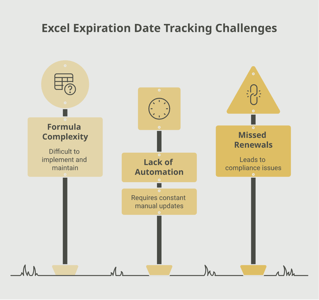
Liquor license renewal dates are easy to overlook because they come around only once a year (or once every two years, depending on the state), and the renewal process involves multiple steps — submitting paperwork, verifying employee training certifications, confirming tax clearances, and paying fees. Starting the process too late can mean missing your deadline entirely.
Common pitfalls of manual tracking include:
- Renewal notices from the state that get lost in the mail or buried in a stack of paperwork
- Different renewal dates for different locations in multi-site operations
- Forgetting to verify that required employee training (such as RAMP or RBS certification) is current before submitting the renewal application
- No centralized system for tracking licenses alongside the supporting documents they depend on
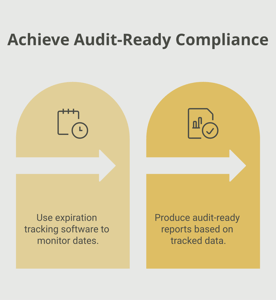
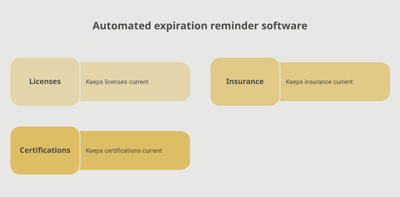
An automated tracking system addresses these challenges by maintaining a centralized record of every liquor license in your organization and sending proactive reminders well before renewal deadlines. A platform like Expiration Reminder can be configured to send alerts at 90, 60, and 30 days before a liquor license expires, giving your team time to gather documentation, verify employee certifications, and submit the renewal on time. Centralized dashboards make it easy to see the status of every license across all locations at a glance.
When alcohol is one of your most important revenue drivers, leaving its legal authorization to memory or a wall calendar is a risk no business should take.
Key Takeaways
- A liquor license is a state-issued permit that authorizes a business to sell, serve, or distribute alcoholic beverages, and operating without one is illegal.
- Most liquor licenses are valid for one to two years depending on the state, with annual renewal being the most common cycle.
- Late renewal penalties are steep — in California, a 50 percent surcharge applies within 60 days of expiration, and the license is revoked if not renewed within 90 days.
- Selling alcohol with an expired license can result in fines ranging from ,000 to ,000 or more, license suspension, or permanent revocation.
- Multi-location businesses must track separate licenses for each establishment, often across different states with different renewal requirements.
- Begin the renewal process at least 60 to 90 days before expiration to allow time for paperwork, tax clearances, and employee training verification.
- Centralizing liquor license tracking in an automated system protects your highest-margin revenue stream and ensures consistent compliance across all locations.
Frequently Asked Questions
What happens if my liquor license expires?
Once your liquor license expires, you must immediately stop all alcohol sales. Continuing to sell alcohol with an expired license is illegal and can result in significant fines, license suspension, or permanent revocation. Some states, like California, offer a limited grace period (60 days) during which you can renew by paying the standard fee plus a 50 percent penalty. Other states may require you to reapply from scratch.
How long is a liquor license valid?
The validity period depends on your state. Most states issue liquor licenses that are valid for one year (California, Washington, Indiana) or two years (Pennsylvania, Kansas). Some states, like North Carolina, issue certain permit types that remain valid indefinitely with annual registration and fee payment. Always check your specific state’s requirements.
How much does a liquor license cost?
Liquor license costs vary widely by state, license type, and location. Annual renewal fees can range from a few hundred dollars to several thousand. In some states, particularly those with a limited number of available licenses (quota states), the market value of a transferable liquor license can reach tens of thousands or even hundreds of thousands of dollars.
Who is required to have a liquor license?
Any business that sells, serves, or distributes alcoholic beverages must hold the appropriate license issued by its state’s liquor control authority. This includes restaurants, bars, hotels, liquor stores, grocery stores, wineries, breweries, distilleries, event venues, caterers, and private clubs. The specific license type required depends on the nature of your alcohol-related activities.
Can you serve alcohol with an expired liquor license?
No. Serving or selling alcohol with an expired license is a violation of state law in every jurisdiction. Penalties for doing so can include fines, immediate cease-and-desist orders, license suspension, and in severe cases, permanent revocation of your license. Even during a state-provided grace period, some jurisdictions prohibit alcohol sales until the renewal is processed.
How far in advance should you start the liquor license renewal process?
Most experts recommend starting the renewal process at least 60 to 90 days before your license expires. This allows time to gather required documents (tax clearances, employee training certifications, updated business information), submit the application, and account for processing time. Starting early also provides a buffer in case issues arise during the review.
Do employees need separate certifications to serve alcohol?
In many states, yes. Employees who serve or sell alcohol may be required to hold certifications such as Responsible Beverage Service (RBS) training in California, Responsible Alcohol Management Program (RAMP) certification in Pennsylvania, or similar state-specific server training programs. These employee certifications must often be current at the time of license renewal.
Can I transfer my liquor license to a new location or owner?
Transfer rules vary by state. In most states, a liquor license can be transferred to a new owner or location through a formal application process that includes background checks, zoning verification, and fee payment. Some states restrict transfers, and certain license types may not be transferable at all. The transfer process can take several weeks to several months, so plan accordingly.
Conclusion
A liquor license is the legal foundation of alcohol service for any hospitality business, and letting it lapse — even briefly — can have consequences that reach far beyond a late fee. From lost revenue and regulatory fines to reputational damage and potential revocation, the risks of poor license management are simply too high to leave to chance.
The smartest approach is a proactive one. Know your renewal dates, understand your state’s specific requirements, and put a system in place that ensures deadlines are never missed. A centralized tracking platform like Expiration Reminder gives you the visibility and automated reminders you need to stay ahead of every renewal, across every location.
When your liquor licenses are always current, your business runs smoothly, your team serves confidently, and your customers enjoy the experience they came for. That is the foundation of a well-managed operation.
Make sure your company is compliant
Say goodbye to outdated spreadsheets and hello to centralized credential management. Avoid fines and late penalties by managing your employee certifications with Expiration Reminder.