Building a Contract Management Calendar: Step by Step
The Forgotten Calendar That Cost $200K
Marcus, a procurement manager at a growing manufacturing company, prided himself on organization. He maintained a detailed Google Calendar with every contract renewal date carefully entered. He even set 30-day reminders.
Then the company went through a system migration. Email addresses changed. Calendar permissions were reset. And in the chaos of transitioning, one critical reminder never arrived.
Their largest raw material supplier's contract included a 90-day cancellation notice requirement. Without that notice, the agreement auto-renewed at the supplier's new pricing. The price increase added $200,000 to their annual costs.
The calendar existed. The information was there. But the system wasn't robust enough to survive organizational change.
This scenario plays out in organizations every day. Studies show companies lose an average of 8-9% of annual revenue to missed deadlines and poor contract management. The problem isn't that teams don't care about contract dates. It's that generic calendars and spreadsheets weren't designed for complex contract management needs.
In this comprehensive guide, you'll learn exactly how to build a contract management calendar that survives staff changes, system migrations, and the daily chaos of business operations.
Why You Need a Dedicated Contract Management Calendar
You might wonder why contracts deserve their own calendar when you already use Outlook, Google Calendar, or your project management tool. The answer lies in the unique requirements of contract lifecycle management.
Beyond Generic Calendars
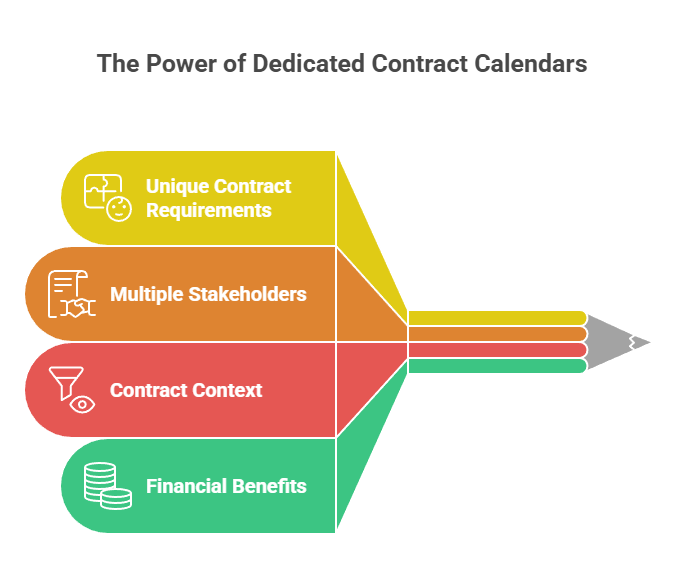
Generic calendars serve many purposes, which makes them great for general scheduling but inadequate for contracts. When you use a personal calendar for contract tracking, critical information leaves when that person leaves.
Contracts require tracking multiple stakeholders, not just one owner. A single agreement might need notifications to procurement, legal, finance, and department heads at different times throughout its lifecycle.
Contract management has evolved from a simple administrative function to a strategic business control system requiring integrated calendar capabilities, AI automation, and real-time visibility across all stakeholders. This transformation demands purpose-built systems.
Generic calendars also can't store the contract context you need for decision-making. When a reminder pops up saying "Vendor X renewal in 30 days," where do you find the original agreement, performance history, pricing terms, and stakeholder notes? Fragmented information leads to rushed decisions.
The Business Case for Structured Tracking
The financial argument for dedicated contract calendar systems is compelling. Companies that implement automated lifecycle tracking with alerts and dashboards based on contract metadata prevent unwanted auto-renewals and proactively manage obligations.
Organizations with structured tracking systems report:
Perhaps most importantly, structured calendar systems create institutional knowledge. When your contract tracking lives in a shared system rather than individual calendars, your organization becomes resilient to turnover.
What Makes a Contract Management Calendar Effective
Not all contract calendars are created equal. Effective systems share specific characteristics that transform them from simple date tracking into strategic management tools.
Core Components
A complete contract management calendar integrates four essential components that work together seamlessly.
Centralized date repository stores all contract-related dates in one accessible location. This includes obvious dates like renewals and expirations plus often-overlooked dates like insurance verification deadlines, performance review schedules, and price escalation dates.
Automated notification system sends timely alerts to the right stakeholders without manual intervention. Set up automated reminders that notify teams about renewal dates at intervals like 60, 30, or 14 days before expiry.
Workflow integration connects calendar notifications to your approval and review processes. When a reminder triggers, the system should initiate the appropriate workflow rather than just sending an email that might get ignored.
Document linkage ties every calendar entry to the underlying contract and related documentation. Your team should be able to click from a calendar notification directly to the agreement, performance history, and stakeholder communications.
Must-Have Features
When evaluating calendar solutions for contract management, prioritize these essential capabilities.
Multi-stakeholder notifications ensure reminders reach everyone involved in contract decisions. Modern systems automatically send email notifications to the right people about key dates with plenty of lead time to take action.
Customizable reminder sequences let you tailor notification timing based on contract value and complexity. Enterprise partnerships might trigger 180-day notice sequences while routine subscriptions use 30-day windows.
Escalation protocols automatically notify supervisors when initial reminders go unacknowledged. This prevents contracts from expiring simply because one busy team member missed an email.
Mobile accessibility allows stakeholders to review notifications and approve actions from anywhere. Seamless calendar synchronization across devices keeps schedules up-to-date and avoids double bookings.
Reporting dashboards provide at-a-glance visibility into upcoming renewals, pending reviews, and overdue actions across your entire contract portfolio.
Integration capabilities connect your contract calendar with existing financial, procurement, and project management systems to create seamless workflows.
Step-by-Step: Building Your Contract Management Calendar
Let's walk through the complete process of building an effective contract management calendar from scratch. These steps work whether you're using dedicated contract management software or building a system using available tools.
Step 1: Audit Your Current Contracts
Begin by identifying every active contract in your organization. This sounds straightforward but often reveals agreements people forgot existed.
Survey all departments to uncover contracts living in:
For each contract you discover, capture basic identifying information: vendor name, contract purpose, primary owner, and approximate value. Don't worry about extracting every detail yet—you just need to know what exists.
Start by categorizing your organization's contracts by complexity, risk level, and renewal frequency. High-value enterprise partnerships require different calendar frameworks than routine software subscriptions.
Many organizations discover they have 30-50% more active contracts than they realized during this audit phase. Finding these forgotten agreements before they auto-renew is the first value of building a structured calendar system.
Step 2: Choose Your Calendar Platform
You have three primary options for building your contract management calendar, each with distinct tradeoffs.
Spreadsheet-based calendars offer simplicity and low cost. Create a master spreadsheet with columns for contract details, key dates, and notification schedules. Set up manual calendar reminders in your email system.
This approach works for very small organizations (under 20 contracts), but quickly becomes unreliable as volume grows. There's no automatic notification, no audit trail, and the system breaks when staff change.
General calendar tools like Google Calendar or Outlook can be enhanced for contract management. Create a dedicated shared calendar, use event descriptions for contract details, and invite relevant stakeholders to each event.
This middle-ground approach provides automatic reminders and stakeholder notifications. However, it lacks workflow integration, document storage, and reporting capabilities. It works adequately for organizations with 20-100 relatively simple contracts.
Dedicated contract management platforms provide purpose-built calendar functionality alongside document storage, workflow automation, and analytics. Modern CLM systems extract key data automatically and let users create reminder rules on templates so every new contract inherits the right triggers without manual setup.
For organizations with 100+ contracts, high-value agreements, or complex stakeholder requirements, dedicated platforms become essential. The time saved through automation quickly justifies the investment.
Step 3: Create Your Contract Registry
Before populating your calendar, build a comprehensive contract registry that serves as your master database. This registry becomes the foundation for all calendar entries.
For each contract, document these essential fields:
Use a unified contract repository where every contract is stored, searchable, and tagged with key metadata like renewal dates, owners, and contract value. This centralization dramatically reduces missed renewals.
Consider using a numbering system that makes contracts easy to reference. For example: "2026-IT-015" tells you it's the 15th IT contract from 2026.
Step 4: Extract and Map All Critical Dates
Now extract every important date from each contract and map it to your calendar. Most organizations focus only on renewal dates, but comprehensive tracking requires capturing multiple date types.
Contract lifecycle dates:
Performance and review dates:
Financial dates:
Compliance dates:
Specify expected completion dates for each milestone to ensure timely progress. Incorporating these dates into your calendar creates comprehensive visibility.
Record all dates correctly into your centralized register, entering start and end dates and then setting automatic notifications. This systematic approach ensures nothing gets overlooked.
Step 5: Set Up Multi-Stage Reminders
Single reminder notifications aren't enough for effective contract management. Build multi-stage reminder sequences that provide escalating alerts as critical dates approach.
Research shows companies should start renewals 90 days before contracts expire, giving enough time to prepare and negotiate. Enterprise partnerships require 180-day renewal cycles with comprehensive risk analysis.
For high-value or complex contracts (>$100K annually):
For medium-value contracts ($25K-$100K annually):
For routine contracts (
Customize these timelines based on your organization's approval processes and decision-making speed. The key is building in sufficient lead time for thoughtful evaluation.
Step 6: Assign Owners and Stakeholders
Every calendar entry needs clearly defined ownership and stakeholder roles. Ambiguous responsibility guarantees missed deadlines.
Define these roles for each contract:
Tag each calendar entry with the appropriate stakeholders so notifications reach the right people. Modern systems notify teams about renewal dates automatically, ensuring all stakeholders stay informed.
Document these assignments in your contract registry and calendar system. When a notification triggers, everyone should immediately know their role in the renewal process.
Step 7: Build Review Workflows
Notifications alone don't ensure action. Build structured review workflows that guide stakeholders through evaluation and renewal decisions.
Performance review workflow:
1. Calendar triggers 90-day notification to contract owner
2. Owner initiates performance evaluation using standardized checklist
3. Department stakeholders submit feedback within 10 days
4. Owner compiles performance summary
5. Decision to renew, renegotiate, or terminate moves to next stage
Renewal decision workflow:
1. Performance review complete
2. Finance reviews budget availability and value for money
3. Procurement analyzes market alternatives if applicable
4. Legal reviews terms and flags any concerns
5. Department stakeholders confirm ongoing need
6. Appropriate approver makes final decision
7. Action executed with appropriate lead time
Create a consistent checklist that includes key steps like usage reviews, stakeholder input, compliance checks, and renewal approvals. When every team follows the same playbook, you reduce bottlenecks.
Your calendar system should trigger these workflows automatically rather than relying on individuals to remember the process.
Step 8: Integrate with Existing Systems
For maximum efficiency, connect your contract calendar to systems your team already uses daily.
Financial system integration ensures budget availability is verified before renewals are approved. Automatic flags when contracts exceed budget thresholds prevent surprise spending.
Procurement system integration streamlines vendor management and ensures contract terms align with purchase orders and invoices.
Email and collaboration platform integration delivers notifications where your team actually works. Platforms like Juro send reminders into Slack, browser dashboards, and ChatGPT where users can ask for upcoming deadlines conversationally.
Document management integration links calendar entries to contract files, amendments, and correspondence stored in your centralized repository.
Project management integration connects contract milestones and deliverables to project timelines, ensuring dependencies are visible.
The goal is embedding contract calendar information into existing workflows rather than creating another system people must remember to check separately.
Step 9: Train Your Team
Even the most sophisticated calendar system fails if people don't understand how to use it. Invest time in comprehensive training.
Provide role-specific training:
Create simple reference guides showing common tasks:
Schedule regular refresher sessions, especially when team members change roles. Contract calendar literacy should be part of onboarding for anyone in procurement, legal, finance, or operational leadership.
Contract Calendar Best Practices
Beyond the basic implementation, these practices elevate your contract calendar from functional to excellent.
Categorize by Contract Type
Not all contracts deserve the same calendar treatment. Create categories that reflect different risk and complexity levels.
Tier 1 - Mission Critical contracts (>$500K or operationally essential) receive the most comprehensive tracking: 180-day renewal cycles, executive oversight, detailed workflows, and monthly check-ins throughout the contract term.
Tier 2 - Significant contracts ($100K-$500K) get standard tracking: 90-day renewal cycles, departmental oversight, standardized workflows, and quarterly check-ins.
Build in Buffer Zones
Never schedule critical contract deadlines back-to-back. Build buffer zones between major renewal decisions to account for unexpected delays.
If you have three major vendor agreements all expiring in the same week, your team won't have capacity to properly evaluate all three. When possible, stagger renewal dates across the calendar year.
Create realistic and achievable deadlines to ensure timely completion. Rushed decisions lead to poor outcomes.
Similarly, avoid scheduling major contract renewals during known busy periods like fiscal year-end, annual budgeting cycles, or industry conference seasons when key stakeholders are unavailable.
Common Calendar Mistakes to Avoid
Organizations building contract calendars often make these predictable errors. Avoiding them saves significant headaches.
Tracking only renewal dates. Comprehensive contract management requires tracking payment dates, compliance checkpoints, performance reviews, and deliverable milestones—not just when agreements renew.
Single-person ownership. When only one person has calendar access or knows how the system works, you're one resignation away from losing institutional knowledge. Build redundancy and shared access.
Notifications without workflows. Sending reminder emails that people can ignore doesn't ensure action. Connect notifications to structured workflows that require documented responses.
Ignoring calendar in daily work. If checking the contract calendar isn't part of regular routines, it becomes stale. Build calendar reviews into weekly team meetings and monthly business reviews.
Inconsistent data entry. When different people enter contracts using different formats, fields, and conventions, your calendar becomes unreliable. Create clear data entry standards and train everyone on them.
No testing of notification delivery. Assuming reminders are working without verification is dangerous. Regularly test that notifications reach intended recipients and aren't caught by spam filters.
Forgetting about amendments. When contracts are amended or extended, those changes must update calendar dates immediately. Establish clear processes for capturing and reflecting changes.
Moving from Spreadsheets to Automation
Many organizations start with spreadsheet-based calendars before eventually recognizing the limitations. Making the transition to automated systems requires planning.
Phase 1: Prepare your data. Clean and standardize your spreadsheet data before migration. Consistent formatting makes the transition smoother.
Phase 2: Run parallel systems. During transition, maintain both your spreadsheet and new system for 30-60 days. This safety net catches any data that didn't migrate correctly.
Phase 3: Validate completeness. Systematically verify that every contract from your spreadsheet exists in the new system with all critical dates captured.
Phase 4: Test workflows. Trigger test notifications and workflows to ensure everything functions as intended before relying on the system for real deadlines.
Phase 5: Train stakeholders. Ensure everyone understands how to interact with the new automated system before discontinuing the spreadsheet.
Phase 6: Archive the old system. Keep your final spreadsheet version as a backup but communicate clearly that the automated system is now the single source of truth.
Contract digitization boosts compliance by 55%, making the transition effort worthwhile. Automation can also reduce administrative contracting costs by 25-30%.
The time invested in building automated calendar systems pays dividends through reduced missed deadlines, better compliance, and countless hours of manual work eliminated.
Looking to move beyond manual calendar management? Automated expiration tracking platforms centralize all your critical dates and send smart notifications to the right people at the right time. See how automated contract tracking works with a free trial.
Implementation Checklist: Your First Two Weeks
Getting started doesn't require months of preparation. Here's what you can accomplish in the first two weeks.
Day 1-2: Complete contract inventory
Day 3-4: Choose and set up your calendar platform
Day 5: Build contract registry
Day 6-7: Extract critical dates
Day 8-9: Configure reminder sequences
Day 10: Document workflows
Even this basic implementation puts you dramatically ahead of where most organizations start. You'll have visibility into immediate renewal needs and a foundation for expanding the system over time.