
How to Track Vendor Insurance Certificates Without Excel
The Friday Afternoon Fire Drill
Sarah had just settled into her desk Friday morning when her phone rang. The construction project manager's voice was tight with urgency: "We need to verify all subcontractor COIs before Monday's site inspection. Can you send me the current list?"
Her stomach dropped. She opened the tracking spreadsheet-last updated three weeks ago. Scrolling through 87 vendors, she spotted expiration dates in red. Some cells were blank. Others had notes like "waiting on email" or "check with Dave."
What should have been a five-minute task turned into an all-day scramble. Digging through email threads. Calling vendors. Discovering two subcontractors with lapsed coverage who'd been working on site all week.
If this scenario feels familiar, you're not alone. According to industry experts, one full-time person is required for every 1,500 certificates of insurance properly tracked. Yet most organizations still rely on Excel spreadsheets that can't keep pace with the complexity of modern vendor networks.
The good news? There are practical alternatives that reduce errors, save time, and ensure nothing slips through the cracks.
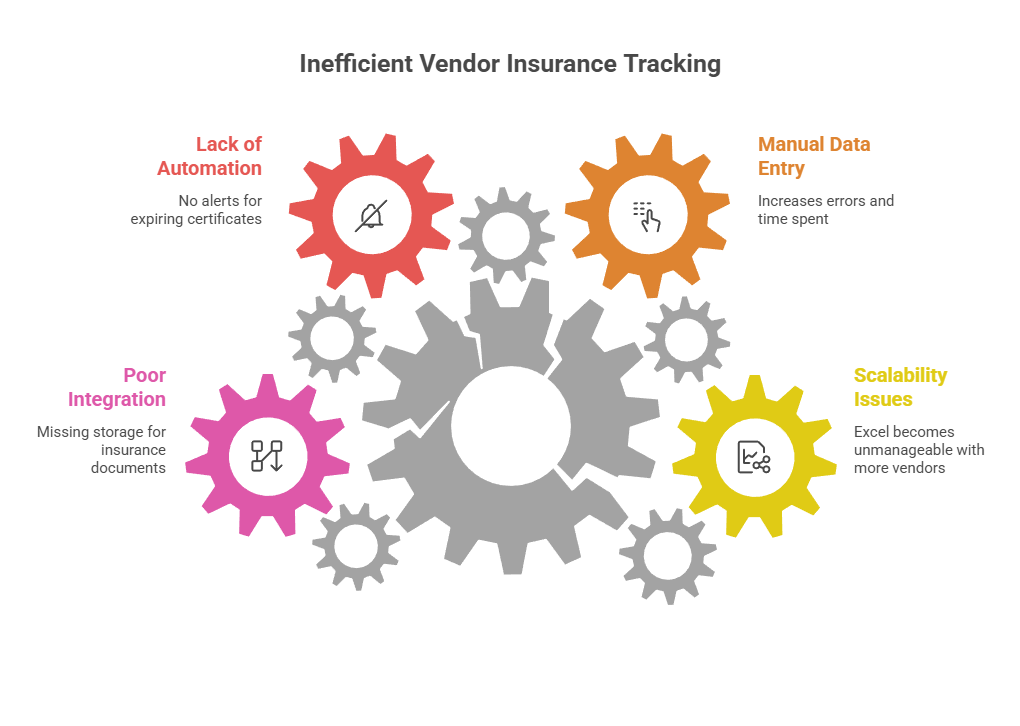
Why Excel Falls Short for Certificate of Insurance Tracking
Excel isn't a bad tool. It's just the wrong tool for managing certificates of insurance at scale. Here's why the limitations matter more than you might think.
The Scalability Problem
—maybe 20 or 30 vendors maximum. But as your vendor network grows, the spreadsheet quickly becomes unwieldy.
You're copying data from PDF certificates into cells. Checking coverage limits against requirements. Color-coding expiration dates. Adding notes about follow-ups. The more comprehensive your tracking, the more time you spend maintaining it.
that what begins as a simple project can snowball into a time-intensive process that's impossible to scale. Organizations add more people and more spreadsheets, which leads to documents being lost or misplaced and increased chances for errors.
Manual Data Entry Creates Error Risk
Every time you manually transcribe information from a COI, you risk introducing errors. Wrong coverage amounts. Transposed policy numbers. Misread expiration dates.
These aren't just administrative inconveniences. A compliance gap could expose your organization to significant liability if an incident occurs with an underinsured or uninsured vendor.
The more data you copy from certificates, the better tracking you get—but it also takes longer and increases mistake risk. It's a frustrating trade-off that doesn't have to exist.
No Automated Renewal Alerts
Perhaps Excel's biggest limitation: it can't proactively notify you when certificates are about to expire.
You can set up conditional formatting to highlight dates. You can create reminder systems. But you still need to check the spreadsheet regularly. Miss a weekly review, and certificates expire without warning.
, by contrast, send renewal alerts automatically—often to both your team and the vendor. This shift from reactive to proactive management is the difference between scrambling and planning.
Missing Document Storage Integration
Excel tracks data, not documents. You need a separate system—shared drives, email folders, physical files—to store the actual certificates.
When someone asks for proof of coverage, you're searching through folders to match the certificate with the spreadsheet entry. Best practices recommend a central repository where data and corresponding COIs are stored together, making retrieval instant and audit preparation straightforward.
Understanding Certificate of Insurance Requirements
Before exploring alternatives, let's establish what you're actually tracking and why it matters.
What Is a COI and Why It Matters
A Certificate of Insurance is a document that proves a vendor or contractor carries specific insurance coverage. It typically includes general liability, workers' compensation, auto insurance, and umbrella policies.
, where safety risks are highest, proper insurance documentation protects you from liability when incidents occur. If a subcontractor's employee is injured on your site and their workers' comp coverage has lapsed, you could face costly claims and legal exposure.
COIs aren't just paperwork. They're risk transfer documents that confirm vendors can financially cover potential losses related to their work.
Common Coverage Requirements for Vendors
Coverage requirements vary by industry and risk level, but typical minimums include:
often need higher limits—$5,000-$50,000+ in annual premiums—while service vendors might carry basic coverage for $500-$2,000 per year.
You also need to verify additional requirements like named insured endorsements, waiver of subrogation clauses, and primary coverage designations. These details matter tremendously if a claim occurs.
The Cost of Compliance Gaps
What happens when tracking fails? The consequences range from operational disruptions to serious financial and legal exposure.
often achieve only 40-60% compliance rates. That means nearly half their vendors may have expired, insufficient, or missing coverage.
When an uninsured vendor causes property damage or injury, your organization becomes the insurance policy of last resort. You're exposed to claims, litigation costs, and reputational damage that proper verification would have prevented.
Better Ways to Track Vendor Insurance Certificates
Let's explore practical alternatives that solve Excel's limitations while fitting different organizational needs and budgets.
Method 1: Dedicated COI Tracking Software
Purpose-built COI tracking platforms are designed specifically for insurance certificate management. They automate the most time-consuming aspects of compliance tracking.
How they work:
These systems let you upload vendor information and insurance requirements. Vendors receive automated requests for certificates. The platform extracts data from submitted COIs, verifies coverage against requirements, stores documents centrally, and sends renewal reminders automatically.
after implementing these systems while improving compliance rates from the low 40s to over 90%.
Method 2: Integrated Compliance Management Platforms
Some organizations benefit from broader compliance platforms that handle multiple credential types—not just insurance certificates.
These systems track COIs alongside business licenses, professional certifications, safety training records, and regulatory permits. Everything lives in one platform with unified expiration tracking.
How they work:
You define requirements for each vendor or credential type. The system tracks expiration dates across all document categories. Automated reminders go out before deadlines. You generate audit reports that show compliance status across your entire vendor network.
Best for:
Method 3: Expiration Tracking Systems
For organizations that need flexibility beyond just COI tracking, expiration tracking platforms offer a middle path. These systems are built around the concept of deadline management rather than insurance-specific workflows.
How they work:
You can track any document or credential with an expiration date—insurance certificates, business licenses, permits, certifications, contracts, equipment inspections. The system sends customizable reminders to responsible parties, maintains document archives, and provides visibility across all upcoming deadlines.
automate deadline tracking across your entire organization. You eliminate the spreadsheet chaos while maintaining a single source of truth for all expiration dates.
When Simple Solutions Still Work
Honesty matters here: not everyone needs sophisticated software. If you're managing fewer than 20 vendors with stable insurance requirements and infrequent changes, a well-maintained spreadsheet might still suffice.
The key word is "well-maintained." That means weekly reviews, documented processes, and backup systems when the responsible person is unavailable.
smaller businesses with limited COIs may find Excel adequate. But the moment tracking becomes burdensome or compliance gaps emerge, it's time to evaluate alternatives.
Key Features to Look for in a Tracking System
Whether you choose dedicated COI software or a broader expiration tracking platform, these features separate effective solutions from inadequate ones.
Automated Expiration Alerts
This feature is non-negotiable. The system should automatically notify you and the vendor well before certificates expire—typically 60, 30, and 15 days out.
and avoids compliance issues that could result in financial penalties or project shutdowns. You shift from reactive scrambling to proactive planning.
Look for customizable reminder schedules. Different vendor relationships might need different notification timelines.
Centralized Document Storage
All certificates should be stored in one secure, searchable location. When someone needs proof of coverage, you locate it in seconds, not minutes or hours.
Cloud-based storage means access from anywhere. Version control ensures you always reference the current certificate, not an outdated copy.
Verification Workflows
The best systems help you verify that submitted certificates actually meet your requirements. This might include:
that manual review can miss when you're rushed or reviewing dozens of certificates.
Audit Trail and Reporting
When audits happen—and they will—you need instant proof of compliance. Look for systems that maintain complete history: when certificates were submitted, who reviewed them, what exceptions were approved, and how quickly vendors responded to renewal requests.
One-click compliance reports save hours during audits. Instead of compiling spreadsheets and searching for documents, you export a comprehensive report showing current compliance status across your vendor base.
Implementation Checklist: Moving Beyond Excel
Ready to transition away from spreadsheet tracking? Here's your step-by-step implementation plan.
1. Audit your current process
Document exactly what you're tracking now. How many vendors? What coverage types? Who's responsible for follow-up? What takes the most time? Understanding your current state helps you choose the right solution and measure improvement.
2. Define your insurance requirements
Create a master list of coverage requirements by vendor category. What limits do you require? What endorsements are mandatory? Having this documented makes configuration easier and ensures consistency.
3. Research and evaluate solutions
Based on your vendor volume and complexity, narrow down to 2-3 platforms. Request demos. Ask about data migration. Understand pricing. Check integration capabilities with your existing systems.
4. Start with a pilot group
Don't migrate everything at once. Choose 20-30 vendors for initial implementation. Work through the process, identify gaps, and refine workflows before full rollout.
5. Migrate vendor data systematically
Plan data migration carefully. Most platforms can import spreadsheet data, but verification is essential. Use this as an opportunity to clean up outdated information and confirm current coverage.
6. Communicate with vendors
Let vendors know about the change. Many will appreciate simplified certificate submission processes. Provide clear instructions and support during transition.
7. Train your team
Even user-friendly platforms require training. Ensure everyone understands how to request certificates, review submissions, and run reports. Document processes for future team members.
8. Monitor and optimize
Track key metrics after implementation: compliance rates, time spent on tracking, vendor response times, and audit readiness. Use these insights to continuously improve your process.
Real Results from Automated COI Tracking
What happens when organizations move beyond Excel? The improvements are measurable and significant.
jumping from compliance rates in the low 40s to over 90% after implementing automated tracking. That means the majority of vendors maintain current, adequate coverage rather than just half.
Time savings are equally impressive. Teams spending 20+ hours weekly on COI tracking reduce this to just a few hours. That's time redirected to higher-value work rather than administrative follow-up.
Error rates drop dramatically. Automated data extraction from certificates eliminates transcription mistakes. Verification workflows catch missing endorsements or inadequate limits before approval.
Perhaps most importantly, audit preparation transforms from a stressful scramble to a simple report export. Organizations report passing compliance audits with minimal preparation time because documentation is always current and accessible.
Getting Started: Your Next Steps
If Excel tracking has become burdensome—or if compliance gaps keep you awake at night—here's what to do next.
For immediate improvement:
Start by documenting your current process and pain points. How much time do you spend on COI tracking weekly? How often do certificates expire without warning? Where do compliance gaps appear most frequently?
This assessment clarifies whether you need purpose-built COI software or a broader expiration tracking solution.
For comprehensive solutions:
If you're tracking numerous credential types beyond just insurance certificates, consider platforms designed for general expiration management. Expiration Reminder helps you track any document with a deadline—insurance certificates, licenses, permits, certifications, contracts, and inspections—all in one centralized system.
The platform automates reminders, maintains document archives, and provides visibility across your entire organization. You eliminate spreadsheet chaos while ensuring nothing expires unnoticed.
For quick wins:
Even if you're not ready for new software, you can improve Excel tracking immediately:
These improvements won't solve scalability problems, but they reduce immediate risk while you evaluate long-term solutions.
Key Takeaways
The Excel Problem
- Excel becomes unmanageable as vendor networks grow beyond 20-30 vendors
- Manual data entry creates significant error risk with coverage amounts, policy numbers, and expiration dates
- No proactive automation means certificates can expire without warning between manual reviews
- Separating tracking data from actual document storage creates inefficiencies
Why COI Tracking Matters
- Certificates of Insurance are risk transfer documents that protect organizations from liability when vendor incidents occur
- Organizations using spreadsheets often achieve only 40-60% compliance rates, leaving nearly half their vendors with expired, insufficient, or missing coverage
- Compliance gaps expose organizations to claims, litigation costs, and reputational damage
Better Tracking Solutions
- Dedicated COI software automates certificate requests, data extraction, verification, and renewal reminders
- Integrated compliance platforms track multiple credential types (licenses, certifications, permits) alongside insurance certificates
- Expiration tracking systems offer flexibility for any document with a deadline, not just insurance-specific workflows
Essential Features to Prioritize
- Automated expiration alerts (typically 60, 30, and 15 days before expiration)
- Centralized, searchable document storage accessible from anywhere
- Verification workflows that flag coverage gaps automatically
- Audit trails and one-click compliance reports
Measurable Results
- Organizations report compliance rates jumping from the low 40s to over 90%
- Time spent on tracking drops from 20+ hours weekly to just a few hours
- Audit preparation transforms from stressful scrambles to simple report exports
Frequently Asked Questions
Q: How many vendors can I realistically manage with Excel before needing dedicated software?
Most experts agree that Excel becomes unmanageable beyond 30-50 vendors. If you're spending more than 5 hours weekly on COI tracking, or if compliance gaps are appearing regularly, you've outgrown spreadsheets. The transition point varies based on vendor turnover rates and your insurance requirements complexity, but consistent missed renewals or error-prone data entry are clear signals that it's time to upgrade.
Q: What's the typical cost difference between Excel tracking and COI software?
Excel appears free, but the hidden costs add up quickly. Calculate time spent on tracking at your hourly rate—often 15-20 hours weekly—plus the cost of compliance gaps and potential liability exposure. Most COI tracking platforms cost $100-500 monthly depending on features and vendor volume. The ROI is usually positive within the first few months when you factor in time savings alone, not to mention risk reduction and improved compliance rates.
Q: Can automated systems integrate with our existing contractor management or project management software?
Many modern COI tracking platforms offer integration capabilities through APIs or built-in connectors. The level of integration varies by platform—some offer deep two-way sync with popular contractor management systems, while others provide basic data export. During evaluation, ask specifically about integration with your current tools. Even without direct integration, most platforms offer data export and import functionality that reduces duplicate entry across systems.
Q: How do we get vendors to cooperate with a new COI submission process?
Clear communication is key. Most vendors actually appreciate simplified submission processes compared to emailing PDFs and waiting for confirmation. Provide advance notice about the change, explain the benefits for them (fewer follow-up requests, automatic renewal reminders), and offer support during transition. Many platforms allow vendors to submit certificates directly through a portal, which is often easier than their current process. Start with your most cooperative vendors to work out any kinks before rolling out to everyone.
Q: What happens if a certificate expires and we don't catch it in time?
The immediate response is to suspend work with that vendor until coverage is restored and verified. Depending on your contract terms and the nature of the work, you may face project delays, need to source emergency replacements, or assume temporary liability risk. This is precisely why automated alerts are so valuable—they prevent this scenario by notifying both you and the vendor 60, 30, and 15 days before expiration. Having documented proof of your tracking and notification attempts also protects you if incidents occur during brief lapses.
Q: Should we track only insurance certificates, or should we include other vendor credentials in the same system?
If you're already managing multiple credential types—business licenses, safety certifications, professional registrations, permits—using one platform for all expiration tracking creates significant efficiency gains. You eliminate multiple spreadsheets and disconnected reminder systems. However, if insurance certificates are truly your only tracking need, purpose-built COI software may be more cost-effective. Assess your complete compliance picture before deciding. Organizations managing diverse credential types typically see greater ROI from unified expiration tracking platforms that handle any document with a deadline.