

Read time:
20
min

Automating COI Renewals for Contractors and Vendors
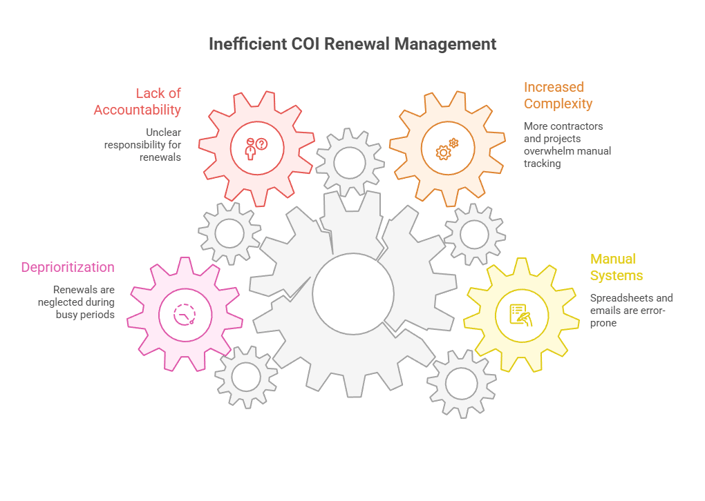
Table of Contents

Share this article
Subscribe
Thank you! Your submission has been received!
Oops! Something went wrong while submitting the form.

Automating COI Renewals for Contractors and Vendors

The Jobsite Incident That Could Have Been Prevented

On a Tuesday morning in March, a subcontractor's equipment malfunctioned on a commercial construction site, causing property damage and minor injuries. The general contractor's project manager pulled out their files, confident they had current certificates of insurance from all subs.

The certificate was there, dated and filed properly. But when they submitted the claim, they discovered a problem. The subcontractor had changed insurance carriers at renewal two months earlier. The new policy had different coverage limits and exclusions.

Nobody had requested an updated certificate. The project manager assumed the original filing covered the project duration. That assumption cost the general contractor $180,000 in out-of-pocket expenses that should have been covered by the subcontractor's insurance.

This scenario isn't rare. 45-55% of initial COI submissions require corrections, and tracking renewals manually means missing policy changes that expose you to significant risk. Certificate of Insurance mistakes cost the average contractor $25,000-$45,000 annually in direct and indirect expenses.

In this comprehensive guide, you'll learn exactly how to automate COI renewal tracking for contractors and vendors, eliminating compliance gaps while drastically reducing your administrative workload.

Why COI Renewal Management Can't Stay Manual

For years, project managers and compliance coordinators have tracked contractor certificates using spreadsheets, email folders, and physical files. But as project complexity increases and contractor networks expand, manual systems are breaking down.

The True Cost of Expired Certificates

When contractor insurance certificates expire without your knowledge, you're exposed to substantial financial and legal risks. The costs extend far beyond the obvious.

Direct liability exposure is the most severe consequence. Missing or expired COIs expose builders and owners to significant liability if a subcontractor's insurance is insufficient or lapses during the project when an incident occurs on-site. A single expired certificate can trigger six-figure liability.

Project delays from certificate issues are expensive and frustrating. Project delays from certificate mistakes average $3,500 per day. When you discover a coverage gap mid-project, work often must stop until proper insurance is in place.

Administrative time drain affects your bottom line even when no incidents occur. Companies using spreadsheets spend 15-20 hours weekly on COI tasks, representing an estimated $36,400 annually at $35 per hour.

Insurance premium increases hit contractors with poor certificate management. Contractors dealing with frequent COI corrections face insurance premium increases of 15-30% at renewal, as insurers view poor certificate management as higher risk.

Compliance audit failures can disqualify you from projects and damage your reputation. 15% of audited projects experienced work stoppages in recent enforcement actions, and the average cost of noncompliance reaches almost $15 million.

The financial argument for automation is clear: contractors implementing professional certificate management reduce these costs by 60-75% within the first year.

Manual Tracking Doesn't Scale

Manual COI tracking might work when you have five regular subcontractors. But growth inevitably breaks these systems.

When you're managing dozens or hundreds of contractor relationships across multiple projects, tracking renewal dates in spreadsheets becomes impossible. Policies renew at different times throughout the year. Contractors switch carriers. Coverage requirements vary by project.

Usually, seven out of 10 collected COIs are noncompliant, and it requires about three follow-ups to make a certificate fully compliant. Multiply that by hundreds of contractors and you have a full-time administrative nightmare.

Manual systems also lack accountability. When a certificate expires, who was responsible for requesting the renewal? Was a reminder sent? Did the contractor respond? Without automated tracking and audit trails, these questions have no answers.

Perhaps most critically, manual tracking fails during the busiest times when you need it most. When you're juggling multiple active projects with tight deadlines, COI renewals get deprioritized until an incident forces them to the front of your mind.

Understanding Certificate of Insurance Compliance

Before diving into automation strategies, let's establish what we're actually tracking and why it matters.

What COIs Protect

A Certificate of Insurance is a document that proves a contractor or vendor carries insurance coverage. It summarizes the types of insurance, coverage amounts, policy dates, and names you as an additional insured party.

COIs protect your organization by:

COIs are essential because they act as your first line of defense against potential financial loss. Without proper COI tracking, you're essentially self-insuring against contractor-caused incidents.

Common COI Requirements for Contractors

While requirements vary by industry, project type, and contract terms, most contractor COIs need to include specific coverage types and minimum limits.

General Liability Insurance covers bodily injury and property damage caused by the contractor's operations. Typical minimum requirements range from $1 million to $2 million per occurrence.

Workers Compensation covers contractor employees injured on the job. This is legally required in most states when contractors have employees.

Commercial Auto Insurance covers vehicles used for business purposes. Required when contractors use vehicles on your property or for your projects.

Umbrella/Excess Liability provides additional coverage beyond primary policy limits. Often required for high-value or high-risk projects.

Professional Liability covers errors and omissions in professional services. Required for consultants, engineers, and specialized trades.

Builders Risk covers property during construction. Required on many construction projects to protect work in progress.

Beyond coverage types, COIs must include:

Ensuring all the necessary information is thoroughly examined requires developing a consistent checklist for reviewing COIs, including verifying policy types, limits, and dates.

The Problem with Manual COI Tracking

Understanding why manual systems fail helps explain why automation delivers such dramatic improvements.

Spreadsheet Limitations

Most organizations start COI tracking with a spreadsheet. Create columns for contractor name, policy numbers, expiration dates, and renewal status. Set calendar reminders. Email contractors when renewals approach.

This approach has fatal weaknesses that compound over time.

No proactive notifications mean you must manually check the spreadsheet regularly. Miss a day and you might miss a critical expiration.

No audit trail exists for who requested renewals, when, and what responses were received. When certificates expire, you can't prove you made good-faith efforts to maintain compliance.

Single point of failure occurs when one person "owns" the spreadsheet. If they leave, get sick, or go on vacation, the system stops functioning.

Version control chaos erupts when multiple people update the same spreadsheet. Which version is current? Did someone's edits overwrite yours?

Can't scale as your contractor network grows. Managing 50 contractors in a spreadsheet is tedious but possible. Managing 500 is effectively impossible without full-time dedicated staff.

No document storage means COIs themselves live elsewhere. You track dates in the spreadsheet but must search email or file systems for actual certificates.

Email Chain Chaos

Many teams track COIs through email exchanges with contractors. Request certificates via email, file responses in a folder, set calendar reminders for renewals.

This creates a different set of problems.

Lost requests happen when emails get buried in busy inboxes. Contractors don't respond because they never saw the request or it was caught by spam filters.

Unclear accountability emerges when multiple people email the same contractor. Who's waiting for the response? Are you sending duplicate requests that irritate vendors?

No standardization means every team member requests COIs differently. Some provide clear requirements; others send vague requests that result in noncompliant certificates.

Difficult reporting makes it nearly impossible to answer simple questions: How many contractor COIs are expiring this month? Which contractors are noncompliant? How long does it take to get certificates from new vendors?

Overwhelmed inboxes result when you're managing dozens of contractor relationships. COI emails mix with project communications, making it easy to overlook critical renewal requests.

Human Error Factors

Even with the best intentions, manual COI tracking suffers from inevitable human errors.

Typos and data entry mistakes corrupt your tracking system. Enter the wrong expiration date and you'll either request unnecessary renewals or miss actual expirations.

Forgotten follow-ups occur when you send a renewal request but forget to follow up if the contractor doesn't respond. It requires about three follow-ups to make a certificate fully compliant.

Overlooked policy changes happen when contractors renew with different carriers, limits, or terms. Renewals aren't just date checks—policy terms often change at renewal (e.g., switching from "any auto" to "scheduled autos only"), and it's easy to miss if you're only verifying expiration dates.

Competing priorities push COI tracking to the bottom of your to-do list until an incident or audit forces it to the top. Urgent operational issues always seem more pressing than renewing certificates that might expire next month.

Automation eliminates these human error factors by creating systematic, reliable processes that don't depend on anyone remembering to check dates or send emails.

How COI Automation Works

Modern COI automation platforms handle the entire lifecycle from initial collection through renewal verification. Understanding the process helps you evaluate solutions and implement them effectively.

Automated Collection

Instead of manually emailing contractors for certificates, automation platforms streamline the request process.

You define insurance requirements for each project or contractor type. When a new contractor is added to your system, the platform automatically sends a branded email requesting certificates that meet your specific requirements.

The email includes clear instructions about coverage types, limits, additional insured requirements, and other specifications. Contractors can upload certificates directly through a secure portal, eliminating the back-and-forth of email attachments.

Integration with platforms such as Procore, Autodesk, Sage 300, and JD Edwards eliminates the need for duplicate data entry. When you add a contractor to your project management system, the COI request triggers automatically.

Some platforms even connect directly with insurance carriers to automatically retrieve updated certificates when policies renew, eliminating contractor involvement entirely for routine renewals.

Intelligent Verification

Receiving a certificate is only valuable if it actually meets your requirements. Manual verification requires someone to carefully review every field, looking for missing endorsements, insufficient limits, or incorrect additional insured language.

Modern automated systems provide AI-powered two-phase verification combining machine learning with human compliance experts for automated COI processing.

AI technology like RiskBot delivers advanced automated analysis, interpreting complex policy language, identifying endorsement gaps, and providing instant color-coded feedback during upload, reducing verification from days to seconds.

The system extracts key data points from uploaded certificates:

It then compares extracted information against your requirements and flags any discrepancies. Instead of manually reviewing hundreds of certificates, you only review the ones flagged as noncompliant.

Proactive Renewal Reminders

The most powerful aspect of COI automation is proactive renewal tracking that never forgets a date.

The system monitors expiration dates for all contractor certificates in your portfolio. Automated reminders for expiring documents and real-time compliance monitoring help businesses stay on top of their compliance needs.

Typical renewal workflows include:

These automated alerts send notifications when COIs approach expiration, ensuring you request renewals proactively ahead of time.

Reminders are customizable based on contractor tier, project criticality, or coverage type. High-risk contractors might receive 90-day advance notices while routine vendors get 30-day reminders.

Compliance Monitoring

Beyond tracking individual certificates, automated systems provide portfolio-wide compliance visibility.

Dashboard views show:

Compliance reports can be generated instantly for audits, client requests, or internal reviews. Instead of spending days compiling spreadsheets and digging through files, you export comprehensive reports with a few clicks.

Automated gap resolution identifies compliance issues and triggers detailed email requests for updated certificates, closing the loop between detection and correction.

Key Benefits of Automated COI Tracking

Organizations that implement automated COI systems report dramatic improvements across multiple areas.

Eliminate Coverage Gaps

The primary benefit of automation is virtually eliminating expired certificate risks.

Proactive renewal tracking prevents coverage lapses by reaching out to contractors ahead of time. Instead of discovering expired coverage when filing a claim, you know about expirations months in advance.

Automated compliance flags prevent noncompliant contractors from being assigned to work. If a contractor's insurance has lapsed or doesn't meet requirements, the system blocks them from project assignments until they provide compliant coverage.

This systematic approach transforms insurance compliance from a reactive scramble to a proactive, managed process.

Reduce Administrative Burden

The time savings from automation are substantial and immediate.

Companies using manual spreadsheets spend 15-20 hours weekly on COI tasks. Automation reduces this to 2-4 hours for the same volume of contractors.

Your team stops:

Instead, the system handles routine tasks automatically while your team focuses on exceptions and strategic contractor relationship management.

Improve Compliance Rates

Automated systems drive significantly higher compliance rates through systematic processes and persistent follow-up.

Manual systems rely on contractors responding to a single email request. Automated systems send escalating reminders until they respond or expire into noncompliance.

While 45-55% of initial COI submissions require corrections, automated systems with intelligent verification catch these issues immediately rather than months later when reviewing files for an audit.

The result: compliance rates above 95% versus the 70-80% typical with manual tracking.

Protect Against Liability

Ultimately, automated COI tracking protects your organization from the financial devastation of uninsured contractor incidents.

You have comprehensive documentation that you requested appropriate insurance and verified compliance. If a contractor provides fraudulent certificates or their coverage actually lapsed, you've done due diligence.

Automated audit trails show every request sent, every certificate received, every noncompliance notification issued. This documentation is invaluable if claims arise or regulators investigate.

Beyond legal protection, automation prevents the nightmare scenarios: the jobsite accident with an uninsured contractor, the property damage claim denied because outdated coverage, the project shutdown because audit discovered gaps.

Implementing Automated COI Renewal Systems

Let's walk through the practical steps to implement COI automation in your organization.

Step 1: Inventory Current Contractor Relationships

Begin by identifying every contractor and vendor who needs certificate tracking.

Step 2: Define Insurance Requirements

Establish clear, written insurance requirements for different contractor categories. Vague requirements lead to noncompliant certificates.

Step 3: Choose Your Automation Platform

Evaluate COI automation platforms based on your specific needs and scale.

For small organizations (< 50 contractors): Basic platforms focused on renewal reminders and document storage may suffice. Look for simple interfaces, mobile access, and reasonable pricing.

For mid-size organizations (50-250 contractors): Platforms with automated verification, workflow customization, and project management integration become valuable. Prioritize systems that reduce manual review time.

For large organizations (250+ contractors): Enterprise platforms with AI-powered verification, extensive integration capabilities, and advanced analytics justify higher investment.

Step 4: Set Up Automated Workflows

Configure your chosen platform to automate routine COI management tasks.

Collection workflows: Define what happens when a new contractor is added to your system. Typically this triggers an automated email with your insurance requirements and a secure upload portal.

Verification workflows: Set up automatic compliance checking against your requirement templates. Decide whether noncompliant certificates are auto-rejected or flagged for manual review.

Renewal workflows: Configure your reminder sequence. How many reminders? At what intervals? Who gets escalation notifications? What happens if a contractor remains noncompliant?

Approval workflows: Determine who must approve certificates before contractors can begin work. Build multi-step approvals for high-value or high-risk situations.

Reporting workflows: Schedule automated compliance reports to relevant stakeholders. Weekly summaries to project managers, monthly portfolio reports to leadership, quarterly audit reports to compliance teams.

Test these workflows thoroughly before rolling out to all contractors. Start with a small pilot group to refine processes.

Step 5: Integrate with Project Management

Maximum value comes from integrating COI tracking with your existing project and contractor management systems.

Modern platforms integrate with tools like Procore, Autodesk, Sage 300, and JD Edwards to create seamless workflows.

The goal is embedding COI compliance into existing processes rather than creating another separate system people must remember to check.

Step 6: Train Your Team and Contractors

Even automated systems require training to maximize effectiveness.

Consider creating short video tutorials showing contractors exactly how to submit certificates through your portal. The easier you make it for contractors, the higher your compliance rates.

Best Practices for Contractor COI Management

Beyond implementing automated systems, these practices ensure optimal results.

Request Before Projects Begin

Never allow contractors to begin work without compliant certificates in place. The time pressure of active projects leads to shortcuts and exceptions that expose you to risk.

Request renewals proactively by reaching out to contractors ahead of time to prevent a lapse in coverage. Build COI compliance into your contractor onboarding and project kickoff processes.

Zero tolerance for "we'll get it to you tomorrow" promises that never materialize.

Build in Renewal Buffer Time

Don't wait until certificates expire to request renewals. Track renewal dates and get updated certificates before old ones expire so you don't have gaps where vendors work without coverage.

Request renewals 60-90 days before expiration.

Building buffer time transforms renewals from emergencies into routine, manageable processes.

Verify Policy Changes at Renewal

The most overlooked aspect of COI management is verifying that renewed policies maintain the same coverage.

Renewals aren't just date checks—policy terms often change at renewal (e.g., switching from "any auto" to "scheduled autos only"). Contractors might switch carriers, reduce coverage limits to save money, or remove endorsements.

Automated verification catches these changes instantly rather than relying on manual review that might miss subtle but important changes.

Common COI Automation Mistakes to Avoid

Organizations implementing COI automation make predictable errors that undermine the benefits.

Setting requirements too low. To avoid pushback from contractors, some organizations set minimum insurance requirements below what actually protects them. This defeats the purpose of tracking compliance.

Allowing too many exceptions. Every exception you grant creates a precedent and a potential gap. "Just this once" becomes "just like last time" and compliance standards erode.

Treating all contractors the same. High-risk trades working on critical infrastructure need different oversight than low-risk vendors providing routine services. Tier your requirements and tracking intensity appropriately.

Not training contractors properly. If contractors don't understand how to use your system, you'll get frustrated phone calls instead of compliance. Invest in clear communication and support.

Forgetting about ongoing monitoring. COI management isn't just about collecting initial certificates. As policies may expire and vendors may switch insurers, always follow up with vendors to have correct information on file.

Ignoring system-generated alerts. Automation only works if you act on the information it provides. Configure alerts thoughtfully and ensure someone is accountable for responding.

No periodic audits. Even automated systems need periodic manual audits to verify accuracy and catch edge cases the system might miss.

Implementation Checklist: First 30 Days

Getting started with COI automation doesn't require months of preparation. Here's what to accomplish in the first month.

Week 1: Preparation

Week 2: Platform Setup

Week 3: Workflow Configuration

Week 4: Launch and Training

Even this basic implementation immediately improves compliance visibility and reduces the time spent on manual tracking tasks.

Ready to eliminate the spreadsheet chaos of COI tracking? Automated expiration reminder systems track all your contractor certificates in one place, send proactive renewal requests, and flag noncompliance before it becomes a problem. See how automated COI tracking works with a free trial.

Share this article
Subscribe
Thank you! Your submission has been received!
Oops! Something went wrong while submitting the form.

Automating COI Renewals for Contractors and Vendors

Table of Contents

Share this article

Automating COI Renewals for Contractors and Vendors

The Jobsite Incident That Could Have Been Prevented

On a Tuesday morning in March, a subcontractor's equipment malfunctioned on a commercial construction site, causing property damage and minor injuries. The general contractor's project manager pulled out their files, confident they had current certificates of insurance from all subs.

The certificate was there, dated and filed properly. But when they submitted the claim, they discovered a problem. The subcontractor had changed insurance carriers at renewal two months earlier. The new policy had different coverage limits and exclusions.

Nobody had requested an updated certificate. The project manager assumed the original filing covered the project duration. That assumption cost the general contractor $180,000 in out-of-pocket expenses that should have been covered by the subcontractor's insurance.

This scenario isn't rare. 45-55% of initial COI submissions require corrections, and tracking renewals manually means missing policy changes that expose you to significant risk. Certificate of Insurance mistakes cost the average contractor $25,000-$45,000 annually in direct and indirect expenses.

In this comprehensive guide, you'll learn exactly how to automate COI renewal tracking for contractors and vendors, eliminating compliance gaps while drastically reducing your administrative workload.

Why COI Renewal Management Can't Stay Manual

For years, project managers and compliance coordinators have tracked contractor certificates using spreadsheets, email folders, and physical files. But as project complexity increases and contractor networks expand, manual systems are breaking down.

The True Cost of Expired Certificates

When contractor insurance certificates expire without your knowledge, you're exposed to substantial financial and legal risks. The costs extend far beyond the obvious.

Direct liability exposure is the most severe consequence. Missing or expired COIs expose builders and owners to significant liability if a subcontractor's insurance is insufficient or lapses during the project when an incident occurs on-site. A single expired certificate can trigger six-figure liability.

Project delays from certificate issues are expensive and frustrating. Project delays from certificate mistakes average $3,500 per day. When you discover a coverage gap mid-project, work often must stop until proper insurance is in place.

Administrative time drain affects your bottom line even when no incidents occur. Companies using spreadsheets spend 15-20 hours weekly on COI tasks, representing an estimated $36,400 annually at $35 per hour.

Insurance premium increases hit contractors with poor certificate management. Contractors dealing with frequent COI corrections face insurance premium increases of 15-30% at renewal, as insurers view poor certificate management as higher risk.

Compliance audit failures can disqualify you from projects and damage your reputation. 15% of audited projects experienced work stoppages in recent enforcement actions, and the average cost of noncompliance reaches almost $15 million.

The financial argument for automation is clear: contractors implementing professional certificate management reduce these costs by 60-75% within the first year.

Manual Tracking Doesn't Scale

Manual COI tracking might work when you have five regular subcontractors. But growth inevitably breaks these systems.

When you're managing dozens or hundreds of contractor relationships across multiple projects, tracking renewal dates in spreadsheets becomes impossible. Policies renew at different times throughout the year. Contractors switch carriers. Coverage requirements vary by project.

Usually, seven out of 10 collected COIs are noncompliant, and it requires about three follow-ups to make a certificate fully compliant. Multiply that by hundreds of contractors and you have a full-time administrative nightmare.

Manual systems also lack accountability. When a certificate expires, who was responsible for requesting the renewal? Was a reminder sent? Did the contractor respond? Without automated tracking and audit trails, these questions have no answers.

Perhaps most critically, manual tracking fails during the busiest times when you need it most. When you're juggling multiple active projects with tight deadlines, COI renewals get deprioritized until an incident forces them to the front of your mind.

Understanding Certificate of Insurance Compliance

Before diving into automation strategies, let's establish what we're actually tracking and why it matters.

What COIs Protect

A Certificate of Insurance is a document that proves a contractor or vendor carries insurance coverage. It summarizes the types of insurance, coverage amounts, policy dates, and names you as an additional insured party.

COIs protect your organization by:

COIs are essential because they act as your first line of defense against potential financial loss. Without proper COI tracking, you're essentially self-insuring against contractor-caused incidents.

Common COI Requirements for Contractors

While requirements vary by industry, project type, and contract terms, most contractor COIs need to include specific coverage types and minimum limits.

General Liability Insurance covers bodily injury and property damage caused by the contractor's operations. Typical minimum requirements range from $1 million to $2 million per occurrence.

Workers Compensation covers contractor employees injured on the job. This is legally required in most states when contractors have employees.

Commercial Auto Insurance covers vehicles used for business purposes. Required when contractors use vehicles on your property or for your projects.

Umbrella/Excess Liability provides additional coverage beyond primary policy limits. Often required for high-value or high-risk projects.

Professional Liability covers errors and omissions in professional services. Required for consultants, engineers, and specialized trades.

Builders Risk covers property during construction. Required on many construction projects to protect work in progress.

Beyond coverage types, COIs must include:

Ensuring all the necessary information is thoroughly examined requires developing a consistent checklist for reviewing COIs, including verifying policy types, limits, and dates.

The Problem with Manual COI Tracking

Understanding why manual systems fail helps explain why automation delivers such dramatic improvements.

Spreadsheet Limitations

Most organizations start COI tracking with a spreadsheet. Create columns for contractor name, policy numbers, expiration dates, and renewal status. Set calendar reminders. Email contractors when renewals approach.

This approach has fatal weaknesses that compound over time.

No proactive notifications mean you must manually check the spreadsheet regularly. Miss a day and you might miss a critical expiration.

No audit trail exists for who requested renewals, when, and what responses were received. When certificates expire, you can't prove you made good-faith efforts to maintain compliance.

Single point of failure occurs when one person "owns" the spreadsheet. If they leave, get sick, or go on vacation, the system stops functioning.

Version control chaos erupts when multiple people update the same spreadsheet. Which version is current? Did someone's edits overwrite yours?

Can't scale as your contractor network grows. Managing 50 contractors in a spreadsheet is tedious but possible. Managing 500 is effectively impossible without full-time dedicated staff.

No document storage means COIs themselves live elsewhere. You track dates in the spreadsheet but must search email or file systems for actual certificates.

Email Chain Chaos

Many teams track COIs through email exchanges with contractors. Request certificates via email, file responses in a folder, set calendar reminders for renewals.

This creates a different set of problems.

Lost requests happen when emails get buried in busy inboxes. Contractors don't respond because they never saw the request or it was caught by spam filters.

Unclear accountability emerges when multiple people email the same contractor. Who's waiting for the response? Are you sending duplicate requests that irritate vendors?

No standardization means every team member requests COIs differently. Some provide clear requirements; others send vague requests that result in noncompliant certificates.

Difficult reporting makes it nearly impossible to answer simple questions: How many contractor COIs are expiring this month? Which contractors are noncompliant? How long does it take to get certificates from new vendors?

Overwhelmed inboxes result when you're managing dozens of contractor relationships. COI emails mix with project communications, making it easy to overlook critical renewal requests.

Human Error Factors

Even with the best intentions, manual COI tracking suffers from inevitable human errors.

Typos and data entry mistakes corrupt your tracking system. Enter the wrong expiration date and you'll either request unnecessary renewals or miss actual expirations.

Forgotten follow-ups occur when you send a renewal request but forget to follow up if the contractor doesn't respond. It requires about three follow-ups to make a certificate fully compliant.

Overlooked policy changes happen when contractors renew with different carriers, limits, or terms. Renewals aren't just date checks—policy terms often change at renewal (e.g., switching from "any auto" to "scheduled autos only"), and it's easy to miss if you're only verifying expiration dates.

Competing priorities push COI tracking to the bottom of your to-do list until an incident or audit forces it to the top. Urgent operational issues always seem more pressing than renewing certificates that might expire next month.

Automation eliminates these human error factors by creating systematic, reliable processes that don't depend on anyone remembering to check dates or send emails.

How COI Automation Works

Modern COI automation platforms handle the entire lifecycle from initial collection through renewal verification. Understanding the process helps you evaluate solutions and implement them effectively.

Automated Collection

Instead of manually emailing contractors for certificates, automation platforms streamline the request process.

You define insurance requirements for each project or contractor type. When a new contractor is added to your system, the platform automatically sends a branded email requesting certificates that meet your specific requirements.

The email includes clear instructions about coverage types, limits, additional insured requirements, and other specifications. Contractors can upload certificates directly through a secure portal, eliminating the back-and-forth of email attachments.

Integration with platforms such as Procore, Autodesk, Sage 300, and JD Edwards eliminates the need for duplicate data entry. When you add a contractor to your project management system, the COI request triggers automatically.

Some platforms even connect directly with insurance carriers to automatically retrieve updated certificates when policies renew, eliminating contractor involvement entirely for routine renewals.

Intelligent Verification

Receiving a certificate is only valuable if it actually meets your requirements. Manual verification requires someone to carefully review every field, looking for missing endorsements, insufficient limits, or incorrect additional insured language.

Modern automated systems provide AI-powered two-phase verification combining machine learning with human compliance experts for automated COI processing.

AI technology like RiskBot delivers advanced automated analysis, interpreting complex policy language, identifying endorsement gaps, and providing instant color-coded feedback during upload, reducing verification from days to seconds.

The system extracts key data points from uploaded certificates:

It then compares extracted information against your requirements and flags any discrepancies. Instead of manually reviewing hundreds of certificates, you only review the ones flagged as noncompliant.

Proactive Renewal Reminders

The most powerful aspect of COI automation is proactive renewal tracking that never forgets a date.

The system monitors expiration dates for all contractor certificates in your portfolio. Automated reminders for expiring documents and real-time compliance monitoring help businesses stay on top of their compliance needs.

Typical renewal workflows include:

These automated alerts send notifications when COIs approach expiration, ensuring you request renewals proactively ahead of time.

Reminders are customizable based on contractor tier, project criticality, or coverage type. High-risk contractors might receive 90-day advance notices while routine vendors get 30-day reminders.

Compliance Monitoring

Beyond tracking individual certificates, automated systems provide portfolio-wide compliance visibility.

Dashboard views show:

Compliance reports can be generated instantly for audits, client requests, or internal reviews. Instead of spending days compiling spreadsheets and digging through files, you export comprehensive reports with a few clicks.

Automated gap resolution identifies compliance issues and triggers detailed email requests for updated certificates, closing the loop between detection and correction.

Key Benefits of Automated COI Tracking

Organizations that implement automated COI systems report dramatic improvements across multiple areas.

Eliminate Coverage Gaps

The primary benefit of automation is virtually eliminating expired certificate risks.

Proactive renewal tracking prevents coverage lapses by reaching out to contractors ahead of time. Instead of discovering expired coverage when filing a claim, you know about expirations months in advance.

Automated compliance flags prevent noncompliant contractors from being assigned to work. If a contractor's insurance has lapsed or doesn't meet requirements, the system blocks them from project assignments until they provide compliant coverage.

This systematic approach transforms insurance compliance from a reactive scramble to a proactive, managed process.

Reduce Administrative Burden

The time savings from automation are substantial and immediate.

Companies using manual spreadsheets spend 15-20 hours weekly on COI tasks. Automation reduces this to 2-4 hours for the same volume of contractors.

Your team stops:

Instead, the system handles routine tasks automatically while your team focuses on exceptions and strategic contractor relationship management.

Improve Compliance Rates

Automated systems drive significantly higher compliance rates through systematic processes and persistent follow-up.

Manual systems rely on contractors responding to a single email request. Automated systems send escalating reminders until they respond or expire into noncompliance.

While 45-55% of initial COI submissions require corrections, automated systems with intelligent verification catch these issues immediately rather than months later when reviewing files for an audit.

The result: compliance rates above 95% versus the 70-80% typical with manual tracking.

Protect Against Liability

Ultimately, automated COI tracking protects your organization from the financial devastation of uninsured contractor incidents.

You have comprehensive documentation that you requested appropriate insurance and verified compliance. If a contractor provides fraudulent certificates or their coverage actually lapsed, you've done due diligence.

Automated audit trails show every request sent, every certificate received, every noncompliance notification issued. This documentation is invaluable if claims arise or regulators investigate.

Beyond legal protection, automation prevents the nightmare scenarios: the jobsite accident with an uninsured contractor, the property damage claim denied because outdated coverage, the project shutdown because audit discovered gaps.

Implementing Automated COI Renewal Systems

Let's walk through the practical steps to implement COI automation in your organization.

Step 1: Inventory Current Contractor Relationships

Begin by identifying every contractor and vendor who needs certificate tracking.

Step 2: Define Insurance Requirements

Establish clear, written insurance requirements for different contractor categories. Vague requirements lead to noncompliant certificates.

Step 3: Choose Your Automation Platform

Evaluate COI automation platforms based on your specific needs and scale.

For small organizations (< 50 contractors): Basic platforms focused on renewal reminders and document storage may suffice. Look for simple interfaces, mobile access, and reasonable pricing.

For mid-size organizations (50-250 contractors): Platforms with automated verification, workflow customization, and project management integration become valuable. Prioritize systems that reduce manual review time.

For large organizations (250+ contractors): Enterprise platforms with AI-powered verification, extensive integration capabilities, and advanced analytics justify higher investment.

Step 4: Set Up Automated Workflows

Configure your chosen platform to automate routine COI management tasks.

Collection workflows: Define what happens when a new contractor is added to your system. Typically this triggers an automated email with your insurance requirements and a secure upload portal.

Verification workflows: Set up automatic compliance checking against your requirement templates. Decide whether noncompliant certificates are auto-rejected or flagged for manual review.

Renewal workflows: Configure your reminder sequence. How many reminders? At what intervals? Who gets escalation notifications? What happens if a contractor remains noncompliant?

Approval workflows: Determine who must approve certificates before contractors can begin work. Build multi-step approvals for high-value or high-risk situations.

Reporting workflows: Schedule automated compliance reports to relevant stakeholders. Weekly summaries to project managers, monthly portfolio reports to leadership, quarterly audit reports to compliance teams.

Test these workflows thoroughly before rolling out to all contractors. Start with a small pilot group to refine processes.

Step 5: Integrate with Project Management

Maximum value comes from integrating COI tracking with your existing project and contractor management systems.

Modern platforms integrate with tools like Procore, Autodesk, Sage 300, and JD Edwards to create seamless workflows.

The goal is embedding COI compliance into existing processes rather than creating another separate system people must remember to check.

Step 6: Train Your Team and Contractors

Even automated systems require training to maximize effectiveness.

Consider creating short video tutorials showing contractors exactly how to submit certificates through your portal. The easier you make it for contractors, the higher your compliance rates.

Best Practices for Contractor COI Management

Beyond implementing automated systems, these practices ensure optimal results.

Request Before Projects Begin

Never allow contractors to begin work without compliant certificates in place. The time pressure of active projects leads to shortcuts and exceptions that expose you to risk.

Request renewals proactively by reaching out to contractors ahead of time to prevent a lapse in coverage. Build COI compliance into your contractor onboarding and project kickoff processes.

Zero tolerance for "we'll get it to you tomorrow" promises that never materialize.

Build in Renewal Buffer Time

Don't wait until certificates expire to request renewals. Track renewal dates and get updated certificates before old ones expire so you don't have gaps where vendors work without coverage.

Request renewals 60-90 days before expiration.

Building buffer time transforms renewals from emergencies into routine, manageable processes.

Verify Policy Changes at Renewal

The most overlooked aspect of COI management is verifying that renewed policies maintain the same coverage.

Renewals aren't just date checks—policy terms often change at renewal (e.g., switching from "any auto" to "scheduled autos only"). Contractors might switch carriers, reduce coverage limits to save money, or remove endorsements.

Automated verification catches these changes instantly rather than relying on manual review that might miss subtle but important changes.

Common COI Automation Mistakes to Avoid

Organizations implementing COI automation make predictable errors that undermine the benefits.

Setting requirements too low. To avoid pushback from contractors, some organizations set minimum insurance requirements below what actually protects them. This defeats the purpose of tracking compliance.

Allowing too many exceptions. Every exception you grant creates a precedent and a potential gap. "Just this once" becomes "just like last time" and compliance standards erode.

Treating all contractors the same. High-risk trades working on critical infrastructure need different oversight than low-risk vendors providing routine services. Tier your requirements and tracking intensity appropriately.

Not training contractors properly. If contractors don't understand how to use your system, you'll get frustrated phone calls instead of compliance. Invest in clear communication and support.

Forgetting about ongoing monitoring. COI management isn't just about collecting initial certificates. As policies may expire and vendors may switch insurers, always follow up with vendors to have correct information on file.

Ignoring system-generated alerts. Automation only works if you act on the information it provides. Configure alerts thoughtfully and ensure someone is accountable for responding.

No periodic audits. Even automated systems need periodic manual audits to verify accuracy and catch edge cases the system might miss.

Implementation Checklist: First 30 Days

Getting started with COI automation doesn't require months of preparation. Here's what to accomplish in the first month.

Week 1: Preparation

Week 2: Platform Setup

Week 3: Workflow Configuration

Week 4: Launch and Training

Even this basic implementation immediately improves compliance visibility and reduces the time spent on manual tracking tasks.

Ready to eliminate the spreadsheet chaos of COI tracking? Automated expiration reminder systems track all your contractor certificates in one place, send proactive renewal requests, and flag noncompliance before it becomes a problem. See how automated COI tracking works with a free trial.

Excel in your subscriptions management
You can eliminate challenges if you have a strong organizational development blueprint.
Read time:
This is some text inside of a div block.
min

Heading

Table of Contents

Share this article
Subscribe
Thank you! Your submission has been received!
Oops! Something went wrong while submitting the form.

What’s a Rich Text element?

What’s a Rich Text element?

The rich text element allows you to create and format headings, paragraphs, blockquotes, images, and video all in one place instead of having to add and format them individually. Just double-click and easily create content.

The rich text element allows you to create and format headings, paragraphs, blockquotes, images, and video all in one place instead of having to add and format them individually. Just double-click and easily create content.

Static and dynamic content editing

Static and dynamic content editing

A rich text element can be used with static or dynamic content. For static content, just drop it into any page and begin editing. For dynamic content, add a rich text field to any collection and then connect a rich text element to that field in the settings panel. Voila!

A rich text element can be used with static or dynamic content. For static content, just drop it into any page and begin editing. For dynamic content, add a rich text field to any collection and then connect a rich text element to that field in the settings panel. Voila!

How to customize formatting for each rich text

How to customize formatting for each rich text

Headings, paragraphs, blockquotes, figures, images, and figure captions can all be styled after a class is added to the rich text element using the "When inside of" nested selector system.

Headings, paragraphs, blockquotes, figures, images, and figure captions can all be styled after a class is added to the rich text element using the "When inside of" nested selector system.
Share this article
Subscribe
Thank you! Your submission has been received!
Oops! Something went wrong while submitting the form.

Keep on reading