DEA License
What Is a DEA License?
A DEA license, formally known as a DEA Controlled Substances Registration, is a federal credential issued by the United States Drug Enforcement Administration (DEA). It authorizes eligible healthcare providers and other qualified professionals to handle controlled substances — medications and chemicals regulated under the Controlled Substances Act (CSA), including opioids, stimulants, sedatives, and other scheduled drugs (Schedules I through V).
The DEA issues this registration to ensure that controlled substances are prescribed, dispensed, researched, and distributed safely and lawfully. Each registrant receives a unique DEA number, which serves as an identifier for tracking controlled substance prescriptions and maintaining accountability within the healthcare system.
Who is required to have a DEA license?
- Physicians, dentists, veterinarians, and podiatrists who prescribe or dispense controlled substances
- Mid-level practitioners such as nurse practitioners, physician assistants, and optometrists who are authorized by their state to prescribe controlled substances
- Pharmacies and pharmacists that dispense controlled substances
- Hospitals and clinics that store and administer controlled substances
- Researchers who use controlled substances in scientific studies
- Manufacturers and distributors of controlled substances
How to obtain a DEA license:
New applicants submit DEA Form 224 through the DEA's online portal. Applicants must hold a valid state license authorizing them to handle controlled substances and provide a physical practice address (P.O. boxes are not accepted). The application fee ranges from $731 to $3,007 depending on the registration type, and processing typically takes four to six weeks.
Validity period and renewal cycle:
A standard DEA registration is valid for three years (36 months). The initial registration period may range from 28 to 39 months, but all subsequent renewals follow a three-year cycle. Practitioners must submit DEA Form 224a for renewal, ideally at least 45 days before the expiration date. Research registrations involving Schedule I substances require annual renewal.
Why the DEA License Matters for Your Organization
For any organization where practitioners prescribe, administer, or dispense controlled substances, maintaining valid DEA registrations is a foundational compliance requirement. Here is why it deserves your close attention.
Compliance and legal requirements
Federal law prohibits any person from handling controlled substances without a valid DEA registration. This is not a gray area — operating with an expired registration, even briefly, is a violation of the Controlled Substances Act. Organizations that employ or credential practitioners with lapsed registrations may face scrutiny from both federal regulators and state licensing boards.
Operational impact
When a practitioner's DEA registration expires, they immediately lose the legal authority to prescribe controlled substances. For a healthcare facility, this can mean appointment cancellations, treatment delays, and the need to redirect patients to other providers. In surgical and emergency settings, the impact on patient care can be immediate and significant.
Risk of expiration
The consequences of an expired DEA registration are serious. Civil penalties can reach up to $25,000 per violation. Criminal charges may apply in cases of unauthorized prescribing. Beyond financial penalties, the DEA can suspend or revoke a registration permanently, and state medical boards may take separate disciplinary action. Pharmacies that fill prescriptions written under an expired DEA number also face liability.
Impact on employees and the organization
Practitioners whose registrations lapse face career disruption, potential legal exposure, and damage to their professional standing. For the organization, a pattern of expired registrations signals systemic compliance gaps that can attract regulatory attention during audits and accreditation reviews.
Common Scenarios for Tracking DEA License Expiration Dates
Managing DEA registration renewals becomes increasingly complex as your organization grows. Here are five common scenarios where proactive tracking makes a meaningful difference.
Hospital Credentialing Offices Managing Provider Rosters
Hospital credentialing teams are responsible for verifying that every practitioner on staff holds a current DEA registration. In a large hospital system, this can mean tracking hundreds of registrations with different expiration dates. When credentialing staff rely on spreadsheets or manual calendar reminders, it is easy for a renewal to slip through — especially during busy periods or staff turnover. Automated tracking ensures that every provider's DEA status is monitored continuously and renewal reminders go out well in advance.
Multi-Site Healthcare Organizations Coordinating State-Specific Registrations
Because federal regulations require a separate DEA registration for each principal place of business where controlled substances are handled, multi-site organizations must track multiple registrations per provider. A physician who practices in three states, for example, needs three separate DEA registrations, each with its own expiration date. Keeping all of these current requires a centralized system that can manage registrations across locations and jurisdictions.
Compliance Officers Preparing for Accreditation Audits
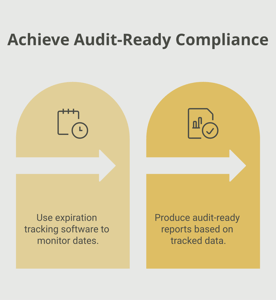
Accreditation bodies such as The Joint Commission and state health departments routinely verify that all practitioners hold valid DEA registrations. Compliance officers need to produce up-to-date records quickly and confidently. If an audit reveals even one lapsed registration, it can trigger corrective action requirements, extend the audit timeline, and raise questions about the organization's overall compliance posture. Having a centralized tracking system with audit-ready reports makes this process straightforward.
HR and Onboarding Teams Verifying New Hire Credentials
When a new practitioner joins your organization, verifying their DEA registration status is a critical step in the onboarding process. HR teams need to confirm that the registration is current, matches the correct practice location, and covers the appropriate drug schedules. They also need to set up tracking for the new hire's future renewal dates from day one, rather than discovering the expiration date months later when it is nearly too late.
Pharmacy Directors Overseeing Dispensing Compliance
Pharmacy directors must verify that every prescription for a controlled substance comes from a provider with a valid DEA registration. They also need to maintain their own pharmacy DEA registrations and ensure that any institutional registrations covering staff pharmacists remain current. For large pharmacy operations or chain pharmacies, this means coordinating dozens or even hundreds of registrations with staggered expiration dates.
How the DEA License Benefits Your Company and Employees
Maintaining current DEA registrations across your organization delivers value that extends beyond simple regulatory compliance.
For the company:
- Compliance assurance — Valid registrations keep your organization in good standing with federal and state regulators, reducing the risk of fines, sanctions, or operational shutdowns.
- Risk mitigation — Proactive tracking eliminates the possibility of practitioners unknowingly operating with expired credentials, protecting your organization from legal liability.
- Operational continuity — When every provider's registration is current, patient care proceeds without interruption. There are no last-minute scrambles to cover for a practitioner who suddenly cannot prescribe.
- Audit readiness — Centralized records of all DEA registrations and their renewal histories make accreditation surveys and regulatory audits efficient and stress-free.
For employees:
- Career protection — Practitioners who maintain their DEA registration without lapses protect their professional standing and avoid the complications of reapplying for a new registration.
- Professional credibility — A current DEA registration signals that a provider meets all federal requirements to handle controlled substances responsibly.
- Job security — Employers increasingly require proof of current credentials. Staying ahead of renewals ensures that practitioners remain fully qualified and employable.
- Reduced personal liability — Prescribing with an expired registration can expose individual practitioners to criminal and civil penalties. Timely renewal eliminates this risk.
For patients and clients:
- Continuity of care — Patients who rely on controlled substance prescriptions receive uninterrupted treatment when their provider's credentials are up to date.
- Trust and confidence — Patients and referring providers trust organizations that demonstrate consistent regulatory compliance.
- Safety assurance — The DEA registration system exists to ensure controlled substances are handled safely. Maintaining compliance supports this public health objective.
How to Track DEA License Expiration Dates
If you are managing DEA registrations for multiple practitioners, you know that the administrative burden grows quickly. Here is a practical look at your options.
Challenges of manual tracking
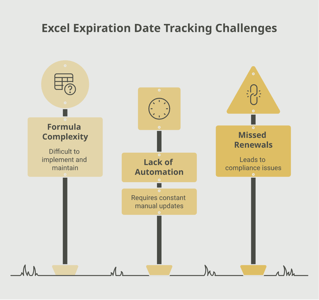
Many organizations still rely on spreadsheets, shared calendars, or email reminders to track DEA renewal dates. While these methods work for a handful of registrations, they break down as your organization scales. Common pain points include data entry errors, outdated spreadsheets, missed reminders buried in crowded inboxes, and the difficulty of producing comprehensive reports for audits.
The DEA itself no longer sends paper renewal notices by mail. Since June 2020, all renewal reminders are sent electronically to the email address on file with the registration. If that email is outdated or unmonitored, the reminder never reaches the right person.
Benefits of automated tracking
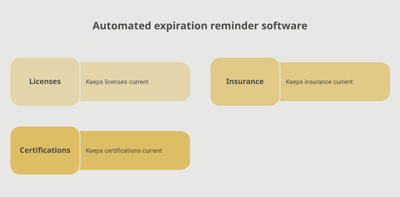
Automated expiration tracking systems address these challenges directly. They provide a centralized dashboard where you can see the status of every DEA registration in your organization at a glance. Automated reminders go out at customizable intervals — for example, at 90, 60, and 30 days before expiration — ensuring that no renewal deadline is missed even during busy periods or staff transitions.
A platform like Expiration Reminder is designed for exactly this kind of use case. It lets you store all your practitioners' DEA registrations in one secure location, set up automated renewal alerts that reach the right people at the right time, generate audit-ready compliance reports, and track registrations across multiple locations and states. The result is less time spent on manual follow-up and more confidence that your organization is always in compliance.
Getting started
Whether you choose a dedicated tracking platform or build a process internally, the key principles are the same: centralize your data, automate your reminders, and review your compliance status regularly. For DEA registrations specifically, aim to begin the renewal process at least 60 days before expiration to allow for processing time and to qualify for the automatic extension provision.
Key Takeaways
- A DEA license (Controlled Substances Registration) is a federal requirement for any practitioner, pharmacy, or organization that prescribes, administers, dispenses, or researches controlled substances.
- Standard DEA registrations are valid for three years and must be renewed using DEA Form 224a, ideally at least 45 days before the expiration date.
- Federal law prohibits handling controlled substances under an expired registration, even for a single day. Violations can result in civil penalties of up to $25,000 per incident, criminal charges, and registration revocation.
- Practitioners who practice in multiple states or at multiple locations need separate DEA registrations for each site where controlled substances are physically handled.
- The DEA no longer sends paper renewal notices. All reminders are electronic, making it critical to keep registration email addresses current.
- Organizations that centralize and automate DEA registration tracking reduce compliance risk, avoid disruptions to patient care, and maintain audit readiness.
- Starting the renewal process at least 60 days before expiration gives you sufficient processing time and ensures your practitioners can continue prescribing without interruption.
Frequently Asked Questions
What happens if a DEA license expires?
Once a DEA registration expires, the practitioner immediately loses the legal authority to prescribe, administer, or dispense controlled substances. Federal law prohibits handling controlled substances under an expired registration. The DEA allows reinstatement within one calendar month of expiration, but a completely new application is required after that window closes. Operating with an expired registration can result in civil fines up to $25,000 per violation, criminal penalties, and disciplinary action from state licensing boards.
How long does it take to renew a DEA license?
Online renewal through the DEA's portal typically takes four to six weeks to process. This is why the DEA recommends submitting your renewal application at least 45 days before the expiration date. If you file at least 45 days early, your existing registration is automatically extended until the DEA takes final action on your renewal, allowing you to continue prescribing without interruption.
Who is required to have a DEA license?
Any individual or entity that prescribes, administers, dispenses, manufactures, distributes, or conducts research with controlled substances must hold a valid DEA registration. This includes physicians, dentists, veterinarians, nurse practitioners, physician assistants, pharmacies, hospitals, research institutions, and manufacturers or distributors of controlled substances.
Can you prescribe controlled substances while your DEA renewal is pending?
Yes, but only if you submitted your renewal application before your registration expired. Under 21 CFR 1301.36(i), filing at least 45 days before expiration triggers an automatic extension that allows you to continue prescribing until the DEA acts on your renewal. If you filed late (less than 45 days before expiration), continued prescribing is at the DEA's discretion. If you did not file before expiration, you may not prescribe controlled substances.
Do you need a separate DEA registration for each state?
Yes. The Controlled Substances Act requires a separate DEA registration for each principal place of business where controlled substances are dispensed or physically handled. If you practice in multiple states, you need a separate registration for each state. However, if you only write prescriptions at a secondary location without storing controlled substances there, you may be able to operate under your primary registration within the same state.
How much does a DEA registration cost?
The fee for a new DEA registration ranges from $731 to $3,007 depending on the type of registration (practitioner, pharmacy, manufacturer, distributor, or researcher). Renewal fees follow the same schedule. These fees are paid at the time of application and cover the full three-year registration period.
How far in advance should you start the DEA renewal process?
The DEA recommends renewing at least 45 days before your registration expires to qualify for the automatic extension provision. However, starting the process 60 to 90 days in advance gives you additional buffer time for any complications, address updates, or documentation needs. The DEA sends electronic renewal reminders at 60, 45, 30, 15, and 5 days before expiration.
Does the DEA still send paper renewal notices?
No. As of June 2020, the DEA no longer mails paper renewal notifications. All renewal reminders are sent electronically to the email address associated with your registration. This makes it essential to keep your registration email address current and monitored. Organizations that rely on a former employee's email for DEA correspondence risk missing critical renewal reminders.
Conclusion
Managing DEA registrations is one of those compliance responsibilities that demands consistent attention. With three-year renewal cycles, multiple registrations per provider in some cases, and strict federal penalties for lapses, it is not a task you want to leave to memory or manual workarounds.
The good news is that staying compliant does not have to be complicated. By centralizing your DEA registration data, setting up automated reminders well ahead of expiration dates, and building renewal tracking into your standard credentialing workflows, you can eliminate the risk of missed deadlines and the disruption they cause. Tools like Expiration Reminder make this process straightforward by giving you a single dashboard for all your tracked documents, automated alerts, and audit-ready reports.
Your practitioners count on having the credentials they need to do their jobs. Your patients count on uninterrupted access to the treatments they rely on. And your organization counts on a compliance posture that holds up under scrutiny. With a proactive approach to DEA registration tracking, you can deliver on all three.
Make sure your company is compliant
Say goodbye to outdated spreadsheets and hello to centralized credential management. Avoid fines and late penalties by managing your employee certifications with Expiration Reminder.