BLS Certification
What Is BLS Certification?
BLS (Basic Life Support) certification is a credential that demonstrates a healthcare provider’s ability to perform life-saving interventions in cardiac and respiratory emergencies. The training covers high-quality CPR for adults, children, and infants, the use of automated external defibrillators (AEDs), relief of foreign-body airway obstructions (choking), and team-based resuscitation techniques.
The most widely recognized BLS certification is offered by the American Heart Association (AHA), though the American Red Cross and other accredited organizations also provide equivalent courses. The AHA’s BLS course is specifically designed for healthcare professionals and is often the standard required by hospitals, clinics, and regulatory bodies.
Who needs BLS certification? The credential is required for a wide range of healthcare and public safety roles, including:
- Registered nurses (RNs) and licensed practical nurses (LPNs)
- Physicians and physician assistants
- Emergency medical technicians (EMTs) and paramedics
- Respiratory therapists
- Physical and occupational therapists
- Pharmacists and pharmacy technicians
- Medical and nursing students
- Dentists and dental hygienists
- Home health aides and certified nursing assistants
- Firefighters, lifeguards, and law enforcement officers
Many non-clinical roles also benefit from or require BLS, including teachers, coaches, childcare providers, personal trainers, and social workers.
How to obtain it: BLS certification can be completed through an instructor-led classroom course (approximately 4 to 5 hours), or through a blended learning format that combines online modules (1 to 2 hours) with an in-person skills session (2 to 3 hours). Both formats require passing a written exam and a hands-on skills evaluation.
Validity period: AHA BLS certification is valid for two years from the date of course completion. The certification card expires at the end of the month, two years from the original training date.
Why BLS Certification Matters for Your Organization
BLS certification is more than a piece of paper in an employee’s file. It represents your organization’s readiness to respond to the most critical moments in patient care.
Regulatory and accreditation requirements: The Joint Commission (TJC), the Centers for Medicare and Medicaid Services (CMS), and state licensing boards require healthcare facilities to ensure that clinical staff maintain current BLS certification. Failing to demonstrate compliance during surveys can result in citations, corrective action plans, or jeopardized accreditation status.
Patient safety: Cardiac arrest can happen anywhere in a healthcare facility — not just in the emergency department. When every clinical team member holds a current BLS card, your organization is better prepared to deliver immediate, high-quality CPR in those critical first minutes before an advanced team arrives.
Employer liability: An employee providing emergency care with an expired BLS certification exposes your organization to significant legal and liability risks, particularly if outcomes are poor and credentialing gaps are discovered during a review.
Hiring and onboarding: Most hospitals and clinics will not allow a healthcare professional to begin clinical duties without a valid BLS card. Tracking this requirement during onboarding prevents start-date delays and ensures new hires are fully compliant from day one.
Staffing continuity: When a team member’s BLS certification lapses, they may need to be temporarily reassigned from patient-facing roles until they complete a renewal course. This creates unexpected staffing gaps, increases workload for remaining team members, and can affect patient care quality.
Common Scenarios for Tracking BLS Certification Expiration Dates
Hospital-Wide Credential Management
Large hospitals may employ hundreds or even thousands of clinical staff, each with their own BLS expiration date. A credential coordinator responsible for tracking BLS alongside dozens of other certifications (ACLS, PALS, nursing licenses) needs a reliable system to prevent any credential from falling through the cracks, especially when renewal dates are staggered throughout the year.
Nursing Department Compliance Audits
Nurse managers are often tasked with verifying that every member of their unit holds a current BLS card. During accreditation surveys or internal audits, a single lapsed certification can trigger a finding. Proactive tracking allows managers to identify upcoming expirations weeks or months in advance, giving nurses time to enroll in a renewal course without disrupting their shift schedule.
EMS Agency Recertification Cycles
Emergency medical services (EMS) agencies must ensure that every EMT and paramedic maintains current BLS certification. With field crews rotating across shifts and stations, and with some providers working for multiple agencies, tracking individual expiration dates becomes a logistics challenge that requires more than a basic calendar or spreadsheet.
Clinical Student and Intern Onboarding
Hospitals and clinics that host medical students, nursing students, and residents must verify BLS certification before allowing these individuals to participate in patient care. With new cohorts arriving at different times throughout the academic year, verifying and tracking temporary staff credentials adds another layer of complexity.
Multi-Facility Healthcare Systems
Healthcare organizations operating across multiple locations — hospitals, outpatient clinics, urgent care centers, rehabilitation facilities — must coordinate BLS compliance across all sites. Different facilities may have different audit schedules and staffing models, making centralized visibility into certification status essential.
How BLS Certification Benefits Your Company and Employees
For your organization:
- Accreditation readiness: Having every clinical staff member’s BLS status documented and current means you can walk into any survey or audit with confidence.
- Risk reduction: Proactive tracking eliminates the legal and operational risks that come with expired certifications going unnoticed.
- Operational continuity: Avoiding last-minute scrambles for renewal courses keeps staffing levels stable and reduces the administrative burden on managers.
- Quality of care: A workforce that is consistently trained in the latest BLS guidelines delivers better emergency response outcomes.
For your employees:
- Career protection: Many healthcare credentials require a current BLS card as a prerequisite. Letting it lapse can create cascading credentialing issues.
- Skill maintenance: BLS renewal courses incorporate the latest AHA guidelines, ensuring providers stay current with evolving best practices in resuscitation science.
- Job security: Employees who maintain current certifications avoid the disruption of being pulled from clinical assignments while they complete retraining.
- Confidence: Regular practice and recertification reinforces the skills and confidence needed to act decisively during a real emergency.
For patients and their families:
- Safety: Patients benefit directly when every member of their care team is trained and current in basic life support techniques.
- Trust: Families trust healthcare facilities that demonstrate rigorous credentialing practices and invest in ongoing staff training.
- Better outcomes: Studies consistently show that timely, high-quality CPR improves survival rates in cardiac arrest, making current BLS training a life-or-death matter.
How to Track BLS Certification Expiration Dates
With BLS certifications expiring on a two-year cycle and each employee’s renewal date falling at a different time, manual tracking quickly becomes a significant administrative burden. The challenge grows with organizational size and complexity.
Common pitfalls of manual tracking include:
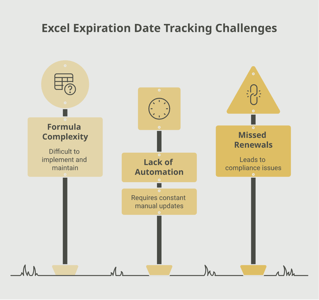
- Spreadsheets that fall out of date as employees join, leave, or renew at different times
- Reminder emails that are overlooked or buried in busy inboxes
- Inconsistent record-keeping across departments or locations
- Difficulty producing compliance reports during time-sensitive audits
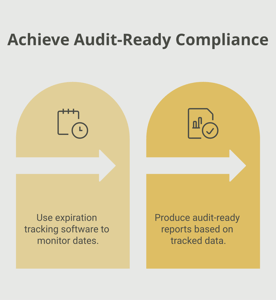
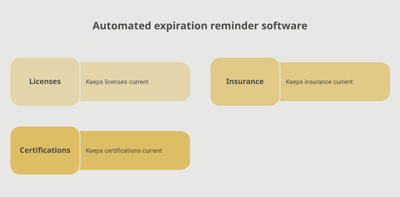
An automated expiration tracking system solves these problems by centralizing all BLS certification records and sending proactive alerts at customized intervals. A platform like Expiration Reminder lets you configure notification schedules — for example, sending alerts to the employee, their manager, and the credentialing office 90, 60, and 30 days before a BLS card expires. Centralized dashboards provide real-time visibility into who is compliant, who is approaching expiration, and who has lapsed, while audit-ready reports can be generated in seconds.
Whether you manage a team of ten or a workforce of thousands, the right tracking system ensures that BLS compliance is consistent, transparent, and stress-free.
Key Takeaways
- BLS (Basic Life Support) certification is a required credential for nearly all healthcare professionals and many public safety roles, demonstrating the ability to perform high-quality CPR and use an AED.
- AHA BLS certification is valid for two years from the date of completion and expires at the end of the month, two years from the training date.
- If your BLS certification expires, you must retake the full initial course rather than the shorter renewal course, adding time and cost.
- Hospitals, clinics, and accrediting bodies such as The Joint Commission require current BLS certification for clinical staff, making lapses a compliance and accreditation risk.
- Begin the renewal process at least 30 to 60 days before your certification expires to allow time for scheduling and completing the course.
- BLS renewal courses take approximately 1.5 to 3 hours and include both a written exam and a hands-on skills evaluation.
- Centralizing BLS certification tracking in an automated system prevents last-minute scrambles, reduces administrative burden, and ensures audit readiness.
Frequently Asked Questions
What happens if my BLS certification expires?
If your BLS certification expires, you can no longer take the abbreviated renewal course and must instead complete the full initial BLS provider course, which is longer and typically more expensive. In a healthcare setting, an expired BLS card may result in being temporarily removed from clinical duties until you are recertified. Employers may also face compliance citations during accreditation surveys.
How long does BLS certification last?
AHA BLS certification is valid for two years from the date of course completion. The certification card expires at the end of the month in which you completed training, two years prior. For example, if you completed your course in March 2024, your card would expire at the end of March 2026.
How long does it take to renew BLS certification?
A BLS renewal course typically takes 1.5 to 3 hours, depending on the format. Blended learning options allow you to complete online modules in 30 to 90 minutes, followed by a 15 to 30 minute in-person skills check. The full initial course, required if your certification has expired, takes approximately 4 to 5 hours.
Who is required to have BLS certification?
BLS certification is required for most healthcare professionals, including registered nurses, physicians, EMTs, paramedics, respiratory therapists, dentists, pharmacists, and many others. It is also commonly required or recommended for firefighters, lifeguards, teachers, coaches, childcare workers, and personal trainers. Nearly every U.S. hospital mandates valid BLS credentials for employment.
Can you work in healthcare with an expired BLS certification?
In most healthcare settings, no. Hospitals and clinics typically require current BLS certification as a condition of employment for clinical staff. An employee with an expired BLS card may be temporarily reassigned from patient care duties or placed on administrative leave until recertification is completed. The specific policy depends on your employer and state regulations.
How far in advance should you start the BLS renewal process?
The AHA recommends renewing your BLS certification before the expiration date. Most credentialing experts suggest beginning the process 30 to 60 days in advance. This gives you adequate time to find an available course, complete both the written and skills components, and submit your updated card to your employer’s credentialing office.
How much does BLS certification cost?
BLS certification costs vary by provider and format. AHA-affiliated classroom courses typically range from 0 to 00. Online-only courses from some providers may cost as little as 5, but these may not meet employer requirements for an in-person skills evaluation. Renewal courses are generally less expensive than initial certification. Many employers cover the cost as part of their professional development or occupational health program.
Is online BLS certification accepted by employers?
It depends on the employer and the course provider. Most hospitals and healthcare systems require BLS certification that includes an in-person, hands-on skills evaluation, which rules out purely online courses. The AHA’s HeartCode BLS blended learning format, which combines online modules with an in-person skills session, is widely accepted. Always verify your employer’s requirements before enrolling in any course.
Conclusion
BLS certification is one of the foundational credentials in healthcare, and keeping it current is a shared responsibility between individual providers and the organizations that employ them. With a two-year renewal cycle and a workforce of clinical professionals whose expiration dates rarely line up, tracking BLS compliance at scale demands more than good intentions and a spreadsheet.
The good news is that proactive management makes all the difference. By establishing clear renewal timelines, communicating expectations to your team, and using a centralized tracking tool like Expiration Reminder to automate the process, you can eliminate the stress and risk of last-minute expirations.
When every member of your clinical team has a current BLS card, your organization is better prepared, your patients are safer, and your compliance posture is rock solid. That is a win for everyone.
Make sure your company is compliant
Say goodbye to outdated spreadsheets and hello to centralized credential management. Avoid fines and late penalties by managing your employee certifications with Expiration Reminder.