

Read time:
16
min

DIY vs. Software Solutions for Expiration Tracking: Which One Actually Works?
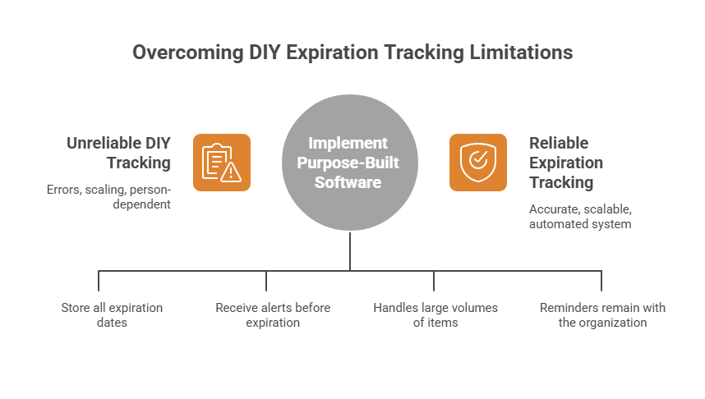
Table of Contents

Share this article
Subscribe
Thank you! Your submission has been received!
Oops! Something went wrong while submitting the form.

DIY vs. Software Solutions for Expiration Tracking: Which One Actually Works?

Marcus had a system. He was proud of it, actually. A color-coded spreadsheet with every contractor's certificate of insurance, safety certification, and permit neatly entered, with columns for expiration dates and a manual highlight protocol: yellow for 60 days out, orange for 30, red for critical. He updated it every Friday afternoon without fail — until the quarter he was pulled into a project overrun that consumed every Friday for three months straight.

He never got back to the spreadsheet. And eight weeks later, during a client site visit, it emerged that two subcontractors had been working on-site with expired COIs. The project stalled for four days while coverage was confirmed and documentation updated. The client relationship survived, but Marcus's confidence in his "system" did not.

This is the DIY expiration tracking story. Not because people are careless, but because manual systems depend on people being consistently available, consistently motivated, and consistently error-free — which is not how real work actually happens. This article compares the DIY approach against purpose-built expiration tracking software, without the hype, so you can decide what your organization actually needs.

What "DIY" Expiration Tracking Really Means

When compliance teams talk about DIY tracking, they typically mean one of four things: a spreadsheet, a shared calendar, a folder system, or some combination of all three. Each approach has genuine strengths — they are free, familiar, and require no vendor relationship. They are also plagued by the same structural limitations that make them increasingly unreliable as organizations grow.

The Spreadsheet Approach

Spreadsheets are the most widely used DIY tool for tracking expiration dates. They can be highly customized, shared across teams, and configured with formulas that flag upcoming dates. At small scale — say, tracking 20 to 30 items for a team of fewer than 10 people — a well-maintained spreadsheet can work reasonably well.

The problems compound quickly as volume grows. A 2024 analysis of business decision-making found that 94% of spreadsheets contain errors that create material risk for the organization. For expiration tracking specifically, common failure modes include formula errors that calculate renewal dates incorrectly, inconsistent naming conventions that make records unsearchable, and stale data that no one has flagged as outdated. The spreadsheet does not know it is wrong. It just displays whatever is in the cells.

The Shared Calendar Approach

Some teams use shared calendar events as their reminder system. This feels intuitive — set a reminder for 30 days before each credential expires, and the calendar will nudge you. In practice, calendar-based tracking has two fatal weaknesses: it does not scale, and it is person-dependent. When the person who created the reminders leaves the organization, the reminders leave with them. When the volume of tracked items grows beyond a few dozen, calendar management becomes a part-time job.

The Folder System Approach

Some organizations keep compliance documents in shared drive folders organized by type or vendor, assuming that having the documents somewhere means the tracking is handled. This conflates document storage with active monitoring. A folder that contains an expired certificate tells you the certificate exists. It does not tell you it has expired, notify anyone that action is needed, or escalate when nothing happens.

Where DIY Tracking Breaks Down

It Requires Human Consistency at Scale

The core requirement of any DIY system is that a person opens it, reviews it, and acts on what they find — regularly, without fail, across every item. For a team managing dozens or hundreds of credential records, this is a significant ask. According to research by Expiration Reminder, approximately 40% of organizations still track renewal dates manually via calendar or spreadsheet, despite the availability of automated tools — and this correlates directly with higher rates of lapsed credentials and missed compliance deadlines.

It Creates No Audit Trail

When an auditor asks who verified a credential, when they verified it, and what documentation they reviewed, a spreadsheet entry provides no useful answer. Audit-ready compliance documentation requires timestamps, verification records, chain of custody for document review, and a history of what changed and when. These are not features that spreadsheets provide. For industries governed by OSHA recordkeeping requirements or Joint Commission standards, an inadequate audit trail is not just inconvenient — it is itself a finding that generates corrective action requirements.

It Does Not Escalate

A spreadsheet that shows a credential expiring in 15 days does nothing with that information unless a human opens the file and sees it. If the responsible person is on leave, busy with a project, or simply overlooked the file, the deadline passes silently. DIY systems have no escalation capability — no mechanism to automatically alert a supervisor when a reminder goes unacknowledged, no way to raise the urgency as a deadline approaches without someone manually engineering that response.

It Does Not Handle Complexity Well

Real-world compliance tracking involves multiple credential types with different renewal cycles, different responsible parties, different notification requirements, and different documentation standards. A construction company might track OSHA 10 certifications (which expire every four years), forklift operator licenses (state-variable timelines), equipment inspection certificates (often annual), COIs (typically annual), and site-specific permits (project-dependent). Managing all of these with a single spreadsheet requires constant manual updates to the logic, the formulas, and the ownership assignments. One configuration change touches everything.

Staff Turnover Destroys It

Perhaps the most damaging structural flaw in DIY tracking is how completely it depends on institutional knowledge. When the person who built and maintains the spreadsheet transitions out of the role, they often take with them the understanding of what the spreadsheet means, which columns matter, which entries are stale, and which items are "handled" through an informal process that never got documented. The next person inherits a file of uncertain reliability and no clear guide to interpreting it.

What Purpose-Built Expiration Tracking Software Does Differently

Dedicated expiration tracking platforms are designed from the ground up to solve the problems that make DIY systems fail. The differences are not cosmetic. They are architectural.

Proactive, Automated Reminders

Software-based tracking sends reminders automatically, on a schedule configured for each credential type. You define the lead time — 90 days for complex renewals, 30 days for simple ones — and the platform sends notifications without any human intervention. The reminder goes to the right people: the credential holder, their manager, and the compliance owner, based on how the system is configured. If no action is taken, the reminders escalate automatically as the deadline approaches.

This is the fundamental shift from reactive to proactive. Instead of someone noticing a deadline is approaching (if they happen to check the right file at the right time), the deadline finds them — consistently, at the right lead time, with the right context.

Centralized, Searchable Records

All compliance records live in a single system with consistent structure, search capability, and access controls. Finding the current status of any credential takes seconds. Generating a report of everything expiring in the next 60 days takes a few clicks. No hunting through folders, no cross-referencing between multiple spreadsheets, no uncertainty about whether the file you are looking at is current.

Built-In Audit Readiness

Every action in a purpose-built tracking system is logged. When a document was uploaded, who reviewed it, when a reminder was sent, who acknowledged it, and what renewal documentation was submitted — all of this is captured automatically. When an auditor arrives, you pull a report that shows exactly what they need to see, in a format they can act on.

For healthcare organizations subject to Joint Commission Human Resources standards, this kind of documented verification history is not optional. It is required evidence of a functioning credentialing program.

Role-Based Access and Accountability

Software platforms enforce clear ownership at the record level. Each credential type has assigned owners and approvers. Notifications go to specific roles, not just a generic email alias. When ownership changes — because someone transfers, leaves, or changes roles — the records and the associated notifications update accordingly. The system does not depend on anyone's memory of who is responsible for what.

Scalability Without Additional Overhead

Adding 50 new employees to a purpose-built tracking system does not require 50 new spreadsheet rows and manually configured formulas for each. The structure scales automatically. New records inherit the tracking rules already defined for their credential type. The platform grows with the organization without proportional increases in administrative effort.

The Hidden Costs of DIY Expiration Tracking

Staff Time

A team managing 200 credential records manually — checking dates, sending reminder emails, following up on renewals, updating records — can easily spend 8 to 15 hours per week on this task. Annualized, that is 400 to 780 hours of staff time dedicated to an administrative function that software handles automatically. At a fully-loaded cost of $50 per hour, that is $20,000 to $39,000 annually in labor costs for a process that could be largely automated.

Penalty Exposure

The research is consistent: organizations that rely on manual compliance tracking face higher rates of lapsed credentials and the associated penalties. According to Mosey's 2025 compliance benchmark research, one-third of companies incur compliance-related penalties in any given year, averaging $16,000 per incident. A single undetected lapse in a regulated environment can cost far more. In construction, an OSHA inspection that finds expired safety certifications can produce per-violation fines and mandatory audits. In healthcare, expired staff credentials can jeopardize accreditation.

Operational Disruption

Beyond fines, the operational cost of a compliance gap can be substantial. Work stoppage while documentation is resolved, emergency renewals at premium cost, client relationship management when a gap is discovered during a site visit — these costs are real and often invisible in a risk analysis that focuses only on regulatory penalties.

When DIY Might Still Make Sense

Honesty requires acknowledging that DIY tracking does work in specific, limited circumstances. A solo consultant tracking their own three or four professional credentials. A startup with fewer than 10 employees and minimal compliance requirements. An organization in an early stage where the volume of tracked items is genuinely small and stable.

In these situations, a well-maintained spreadsheet with calendar reminders can be a practical short-term solution. The key qualifier is "well-maintained" — and the key risk is the assumption that the situation will stay simple. Organizations grow. Regulatory requirements expand. The credential volume that felt manageable last year may not feel manageable this year.

Frequently Asked Questions

Is expiration tracking software worth it for small businesses?

It depends on the number of records and the regulatory environment. For a small business in a heavily regulated industry — construction, healthcare, childcare, food service — even a handful of compliance gaps can produce serious penalties. Most platforms are priced for small organizations and the savings from even one prevented lapse typically cover months of subscription cost. If your business relies on maintaining active licenses, certificates, or insurance for legal operation, purpose-built software is worth serious consideration regardless of size.

Can I build a reliable expiration tracking system in Excel or Google Sheets?

You can build a functional system for a limited number of records with a flat renewal structure. The limitations become apparent as complexity increases: Excel cannot send automated reminders without significant custom development, it cannot maintain a proper audit trail, and it requires constant manual maintenance to stay accurate. For organizations with more than 30 to 50 records, or with regulatory audit requirements, Excel is not a sufficient long-term solution.

What is the biggest risk of staying with manual tracking?

The biggest risk is a silent lapse: a credential that expires without anyone noticing until an auditor, a client, or an incident forces the discovery. By then, the opportunity to prevent the gap has passed. The consequences — financial penalties, operational disruption, damaged client relationships — are all significantly more expensive than the software subscription that would have prevented them.

How long does it take to implement expiration tracking software?

For most small to mid-sized organizations, implementation takes days to a few weeks, not months. The key steps are importing existing records, configuring reminder schedules for each credential type, and setting up user roles and notifications. Many organizations are operational within a week of starting the setup process.

What should I look for when choosing expiration tracking software?

Prioritize: automated reminder delivery with configurable lead times, role-based notification and ownership, audit-ready reporting with activity logs, document storage and version control, and the ability to handle multiple credential types with different renewal cycles. Integration with your existing HR or operations systems is a bonus that can reduce duplicate data entry. Ease of setup matters too — a platform that requires weeks of configuration is harder to adopt and less likely to be used consistently.

Curious whether your current system is leaving you exposed? Book a free demo with Expiration Reminder to see what automated expiration tracking looks like in practice — and how quickly your team can get up and running.

PS: A missed renewal never announces itself in advance. It shows up when you can least afford it — during an audit, before an important project milestone, or after an incident. Automated expiration tracking costs a fraction of what a single lapse can produce, and it works quietly in the background so your team does not have to.

Share this article
Subscribe
Thank you! Your submission has been received!
Oops! Something went wrong while submitting the form.

DIY vs. Software Solutions for Expiration Tracking: Which One Actually Works?

Table of Contents

Share this article

DIY vs. Software Solutions for Expiration Tracking: Which One Actually Works?

Marcus had a system. He was proud of it, actually. A color-coded spreadsheet with every contractor's certificate of insurance, safety certification, and permit neatly entered, with columns for expiration dates and a manual highlight protocol: yellow for 60 days out, orange for 30, red for critical. He updated it every Friday afternoon without fail — until the quarter he was pulled into a project overrun that consumed every Friday for three months straight.

He never got back to the spreadsheet. And eight weeks later, during a client site visit, it emerged that two subcontractors had been working on-site with expired COIs. The project stalled for four days while coverage was confirmed and documentation updated. The client relationship survived, but Marcus's confidence in his "system" did not.

This is the DIY expiration tracking story. Not because people are careless, but because manual systems depend on people being consistently available, consistently motivated, and consistently error-free — which is not how real work actually happens. This article compares the DIY approach against purpose-built expiration tracking software, without the hype, so you can decide what your organization actually needs.

What "DIY" Expiration Tracking Really Means

When compliance teams talk about DIY tracking, they typically mean one of four things: a spreadsheet, a shared calendar, a folder system, or some combination of all three. Each approach has genuine strengths — they are free, familiar, and require no vendor relationship. They are also plagued by the same structural limitations that make them increasingly unreliable as organizations grow.

The Spreadsheet Approach

Spreadsheets are the most widely used DIY tool for tracking expiration dates. They can be highly customized, shared across teams, and configured with formulas that flag upcoming dates. At small scale — say, tracking 20 to 30 items for a team of fewer than 10 people — a well-maintained spreadsheet can work reasonably well.

The problems compound quickly as volume grows. A 2024 analysis of business decision-making found that 94% of spreadsheets contain errors that create material risk for the organization. For expiration tracking specifically, common failure modes include formula errors that calculate renewal dates incorrectly, inconsistent naming conventions that make records unsearchable, and stale data that no one has flagged as outdated. The spreadsheet does not know it is wrong. It just displays whatever is in the cells.

The Shared Calendar Approach

Some teams use shared calendar events as their reminder system. This feels intuitive — set a reminder for 30 days before each credential expires, and the calendar will nudge you. In practice, calendar-based tracking has two fatal weaknesses: it does not scale, and it is person-dependent. When the person who created the reminders leaves the organization, the reminders leave with them. When the volume of tracked items grows beyond a few dozen, calendar management becomes a part-time job.

The Folder System Approach

Some organizations keep compliance documents in shared drive folders organized by type or vendor, assuming that having the documents somewhere means the tracking is handled. This conflates document storage with active monitoring. A folder that contains an expired certificate tells you the certificate exists. It does not tell you it has expired, notify anyone that action is needed, or escalate when nothing happens.

Where DIY Tracking Breaks Down

It Requires Human Consistency at Scale

The core requirement of any DIY system is that a person opens it, reviews it, and acts on what they find — regularly, without fail, across every item. For a team managing dozens or hundreds of credential records, this is a significant ask. According to research by Expiration Reminder, approximately 40% of organizations still track renewal dates manually via calendar or spreadsheet, despite the availability of automated tools — and this correlates directly with higher rates of lapsed credentials and missed compliance deadlines.

It Creates No Audit Trail

When an auditor asks who verified a credential, when they verified it, and what documentation they reviewed, a spreadsheet entry provides no useful answer. Audit-ready compliance documentation requires timestamps, verification records, chain of custody for document review, and a history of what changed and when. These are not features that spreadsheets provide. For industries governed by OSHA recordkeeping requirements or Joint Commission standards, an inadequate audit trail is not just inconvenient — it is itself a finding that generates corrective action requirements.

It Does Not Escalate

A spreadsheet that shows a credential expiring in 15 days does nothing with that information unless a human opens the file and sees it. If the responsible person is on leave, busy with a project, or simply overlooked the file, the deadline passes silently. DIY systems have no escalation capability — no mechanism to automatically alert a supervisor when a reminder goes unacknowledged, no way to raise the urgency as a deadline approaches without someone manually engineering that response.

It Does Not Handle Complexity Well

Real-world compliance tracking involves multiple credential types with different renewal cycles, different responsible parties, different notification requirements, and different documentation standards. A construction company might track OSHA 10 certifications (which expire every four years), forklift operator licenses (state-variable timelines), equipment inspection certificates (often annual), COIs (typically annual), and site-specific permits (project-dependent). Managing all of these with a single spreadsheet requires constant manual updates to the logic, the formulas, and the ownership assignments. One configuration change touches everything.

Staff Turnover Destroys It

Perhaps the most damaging structural flaw in DIY tracking is how completely it depends on institutional knowledge. When the person who built and maintains the spreadsheet transitions out of the role, they often take with them the understanding of what the spreadsheet means, which columns matter, which entries are stale, and which items are "handled" through an informal process that never got documented. The next person inherits a file of uncertain reliability and no clear guide to interpreting it.

What Purpose-Built Expiration Tracking Software Does Differently

Dedicated expiration tracking platforms are designed from the ground up to solve the problems that make DIY systems fail. The differences are not cosmetic. They are architectural.

Proactive, Automated Reminders

Software-based tracking sends reminders automatically, on a schedule configured for each credential type. You define the lead time — 90 days for complex renewals, 30 days for simple ones — and the platform sends notifications without any human intervention. The reminder goes to the right people: the credential holder, their manager, and the compliance owner, based on how the system is configured. If no action is taken, the reminders escalate automatically as the deadline approaches.

This is the fundamental shift from reactive to proactive. Instead of someone noticing a deadline is approaching (if they happen to check the right file at the right time), the deadline finds them — consistently, at the right lead time, with the right context.

Centralized, Searchable Records

All compliance records live in a single system with consistent structure, search capability, and access controls. Finding the current status of any credential takes seconds. Generating a report of everything expiring in the next 60 days takes a few clicks. No hunting through folders, no cross-referencing between multiple spreadsheets, no uncertainty about whether the file you are looking at is current.

Built-In Audit Readiness

Every action in a purpose-built tracking system is logged. When a document was uploaded, who reviewed it, when a reminder was sent, who acknowledged it, and what renewal documentation was submitted — all of this is captured automatically. When an auditor arrives, you pull a report that shows exactly what they need to see, in a format they can act on.

For healthcare organizations subject to Joint Commission Human Resources standards, this kind of documented verification history is not optional. It is required evidence of a functioning credentialing program.

Role-Based Access and Accountability

Software platforms enforce clear ownership at the record level. Each credential type has assigned owners and approvers. Notifications go to specific roles, not just a generic email alias. When ownership changes — because someone transfers, leaves, or changes roles — the records and the associated notifications update accordingly. The system does not depend on anyone's memory of who is responsible for what.

Scalability Without Additional Overhead

Adding 50 new employees to a purpose-built tracking system does not require 50 new spreadsheet rows and manually configured formulas for each. The structure scales automatically. New records inherit the tracking rules already defined for their credential type. The platform grows with the organization without proportional increases in administrative effort.

The Hidden Costs of DIY Expiration Tracking

Staff Time

A team managing 200 credential records manually — checking dates, sending reminder emails, following up on renewals, updating records — can easily spend 8 to 15 hours per week on this task. Annualized, that is 400 to 780 hours of staff time dedicated to an administrative function that software handles automatically. At a fully-loaded cost of $50 per hour, that is $20,000 to $39,000 annually in labor costs for a process that could be largely automated.

Penalty Exposure

The research is consistent: organizations that rely on manual compliance tracking face higher rates of lapsed credentials and the associated penalties. According to Mosey's 2025 compliance benchmark research, one-third of companies incur compliance-related penalties in any given year, averaging $16,000 per incident. A single undetected lapse in a regulated environment can cost far more. In construction, an OSHA inspection that finds expired safety certifications can produce per-violation fines and mandatory audits. In healthcare, expired staff credentials can jeopardize accreditation.

Operational Disruption

Beyond fines, the operational cost of a compliance gap can be substantial. Work stoppage while documentation is resolved, emergency renewals at premium cost, client relationship management when a gap is discovered during a site visit — these costs are real and often invisible in a risk analysis that focuses only on regulatory penalties.

When DIY Might Still Make Sense

Honesty requires acknowledging that DIY tracking does work in specific, limited circumstances. A solo consultant tracking their own three or four professional credentials. A startup with fewer than 10 employees and minimal compliance requirements. An organization in an early stage where the volume of tracked items is genuinely small and stable.

In these situations, a well-maintained spreadsheet with calendar reminders can be a practical short-term solution. The key qualifier is "well-maintained" — and the key risk is the assumption that the situation will stay simple. Organizations grow. Regulatory requirements expand. The credential volume that felt manageable last year may not feel manageable this year.

Frequently Asked Questions

Is expiration tracking software worth it for small businesses?

It depends on the number of records and the regulatory environment. For a small business in a heavily regulated industry — construction, healthcare, childcare, food service — even a handful of compliance gaps can produce serious penalties. Most platforms are priced for small organizations and the savings from even one prevented lapse typically cover months of subscription cost. If your business relies on maintaining active licenses, certificates, or insurance for legal operation, purpose-built software is worth serious consideration regardless of size.

Can I build a reliable expiration tracking system in Excel or Google Sheets?

You can build a functional system for a limited number of records with a flat renewal structure. The limitations become apparent as complexity increases: Excel cannot send automated reminders without significant custom development, it cannot maintain a proper audit trail, and it requires constant manual maintenance to stay accurate. For organizations with more than 30 to 50 records, or with regulatory audit requirements, Excel is not a sufficient long-term solution.

What is the biggest risk of staying with manual tracking?

The biggest risk is a silent lapse: a credential that expires without anyone noticing until an auditor, a client, or an incident forces the discovery. By then, the opportunity to prevent the gap has passed. The consequences — financial penalties, operational disruption, damaged client relationships — are all significantly more expensive than the software subscription that would have prevented them.

How long does it take to implement expiration tracking software?

For most small to mid-sized organizations, implementation takes days to a few weeks, not months. The key steps are importing existing records, configuring reminder schedules for each credential type, and setting up user roles and notifications. Many organizations are operational within a week of starting the setup process.

What should I look for when choosing expiration tracking software?

Prioritize: automated reminder delivery with configurable lead times, role-based notification and ownership, audit-ready reporting with activity logs, document storage and version control, and the ability to handle multiple credential types with different renewal cycles. Integration with your existing HR or operations systems is a bonus that can reduce duplicate data entry. Ease of setup matters too — a platform that requires weeks of configuration is harder to adopt and less likely to be used consistently.

Curious whether your current system is leaving you exposed? Book a free demo with Expiration Reminder to see what automated expiration tracking looks like in practice — and how quickly your team can get up and running.

PS: A missed renewal never announces itself in advance. It shows up when you can least afford it — during an audit, before an important project milestone, or after an incident. Automated expiration tracking costs a fraction of what a single lapse can produce, and it works quietly in the background so your team does not have to.

Excel in your subscriptions management
You can eliminate challenges if you have a strong organizational development blueprint.
Read time:
This is some text inside of a div block.
min

Heading

Table of Contents

Share this article
Subscribe
Thank you! Your submission has been received!
Oops! Something went wrong while submitting the form.

What’s a Rich Text element?

What’s a Rich Text element?

The rich text element allows you to create and format headings, paragraphs, blockquotes, images, and video all in one place instead of having to add and format them individually. Just double-click and easily create content.

The rich text element allows you to create and format headings, paragraphs, blockquotes, images, and video all in one place instead of having to add and format them individually. Just double-click and easily create content.

Static and dynamic content editing

Static and dynamic content editing

A rich text element can be used with static or dynamic content. For static content, just drop it into any page and begin editing. For dynamic content, add a rich text field to any collection and then connect a rich text element to that field in the settings panel. Voila!

A rich text element can be used with static or dynamic content. For static content, just drop it into any page and begin editing. For dynamic content, add a rich text field to any collection and then connect a rich text element to that field in the settings panel. Voila!

How to customize formatting for each rich text

How to customize formatting for each rich text

Headings, paragraphs, blockquotes, figures, images, and figure captions can all be styled after a class is added to the rich text element using the "When inside of" nested selector system.

Headings, paragraphs, blockquotes, figures, images, and figure captions can all be styled after a class is added to the rich text element using the "When inside of" nested selector system.
Share this article
Subscribe
Thank you! Your submission has been received!
Oops! Something went wrong while submitting the form.

Keep on reading