

Read time:
14
min

How to Automate Renewal Reminders for Staff Training Certifications

Table of Contents

Share this article
Subscribe
Thank you! Your submission has been received!
Oops! Something went wrong while submitting the form.

How to Automate Renewal Reminders for Staff Training Certifications

If you have ever been blindsided by an expired employee certification — the CPR card that lapsed last month, the safety training that should have been renewed in Q3, the forklift operator license that nobody remembered to track, you know the feeling. It is a mix of frustration and urgency, usually followed by a scramble to get the employee recertified before an audit, a project deadline, or a safety incident forces the issue.

The challenge is not that organizations do not care about training compliance. Most do. The challenge is that tracking dozens or hundreds of certification expiration dates across an entire workforce, using spreadsheets or calendar reminders, is a system designed to fail. People change roles, dates get missed, spreadsheets go stale, and before you know it, you are managing compliance by crisis instead of by design.

This article walks you through how to automate renewal reminders for staff training certifications so you can move from reactive firefighting to proactive compliance management.
Why Staff Training Certifications Need Active Tracking

Staff training certifications are not one-time achievements. Most professional certifications and required training programs have defined validity periods, after which the credential expires and must be renewed. CPR and first aid certifications typically last two years. OSHA safety training cards may be valid for specific periods depending on the standard. Industry-specific certifications, from healthcare credentialing to equipment operation licenses — each have their own renewal cycles.

For organizations, this creates an ongoing tracking challenge that grows more complex with every new hire, every additional certification requirement, and every regulatory change. Consider a healthcare facility with 200 employees, each of whom holds an average of three to five certifications. That is 600 to 1,000 individual expiration dates to monitor, each with its own renewal timeline, training provider, and documentation requirements.

When even one of those certifications lapses, the consequences can be immediate: the employee may be unable to perform certain duties, the organization may fall out of regulatory compliance, and in safety-critical environments, the risk of incidents increases.

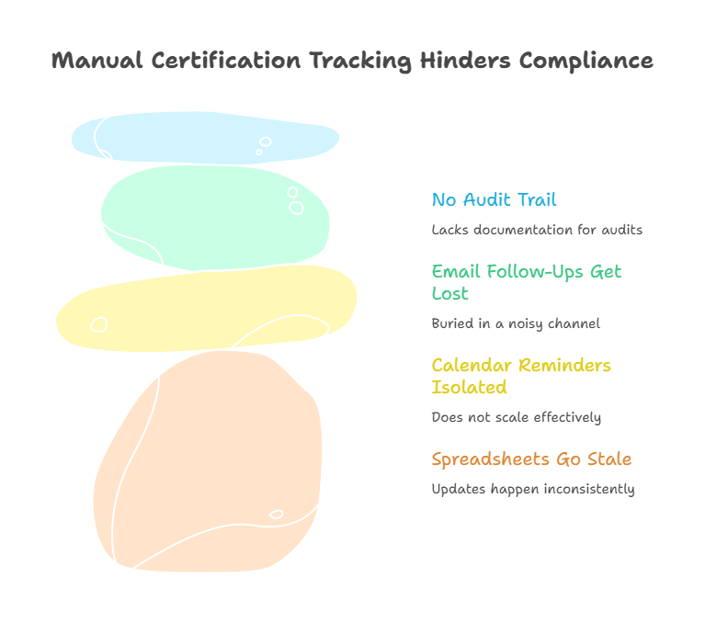
The Problem With Manual Tracking

Most organizations start with the best of intentions. Someone creates a spreadsheet listing every employee, their certifications, and the expiration dates. It works well for the first few months. Then the problems begin.

Spreadsheets Go Stale

A spreadsheet is only as current as the last time someone updated it. In practice, updates happen inconsistently. New hires get added late. Renewed certifications do not get recorded promptly. Employees who leave the organization are not always removed. Over time, the spreadsheet drifts further from reality, and the team loses confidence in its accuracy.

Calendar Reminders Are Isolated

Some managers set personal calendar reminders for their direct reports' certification dates. This works for a handful of people, but it does not scale. If the manager leaves, those reminders go with them. If an employee reports to a new manager, the tracking responsibility may not transfer. There is no organizational visibility into what is covered and what is not.

Email Follow-Ups Get Lost

When someone does notice an upcoming expiration, the typical response is to send an email reminder to the employee and their manager. But email is a noisy channel. Those messages get buried, forgotten, or deprioritized alongside hundreds of other messages. Without a system to escalate and follow up, the initial reminder often goes nowhere.

No Audit Trail

Manual processes rarely create the documentation needed for regulatory audits. When an auditor asks for proof that employees were notified about upcoming renewals, or that certifications were current at a specific point in time, a spreadsheet with inconsistent updates is not compelling evidence. Organizations need a system that automatically records when notifications were sent, when certifications were renewed, and when gaps were identified.

What Automated Renewal Reminders Look Like

Automated renewal reminders replace the manual effort of tracking and notifying with a system that runs continuously in the background. Here is how it works in practice.

Centralized Certification Database

All employee certifications are stored in a single system, including the employee name, certification type, date issued, expiration date, training provider, and any supporting documentation. When a new certification is earned or renewed, the record is updated in one place, and the system automatically calculates when the next reminder should be sent.

Tiered Notification Schedules

Instead of a single reminder, automated systems send a series of notifications at predefined intervals. A typical schedule might include reminders at 90 days, 60 days, 30 days, and 7 days before expiration. Each notification goes to the employee, their manager, and optionally to the compliance or HR team. This tiered approach ensures that even if the first reminder is overlooked, subsequent reminders keep the renewal on everyone's radar.

Escalation Paths

If a certification is not renewed by a certain threshold — say, 14 days before expiration — the system can automatically escalate the notification to a department head or compliance officer. This ensures that critical renewals do not fall through the cracks, even if the employee or their direct manager has not taken action.

Dashboard Visibility

A centralized dashboard shows the current status of all certifications across the organization: what is current, what is expiring soon, what has already lapsed, and what percentage of the workforce is fully compliant. This gives HR and compliance teams an at-a-glance view of the organization's training status without having to dig through spreadsheets or chase down individual managers.

Audit-Ready Reporting

Automated systems maintain a complete history of notifications sent, certifications renewed, and any gaps that occurred. When an auditor requests documentation, you can generate a report in minutes that shows your organization's compliance posture at any point in time.

Common Scenarios Where Automation Makes the Difference

Healthcare: Managing Clinical Staff Certifications

A hospital or clinical practice must ensure that every nurse, technician, and support staff member maintains current BLS, ACLS, and other required certifications. With staff working rotating shifts across multiple departments, manually tracking these dates is a logistical challenge. Automated reminders ensure that each employee receives timely notifications about upcoming renewals, regardless of their schedule or department, and that the compliance team has a clear view of organizational readiness.

Construction: Keeping Jobsite Safety Training Current

Construction companies need workers with current OSHA 10 or OSHA 30 certifications, equipment operation licenses, fall protection training, and confined space entry certifications. With crews rotating between job sites and a mix of employees and subcontractors, keeping every credential current is a constant challenge. Automated tracking ensures that a worker is never assigned to a site without the required certifications in place.

HR Departments: Onboarding and Ongoing Compliance

HR teams are often the central point of coordination for employee training requirements. During onboarding, new hires must complete required certifications before they can begin work. After that, HR needs to track ongoing renewals across the entire workforce. Automated systems handle both stages, flagging onboarding requirements that have not been completed and sending renewal reminders for existing staff on a continuous basis.

Manufacturing: Equipment Operation and Safety Certifications

Manufacturing environments require operators to hold current certifications for specific equipment, including forklifts, cranes, powered industrial trucks, and hazardous material handling. OSHA requires that these operators be evaluated and certified, and the certifications have defined validity periods. Automated reminders ensure that no operator is working with expired credentials, reducing both safety risk and regulatory exposure.

Education: Faculty and Staff Credentialing

Educational institutions track teaching certifications, continuing education credits, background check renewals, and specialized training requirements. With academic calendars creating natural tracking gaps over summers and breaks, automated systems ensure that renewal deadlines are not lost during periods when administrative offices are operating with reduced staff.

How to Implement Automated Renewal Reminders

Getting started with automated certification tracking does not need to be a massive project. Here is a practical roadmap.

Step 1: Audit Your Current Certifications

Start by creating a complete inventory of every certification your organization tracks. For each one, document the certification type, the employees who hold it, the current expiration date, the renewal cycle, and the training provider. This inventory becomes the foundation for your automated system.

Step 2: Identify Your Most Critical Certifications

Not all certifications carry equal risk. Prioritize the ones that are legally required (OSHA safety training, healthcare licensure), that affect your ability to operate (equipment certifications, insurance requirements), or that are subject to audit (regulatory compliance training). These should be the first certifications you move into your automated system.

Step 3: Choose the Right Platform

Look for a tracking platform that offers centralized storage for certification records, automated reminder schedules with customizable timing, multi-level notifications (employee, manager, compliance team), dashboard visibility across the entire organization, and audit-ready reporting. Expiration Reminder is designed specifically for this purpose, providing automated renewal notifications, a centralized dashboard, and compliance reporting tools that help HR and safety teams manage employee certifications without the manual overhead.

Step 4: Set Up Your Notification Schedule

Configure reminders for each certification type based on how long the renewal process takes. For certifications that require scheduling a training class, start reminders at 90 days. For simple renewals that only require paperwork, 60 days may be sufficient. Always include a final reminder in the last week before expiration as a last-resort notification.

Step 5: Communicate the Change to Your Team

Let employees and managers know that they will be receiving automated renewal reminders. Explain what the notifications look like, what action is expected, and who to contact with questions. Clear communication ensures that reminders are taken seriously and acted upon promptly.

Step 6: Monitor, Adjust, and Improve

After implementation, review your dashboard regularly to see how the system is performing. Are employees renewing on time? Are certain certifications consistently falling behind? Use this data to adjust your reminder schedules, add escalation paths where needed, and identify training bottlenecks that may require organizational attention.

Frequently Asked Questions

What types of staff training certifications need renewal tracking?

Any certification with an expiration date should be tracked. Common examples include CPR and first aid (every 2 years), OSHA safety training, equipment operation licenses, healthcare credentialing (BLS, ACLS, PALS), food safety certifications, and industry-specific compliance training. If it expires, it needs to be tracked.

How often do most employee certifications need to be renewed?

Renewal cycles vary by certification type. CPR and first aid certifications typically last 2 years. OSHA 10 and OSHA 30 cards do not technically expire but many employers require refresher training every 3 to 5 years. Healthcare certifications vary from 1 to 3 years depending on the credential. Equipment operation certifications are typically valid for 3 years. Always check with the issuing authority for specific requirements.

What happens if an employee's certification expires?

The consequences depend on the certification and industry. In many cases, the employee cannot legally or safely perform the duties that require the certification until it is renewed. This can mean being pulled from assignments, job site shutdowns if no qualified replacement is available, and potential OSHA citations or regulatory penalties for the employer. In healthcare, an expired credential can affect the organization's accreditation status.

Can automated reminders be customized for different certification types?

Yes. Most automated tracking systems allow you to set different reminder schedules for different certification types. A certification that requires scheduling a multi-day training class might have reminders starting at 120 days out, while a simple online renewal might only need 30 to 60 days of lead time. Notifications can also be directed to different people depending on the certification type.

How do you handle certification tracking for contractors and temporary workers?

Contractors and temporary workers should be tracked in the same system as regular employees, with their certifications verified before they begin work and monitored throughout their engagement. Many organizations require contractors to submit proof of current certifications as part of the onboarding process, and automated systems can flag when those credentials are approaching expiration.

What is the ROI of automating certification renewal reminders?

The return on investment comes from multiple areas: reduced administrative time spent on manual tracking and follow-up, avoidance of fines and penalties for compliance lapses, elimination of rush fees for emergency training sessions, reduced risk of safety incidents involving uncertified workers, and the operational efficiency of not having employees sidelined due to expired certifications. For most organizations, the cost of an automated system is a fraction of the cost of a single compliance failure.

How long does it take to implement an automated tracking system?

Implementation timelines depend on the size of your organization and the number of certifications being tracked. For small to mid-sized organizations, initial setup — including data entry and notification configuration, can typically be completed within a few days to two weeks. The most time-consuming part is usually the initial audit and data gathering, not the system setup itself.

Do employees receive the reminders directly, or only managers?

Best practice is to notify both the employee and their manager, with optional escalation to HR or compliance teams if the renewal is not completed by a certain date. This shared accountability ensures that renewals are not dependent on a single person remembering to take action.

Start Building a Proactive Training Compliance Program

Managing staff training certifications does not have to be a source of constant anxiety. The organizations that handle it well are not the ones with the biggest HR departments or the most resources, they are the ones that have replaced manual, error-prone processes with automated systems that do the tracking for them.

If you are still relying on spreadsheets, email reminders, or individual memory to keep your workforce's certifications current, the risk of a lapse is not a matter of if but when. The good news is that the transition to automated tracking is straightforward, and the benefits are immediate. With a platform like Expiration Reminder, you can centralize your certification records, automate your renewal notifications, and gain the visibility you need to keep your entire team compliant, without the manual overhead.

Your employees are investing in their professional development every time they earn or renew a certification. The least your organization can do is make sure that investment is protected by tracking it properly. Start today, and turn training compliance from a recurring headache into a solved problem.

Share this article
Subscribe
Thank you! Your submission has been received!
Oops! Something went wrong while submitting the form.

How to Automate Renewal Reminders for Staff Training Certifications

Table of Contents

Share this article

How to Automate Renewal Reminders for Staff Training Certifications

If you have ever been blindsided by an expired employee certification — the CPR card that lapsed last month, the safety training that should have been renewed in Q3, the forklift operator license that nobody remembered to track, you know the feeling. It is a mix of frustration and urgency, usually followed by a scramble to get the employee recertified before an audit, a project deadline, or a safety incident forces the issue.

The challenge is not that organizations do not care about training compliance. Most do. The challenge is that tracking dozens or hundreds of certification expiration dates across an entire workforce, using spreadsheets or calendar reminders, is a system designed to fail. People change roles, dates get missed, spreadsheets go stale, and before you know it, you are managing compliance by crisis instead of by design.

This article walks you through how to automate renewal reminders for staff training certifications so you can move from reactive firefighting to proactive compliance management.

Why Staff Training Certifications Need Active Tracking

Staff training certifications are not one-time achievements. Most professional certifications and required training programs have defined validity periods, after which the credential expires and must be renewed. CPR and first aid certifications typically last two years. OSHA safety training cards may be valid for specific periods depending on the standard. Industry-specific certifications, from healthcare credentialing to equipment operation licenses — each have their own renewal cycles.

For organizations, this creates an ongoing tracking challenge that grows more complex with every new hire, every additional certification requirement, and every regulatory change. Consider a healthcare facility with 200 employees, each of whom holds an average of three to five certifications. That is 600 to 1,000 individual expiration dates to monitor, each with its own renewal timeline, training provider, and documentation requirements.

When even one of those certifications lapses, the consequences can be immediate: the employee may be unable to perform certain duties, the organization may fall out of regulatory compliance, and in safety-critical environments, the risk of incidents increases.

The Problem With Manual Tracking

Most organizations start with the best of intentions. Someone creates a spreadsheet listing every employee, their certifications, and the expiration dates. It works well for the first few months. Then the problems begin.

Spreadsheets Go Stale

A spreadsheet is only as current as the last time someone updated it. In practice, updates happen inconsistently. New hires get added late. Renewed certifications do not get recorded promptly. Employees who leave the organization are not always removed. Over time, the spreadsheet drifts further from reality, and the team loses confidence in its accuracy.

Calendar Reminders Are Isolated

Some managers set personal calendar reminders for their direct reports' certification dates. This works for a handful of people, but it does not scale. If the manager leaves, those reminders go with them. If an employee reports to a new manager, the tracking responsibility may not transfer. There is no organizational visibility into what is covered and what is not.

Email Follow-Ups Get Lost

When someone does notice an upcoming expiration, the typical response is to send an email reminder to the employee and their manager. But email is a noisy channel. Those messages get buried, forgotten, or deprioritized alongside hundreds of other messages. Without a system to escalate and follow up, the initial reminder often goes nowhere.

No Audit Trail

Manual processes rarely create the documentation needed for regulatory audits. When an auditor asks for proof that employees were notified about upcoming renewals, or that certifications were current at a specific point in time, a spreadsheet with inconsistent updates is not compelling evidence. Organizations need a system that automatically records when notifications were sent, when certifications were renewed, and when gaps were identified.

What Automated Renewal Reminders Look Like

Automated renewal reminders replace the manual effort of tracking and notifying with a system that runs continuously in the background. Here is how it works in practice.

Centralized Certification Database

All employee certifications are stored in a single system, including the employee name, certification type, date issued, expiration date, training provider, and any supporting documentation. When a new certification is earned or renewed, the record is updated in one place, and the system automatically calculates when the next reminder should be sent.

Tiered Notification Schedules

Instead of a single reminder, automated systems send a series of notifications at predefined intervals. A typical schedule might include reminders at 90 days, 60 days, 30 days, and 7 days before expiration. Each notification goes to the employee, their manager, and optionally to the compliance or HR team. This tiered approach ensures that even if the first reminder is overlooked, subsequent reminders keep the renewal on everyone's radar.

Escalation Paths

If a certification is not renewed by a certain threshold — say, 14 days before expiration — the system can automatically escalate the notification to a department head or compliance officer. This ensures that critical renewals do not fall through the cracks, even if the employee or their direct manager has not taken action.

Dashboard Visibility

A centralized dashboard shows the current status of all certifications across the organization: what is current, what is expiring soon, what has already lapsed, and what percentage of the workforce is fully compliant. This gives HR and compliance teams an at-a-glance view of the organization's training status without having to dig through spreadsheets or chase down individual managers.

Audit-Ready Reporting

Automated systems maintain a complete history of notifications sent, certifications renewed, and any gaps that occurred. When an auditor requests documentation, you can generate a report in minutes that shows your organization's compliance posture at any point in time.

Common Scenarios Where Automation Makes the Difference

Healthcare: Managing Clinical Staff Certifications

A hospital or clinical practice must ensure that every nurse, technician, and support staff member maintains current BLS, ACLS, and other required certifications. With staff working rotating shifts across multiple departments, manually tracking these dates is a logistical challenge. Automated reminders ensure that each employee receives timely notifications about upcoming renewals, regardless of their schedule or department, and that the compliance team has a clear view of organizational readiness.

Construction: Keeping Jobsite Safety Training Current

Construction companies need workers with current OSHA 10 or OSHA 30 certifications, equipment operation licenses, fall protection training, and confined space entry certifications. With crews rotating between job sites and a mix of employees and subcontractors, keeping every credential current is a constant challenge. Automated tracking ensures that a worker is never assigned to a site without the required certifications in place.

HR Departments: Onboarding and Ongoing Compliance

HR teams are often the central point of coordination for employee training requirements. During onboarding, new hires must complete required certifications before they can begin work. After that, HR needs to track ongoing renewals across the entire workforce. Automated systems handle both stages, flagging onboarding requirements that have not been completed and sending renewal reminders for existing staff on a continuous basis.

Manufacturing: Equipment Operation and Safety Certifications

Manufacturing environments require operators to hold current certifications for specific equipment, including forklifts, cranes, powered industrial trucks, and hazardous material handling. OSHA requires that these operators be evaluated and certified, and the certifications have defined validity periods. Automated reminders ensure that no operator is working with expired credentials, reducing both safety risk and regulatory exposure.

Education: Faculty and Staff Credentialing

Educational institutions track teaching certifications, continuing education credits, background check renewals, and specialized training requirements. With academic calendars creating natural tracking gaps over summers and breaks, automated systems ensure that renewal deadlines are not lost during periods when administrative offices are operating with reduced staff.

How to Implement Automated Renewal Reminders

Getting started with automated certification tracking does not need to be a massive project. Here is a practical roadmap.

Step 1: Audit Your Current Certifications

Start by creating a complete inventory of every certification your organization tracks. For each one, document the certification type, the employees who hold it, the current expiration date, the renewal cycle, and the training provider. This inventory becomes the foundation for your automated system.

Step 2: Identify Your Most Critical Certifications

Not all certifications carry equal risk. Prioritize the ones that are legally required (OSHA safety training, healthcare licensure), that affect your ability to operate (equipment certifications, insurance requirements), or that are subject to audit (regulatory compliance training). These should be the first certifications you move into your automated system.

Step 3: Choose the Right Platform

Look for a tracking platform that offers centralized storage for certification records, automated reminder schedules with customizable timing, multi-level notifications (employee, manager, compliance team), dashboard visibility across the entire organization, and audit-ready reporting. Expiration Reminder is designed specifically for this purpose, providing automated renewal notifications, a centralized dashboard, and compliance reporting tools that help HR and safety teams manage employee certifications without the manual overhead.

Step 4: Set Up Your Notification Schedule

Configure reminders for each certification type based on how long the renewal process takes. For certifications that require scheduling a training class, start reminders at 90 days. For simple renewals that only require paperwork, 60 days may be sufficient. Always include a final reminder in the last week before expiration as a last-resort notification.

Step 5: Communicate the Change to Your Team

Let employees and managers know that they will be receiving automated renewal reminders. Explain what the notifications look like, what action is expected, and who to contact with questions. Clear communication ensures that reminders are taken seriously and acted upon promptly.

Step 6: Monitor, Adjust, and Improve

After implementation, review your dashboard regularly to see how the system is performing. Are employees renewing on time? Are certain certifications consistently falling behind? Use this data to adjust your reminder schedules, add escalation paths where needed, and identify training bottlenecks that may require organizational attention.

Frequently Asked Questions

What types of staff training certifications need renewal tracking?

Any certification with an expiration date should be tracked. Common examples include CPR and first aid (every 2 years), OSHA safety training, equipment operation licenses, healthcare credentialing (BLS, ACLS, PALS), food safety certifications, and industry-specific compliance training. If it expires, it needs to be tracked.

How often do most employee certifications need to be renewed?

Renewal cycles vary by certification type. CPR and first aid certifications typically last 2 years. OSHA 10 and OSHA 30 cards do not technically expire but many employers require refresher training every 3 to 5 years. Healthcare certifications vary from 1 to 3 years depending on the credential. Equipment operation certifications are typically valid for 3 years. Always check with the issuing authority for specific requirements.

What happens if an employee's certification expires?

The consequences depend on the certification and industry. In many cases, the employee cannot legally or safely perform the duties that require the certification until it is renewed. This can mean being pulled from assignments, job site shutdowns if no qualified replacement is available, and potential OSHA citations or regulatory penalties for the employer. In healthcare, an expired credential can affect the organization's accreditation status.

Can automated reminders be customized for different certification types?

Yes. Most automated tracking systems allow you to set different reminder schedules for different certification types. A certification that requires scheduling a multi-day training class might have reminders starting at 120 days out, while a simple online renewal might only need 30 to 60 days of lead time. Notifications can also be directed to different people depending on the certification type.

How do you handle certification tracking for contractors and temporary workers?

Contractors and temporary workers should be tracked in the same system as regular employees, with their certifications verified before they begin work and monitored throughout their engagement. Many organizations require contractors to submit proof of current certifications as part of the onboarding process, and automated systems can flag when those credentials are approaching expiration.

What is the ROI of automating certification renewal reminders?

The return on investment comes from multiple areas: reduced administrative time spent on manual tracking and follow-up, avoidance of fines and penalties for compliance lapses, elimination of rush fees for emergency training sessions, reduced risk of safety incidents involving uncertified workers, and the operational efficiency of not having employees sidelined due to expired certifications. For most organizations, the cost of an automated system is a fraction of the cost of a single compliance failure.

How long does it take to implement an automated tracking system?

Implementation timelines depend on the size of your organization and the number of certifications being tracked. For small to mid-sized organizations, initial setup — including data entry and notification configuration, can typically be completed within a few days to two weeks. The most time-consuming part is usually the initial audit and data gathering, not the system setup itself.

Do employees receive the reminders directly, or only managers?

Best practice is to notify both the employee and their manager, with optional escalation to HR or compliance teams if the renewal is not completed by a certain date. This shared accountability ensures that renewals are not dependent on a single person remembering to take action.

Start Building a Proactive Training Compliance Program

Managing staff training certifications does not have to be a source of constant anxiety. The organizations that handle it well are not the ones with the biggest HR departments or the most resources, they are the ones that have replaced manual, error-prone processes with automated systems that do the tracking for them.

If you are still relying on spreadsheets, email reminders, or individual memory to keep your workforce's certifications current, the risk of a lapse is not a matter of if but when. The good news is that the transition to automated tracking is straightforward, and the benefits are immediate. With a platform like Expiration Reminder, you can centralize your certification records, automate your renewal notifications, and gain the visibility you need to keep your entire team compliant, without the manual overhead.

Your employees are investing in their professional development every time they earn or renew a certification. The least your organization can do is make sure that investment is protected by tracking it properly. Start today, and turn training compliance from a recurring headache into a solved problem.

Excel in your subscriptions management
You can eliminate challenges if you have a strong organizational development blueprint.
Read time:
This is some text inside of a div block.
min

Heading

Table of Contents

Share this article
Subscribe
Thank you! Your submission has been received!
Oops! Something went wrong while submitting the form.

What’s a Rich Text element?

What’s a Rich Text element?

The rich text element allows you to create and format headings, paragraphs, blockquotes, images, and video all in one place instead of having to add and format them individually. Just double-click and easily create content.

The rich text element allows you to create and format headings, paragraphs, blockquotes, images, and video all in one place instead of having to add and format them individually. Just double-click and easily create content.

Static and dynamic content editing

Static and dynamic content editing

A rich text element can be used with static or dynamic content. For static content, just drop it into any page and begin editing. For dynamic content, add a rich text field to any collection and then connect a rich text element to that field in the settings panel. Voila!

A rich text element can be used with static or dynamic content. For static content, just drop it into any page and begin editing. For dynamic content, add a rich text field to any collection and then connect a rich text element to that field in the settings panel. Voila!

How to customize formatting for each rich text

How to customize formatting for each rich text

Headings, paragraphs, blockquotes, figures, images, and figure captions can all be styled after a class is added to the rich text element using the "When inside of" nested selector system.

Headings, paragraphs, blockquotes, figures, images, and figure captions can all be styled after a class is added to the rich text element using the "When inside of" nested selector system.
Share this article
Subscribe
Thank you! Your submission has been received!
Oops! Something went wrong while submitting the form.

Keep on reading