

Compliance Tracking 101: Why Reminders Matter More Than You Think
Picture this: a mid-sized manufacturing company runs a routine quality audit. Everything looks solid until the auditor pulls up a report showing three employees had operated certified equipment with lapsed OSHA safety credentials for the past six weeks. Nobody had flagged it. Nobody had followed up. The certifications had simply expired quietly — and the company walked away with an $18,000 fine and a mandatory corrective action plan.
This kind of story is far more common than organizations like to admit. Compliance tracking failures do not usually announce themselves with alarm bells. They accumulate quietly in the background, invisible until someone looks, or until an auditor forces the issue. That is why compliance reminders are not a nice-to-have feature. They are the frontline defense between your organization and a preventable, costly mistake.
This guide breaks down what compliance tracking actually involves, why reminders are the cornerstone of any working system, and what a practical, modern approach looks like for teams across healthcare, HR, construction, and beyond.
What Is Compliance Tracking?
Compliance tracking is the ongoing process of monitoring whether your organization meets the regulatory, contractual, and operational requirements it is bound by. That includes employee certifications, professional licenses, equipment inspections, insurance certificates, vendor permits, safety training records, and dozens of other time-sensitive documents depending on your industry.
The word "ongoing" is critical. Compliance is not a one-time event. Certifications expire. Licenses come up for renewal. Regulations change. What was compliant last year may not be compliant today. That is the dynamic that makes tracking complex and reminders essential.
For most organizations, compliance tracking spans several categories:
Managing all of these simultaneously — across departments, locations, and personnel — is the compliance tracking challenge that keeps operations managers and compliance officers up at night.
Why Reminders Are the Engine of Compliance
The Human Memory Problem
No matter how organized your team is, human memory is an unreliable compliance system. People get busy. Priorities shift. The operations coordinator who tracks 200 employee certifications across three locations cannot keep those expiration dates mentally catalogued while also managing onboarding, fielding staff questions, and preparing for quarterly reviews.
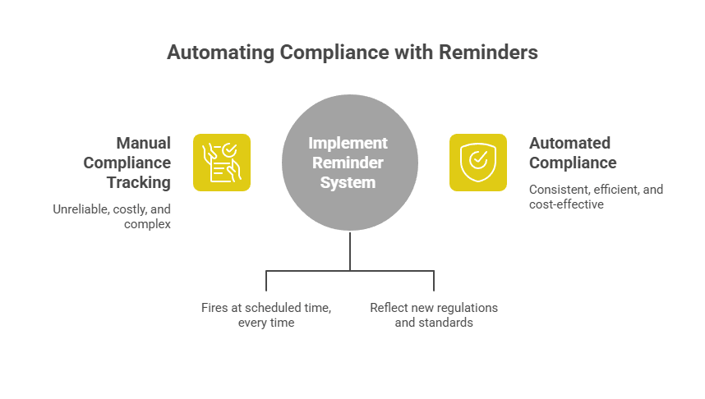
According to research cited by compliance technology firms, companies that use automated regulatory tracking have cut compliance-related delays by 50% compared to manual processes. The reason is straightforward: automation does not forget. A reminder system fires at a scheduled time, every time, regardless of what else is happening in the organization.
That consistency is impossible to replicate with manual tracking. Even the most diligent human checker will eventually miss something. A well-configured reminder system will not.
The Cost of Missing a Deadline
Missed compliance deadlines carry real financial consequences. According to a 2025 Multi-State Compliance Benchmark Report from Mosey, one-third of companies incurred compliance-related penalties in the past year, with average costs of $16,000 per affected company. For regulated industries like healthcare, construction, or finance, a single missed certification renewal can trigger fines ranging from $10,000 to $50,000 or more, depending on severity and jurisdiction.
Beyond the direct fines, there are indirect costs: emergency procurement of replacement credentials, operational downtime while gaps are closed, legal defense if an incident occurs during the lapse, and reputational damage with clients, partners, or regulators. These downstream consequences are often far more expensive than the fine itself.
Regulatory Expectations Are Not Slowing Down
The regulatory environment continues to grow more complex, not less. The Occupational Safety and Health Administration (OSHA) regularly updates safety training requirements. The Centers for Medicare and Medicaid Services (CMS) issues new conditions of participation that affect healthcare credentialing. State licensing boards modify renewal requirements. Industry standards bodies update their certification timelines.
Organizations that rely on manual tracking often discover regulatory changes only when they trigger an issue. Reminder-driven compliance systems, by contrast, can be updated to reflect new requirements and ensure that teams stay current without requiring constant manual oversight.
The Real Cost of "We'll Handle It Manually"
The Spreadsheet Mirage
Spreadsheets are the most common compliance tracking tool in use today. They are familiar, free, and flexible. They are also profoundly unreliable for compliance management. A 2024 analysis found that 94% of spreadsheets used in business decision-making contain errors that pose material risks to the organization. For compliance tracking specifically, this means the same tool that is supposed to prevent costly mistakes is actively introducing them.
Spreadsheets are static. They show you a snapshot of what someone entered at a specific moment. They do not push alerts. They do not escalate when a deadline passes. They do not know when data was last verified or whether the person responsible for the data still works there. They require someone to remember to look at them, and that is exactly the failure mode that creates compliance gaps.
The Calendar Hack That Does Not Scale
Many teams try to fill the gaps with calendar reminders. A manager manually enters an expiration date and sets a reminder for 30 days out. This works fine for one or two items. Multiply it across 50 employees with multiple certifications each, add vendor credentials, add equipment records, and the calendar becomes unmanageable within months. Worse, those reminders are tied to one person's calendar. When they leave, the reminders leave with them.
Staff Turnover Breaks Manual Systems
Every organization has experienced the compliance gap that opens when a key person transitions out of their role. The institutional knowledge of which credentials are due, who is responsible for which renewals, and which vendors are tracked in which folder — that knowledge lives in people's heads or in personal files. When the person moves on, that infrastructure collapses overnight.
Centralized reminder systems solve this problem by design. The information and the alert logic live in the platform, not with any individual employee. New team members inherit a functional system, not a mystery to unravel.
What a Working Compliance Reminder System Looks Like
Centralized Record Keeping
Every compliance document, certification record, license, and credential should live in one searchable, accessible system. Not in someone's email. Not in a shared drive folder that only one person knows how to navigate. Not in three different spreadsheets maintained by three different departments. One system, with clear ownership and access controls.
Centralization does two things. First, it creates a single source of truth that teams across the organization can rely on. Second, it makes the reminder logic possible — you cannot trigger alerts on records that exist in scattered files and inboxes.
Multi-Tiered Reminder Schedules
A single reminder sent the day before a credential expires is not a compliance strategy. Effective systems send reminders at multiple intervals: 90 days out, 60 days out, 30 days out, and then with increasing urgency as the deadline approaches. Each reminder can be routed to a different audience — the employee themselves, their supervisor, and the compliance officer — ensuring that multiple people are aware and accountable.
This layered approach is particularly valuable for credentials that require preparation time. A nursing license renewal may require continuing education hours that take weeks to complete. A contractor's certification may require a testing period and processing time. A reminder at 30 days is nearly useless for these situations. A reminder at 90 days gives teams time to actually act.
Role-Based Visibility and Accountability
Effective compliance tracking assigns clear ownership to every item. The system knows not just that a credential is expiring, but who is responsible for renewing it and who needs to be notified if it lapses. This role-based structure eliminates the ambiguity that often causes compliance gaps: the situation where everyone assumed someone else was handling it.
Audit-Ready Reporting
When a regulatory auditor arrives unannounced — and in industries like healthcare and construction, they do — you need to be able to demonstrate compliance status immediately. A well-designed tracking system generates reports that show current credential status, renewal history, who took action and when, and any gaps that exist along with the steps being taken to address them.
This kind of audit-ready documentation is nearly impossible to produce from a spreadsheet on short notice. It is built into purpose-designed compliance tracking platforms as a core feature.
Industry-Specific Compliance Tracking Priorities
Healthcare: Credentialing and Certification Renewals
Healthcare organizations face some of the most complex compliance tracking requirements of any industry. Clinical staff must maintain current licenses, CPR and BLS certifications, annual mandatory training completions, and any specialty credentials required for their role. Hospitals and health systems must maintain Joint Commission accreditation, which depends heavily on demonstrating that staff credentials are current and properly documented.
The Joint Commission requires healthcare organizations to verify that licensed and certified staff credentials are current as part of its human resources standards. An expired RN license, a lapsed CPR certification, or a missed HIPAA training completion can generate a finding that jeopardizes accreditation. With nursing staff sometimes numbering in the hundreds across multiple units, manual tracking is simply not sufficient for the volume and complexity involved.
Construction: COIs, Permits, and Safety Training
Construction organizations deal with a multi-layered compliance challenge. General contractors must track their own credentials alongside those of every subcontractor and vendor on a project. Certificates of Insurance (COIs) must be current at all times — an expired COI can stop a project in its tracks, or worse, expose the general contractor to liability for an incident that the subcontractor was supposed to be insured against.
OSHA safety training certifications — including OSHA 10 and OSHA 30 credentials — expire and must be renewed on set schedules. Equipment operator certifications, scaffold inspection qualifications, and confined space entry permits all have expiration timelines that must be tracked across an often-changing workforce.
Human Resources: Employee Compliance Across the Workforce
For HR teams, compliance tracking is fundamentally a workforce management function. Every employee with a professional license, required certification, or mandatory training obligation represents a compliance record that must be kept current. In industries with heavy certification requirements — healthcare, education, financial services, childcare — HR may be managing thousands of individual records simultaneously.
The challenge intensifies during high-turnover periods or rapid growth. New hires arrive with credentials that need to be captured and scheduled for future renewal. Departing employees' credentials need to be deactivated so they do not generate spurious renewal reminders. The administrative overhead alone can become a significant time drain without the right systems in place.
How to Build a Compliance Reminder System That Actually Works
Here is a practical, step-by-step implementation checklist for organizations ready to move beyond spreadsheets:
Teams that have moved from spreadsheet-based tracking to a dedicated platform like Expiration Reminder consistently report that the shift eliminates the constant background anxiety of wondering whether something slipped through the cracks. When the system is configured correctly, the reminders go out automatically, the right people take action, and compliance status is visible at a glance without anyone having to hunt for it.
The Business Case for Automated Compliance Reminders
Nearly two-thirds of corporate risk and compliance professionals believe that automating manual processes can meaningfully reduce the complexity and cost of compliance programs, according to research from Secureframe. The math is not difficult: if your team spends 10 hours per week chasing down expiration dates, sending manual reminders, and updating spreadsheets, that is 500+ hours annually — time that could be spent on higher-value work.
Beyond time savings, the risk reduction argument is compelling. Companies using automated tracking report up to 40% improvement in compliance management outcomes. Given that the average compliance-related penalty runs $16,000 per incident for companies that get caught out, even one prevented lapse per year pays for most compliance software investments many times over.
The question is no longer whether your organization can afford a dedicated compliance reminder system. The question is whether you can afford to keep operating without one.
Key Takeaways
Frequently Asked Questions
What is the difference between compliance tracking and compliance management?
Compliance tracking refers specifically to monitoring the status of compliance-related records — certifications, licenses, permits — and ensuring they remain current. Compliance management is the broader discipline that includes policy development, risk assessment, training programs, and overall governance. Effective reminders and tracking are the operational foundation that makes compliance management programs actually function in practice.
How far in advance should compliance reminders be sent?
It depends on the credential type. Simple renewals that require only payment or a short form submission may only need a 30-day lead time. Complex renewals that require continuing education, testing, or regulatory processing should be flagged 90 days in advance or more. Best practice is to configure reminder schedules based on the actual renewal process for each credential category rather than applying a single timeline across all items.
Can a small organization afford compliance tracking software?
Most modern compliance tracking platforms scale to fit organizations of all sizes and are priced accordingly. For a small organization managing dozens of credentials rather than thousands, a basic platform tier is typically affordable and pays for itself quickly through time savings and avoided penalties. The real cost question is what it costs to keep managing compliance manually — in staff time, error risk, and potential fines.
What happens during an audit if we cannot produce current compliance records?
The consequences vary by industry and regulatory body, but they can be severe. In healthcare, missing or outdated credentialing records can result in Joint Commission findings that jeopardize accreditation. In construction, an OSHA audit that reveals expired certifications can produce per-violation fines and mandatory corrective action plans. In any regulated industry, the inability to produce current records demonstrates a deficiency in your compliance program, which typically triggers deeper scrutiny and additional requirements.
What types of records should be included in a compliance tracking system?
Any document or credential that has an expiration date and a regulatory or contractual significance should be included. This typically covers: employee professional licenses, safety certifications, CPR and first aid credentials, OSHA training records, insurance certificates, permits, equipment inspection logs, vendor compliance documents, and mandatory policy acknowledgments. If missing or letting it expire creates risk, it belongs in your tracking system.
How do compliance reminders help with staff accountability?
Automated reminders create a clear record of who was notified, when, and what action was taken. When reminders are routed to both the credential holder and their manager, accountability is shared and visible. Systems that escalate unacknowledged reminders add another layer: if someone ignores a 60-day warning, the 30-day warning automatically goes to their supervisor as well. This structured accountability makes it much harder for renewals to fall through the cracks without anyone taking responsibility.
Internal Link Suggestions
Visual Suggestions
Ready to stop relying on spreadsheets and start running compliance on autopilot? Start a free trial with Expiration Reminder and see how automated reminders can eliminate compliance gaps across your organization.
PS: Every day you spend tracking compliance manually is another day a deadline could quietly slip by. Automated reminders take minutes to configure and work continuously in the background — so your team can focus on the work that matters, not on chasing expiration dates.
-1.png?width=400&height=300&name=69a9a18f8333f7aee4f91178__-%20visual%20selection%20(2)-1.png)

