Certificate of Insurance (COI)
You just landed a big contract with a new client, and everything is moving forward — until someone from their risk management team asks for your Certificate of Insurance. Suddenly, you are scrambling to find out if your COI is current, whether your coverage limits match the contract requirements, and how to get an updated copy to them before the deadline.
If that scenario sounds familiar, you are not alone. Certificates of Insurance are one of the most commonly requested — and most commonly mismanaged — documents in the business world. Whether you are a contractor, property manager, or vendor, your COI is the front door to doing business with other organizations. And when it expires without anyone noticing, the consequences can range from stalled projects to lost contracts.
In this article, we will walk through exactly what a Certificate of Insurance is, who needs one, why tracking its expiration date matters, and how to set up a system that keeps your COIs current without the constant stress.
What Is a Certificate of Insurance (COI)?
A Certificate of Insurance (COI) is a standardized document that provides a summary of your insurance coverage at a glance. It is not the insurance policy itself — think of it as a snapshot that confirms the key details: the type of coverage you carry, your policy limits, the effective dates, and the name of the insurer providing the coverage.
COIs are most commonly issued on an ACORD 25 form, the industry standard maintained by the Association for Cooperative Operations Research and Development. This standardized format makes it easy for certificate holders to quickly verify coverage details without needing to review the full policy documents.
A typical COI includes the following information:
- Named insured — the individual or business that holds the policy
- Insurance company name and contact information
- Policy number for each type of coverage
- Types of coverage — such as general liability, commercial auto, workers' compensation, and umbrella or excess liability
- Coverage limits for each policy type
- Effective and expiration dates for each policy
- Certificate holder — the entity requesting the proof of insurance
- Additional insured endorsements if applicable
COIs are issued by the insurance agent or broker, not the policyholder. Most policies are written on an annual basis, which means the COI is valid for one year and must be renewed when the underlying policy renews. Some project-specific policies may have shorter durations, and certain industries require quarterly verification updates.
Why a Certificate of Insurance Matters for Your Organization
A Certificate of Insurance is far more than a piece of paperwork — it is a critical risk management tool. For organizations that work with contractors, vendors, tenants, or subcontractors, requiring a valid COI before work begins is one of the most effective ways to transfer and manage risk.
Contractual compliance. Most commercial contracts include insurance requirements as a condition of doing business. If a vendor or subcontractor cannot produce a current COI with the required coverage types and limits, they are in breach of contract before the work even starts. This can halt projects, void agreements, and trigger legal disputes.
Liability protection. When you verify that a contractor or vendor has adequate insurance through their COI, you are confirming that their insurer — not your organization — bears the financial responsibility if something goes wrong. Without that verification, your company may be on the hook for injuries, property damage, or other claims that should have been covered by the other party's policy.
Regulatory requirements. In industries like construction, healthcare, and property management, regulatory bodies often require that organizations verify the insurance status of every contractor and subcontractor on site. Failure to maintain current COIs on file can result in fines, project shutdowns, or loss of operating permits.
Audit readiness. Insurance audits, whether internal or external, often request documentation proving that all vendors and contractors had valid insurance coverage during the audit period. Without organized, up-to-date COI records, your organization may face compliance findings or increased premiums.
Common Scenarios for Tracking Certificate of Insurance Expiration Dates
Construction Project Managers Verifying Subcontractor Coverage
On a large construction project, the general contractor may work with dozens of subcontractors at any given time. Each subcontractor is typically required to carry general liability, workers' compensation, and commercial auto coverage — and produce a COI proving it. When a subcontractor's COI expires mid-project, the general contractor faces a choice: stop work until updated documentation arrives, or accept liability risk. Tracking expiration dates across every subcontractor prevents this dilemma entirely.
Property Managers Monitoring Tenant and Vendor Insurance
Commercial property managers often require tenants and service vendors — cleaning crews, landscapers, elevator maintenance companies — to carry liability insurance and name the property owner as an additional insured. With multiple vendors and tenants across several properties, each with different policy renewal dates, COI tracking becomes a significant administrative task that can easily fall through the cracks.
Procurement Teams Onboarding New Vendors
Before a new vendor is approved and added to the system, procurement and risk management teams typically require a current COI that meets the organization's minimum insurance requirements. But the work does not stop at onboarding. Those COIs expire annually, and without a system to flag upcoming expirations, vendors can continue working without valid insurance documentation long after their initial COI lapses.
Risk Managers Preparing for Annual Insurance Audits
When audit season arrives, risk managers need to demonstrate that every contractor and vendor had valid insurance coverage throughout the audit period. If COIs were not tracked and stored consistently, gathering this documentation retroactively can take weeks of work. A proactive tracking system ensures that audit-ready records are available at any time.
HR and Safety Officers Managing Contractor Compliance on Site
In industries like healthcare, manufacturing, and energy, safety officers are responsible for ensuring that every person on site meets compliance requirements — and insurance is a major component. If a visiting contractor's COI has expired, they should not be on the premises. Tracking COI expiration dates alongside other compliance credentials helps safety teams maintain a secure and compliant worksite.
How a Certificate of Insurance Benefits Your Company and Employees
For your company: Maintaining current COIs for all vendors and contractors reduces your organization's exposure to financial liability. If an incident occurs and the responsible party has valid insurance, their policy responds first — not yours. This protects your bottom line, preserves your own insurance claims history, and demonstrates due diligence to regulators, auditors, and clients. Organized COI records also streamline the audit process and can help negotiate better insurance terms at renewal.
For your employees: Workers benefit from a well-managed COI program because it ensures that every contractor and vendor on site carries adequate workers' compensation and liability coverage. This means that if an incident involving an outside party occurs, the proper insurance is in place to cover medical costs, legal fees, and damages — reducing the risk that your employees or your company's insurance will need to absorb costs that belong to someone else.
For your clients and customers: When your organization can demonstrate a rigorous COI tracking program, it builds trust with the clients and customers you serve. They can be confident that you take risk management seriously, that your supply chain partners are properly insured, and that your operations are compliant with industry standards. This kind of operational maturity can be a competitive advantage when bidding on contracts or forming new partnerships.
How to Track Certificate of Insurance Expiration Dates
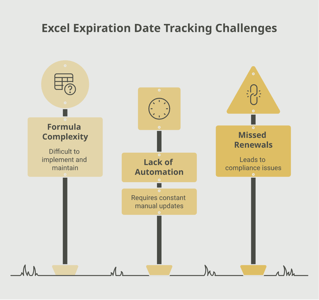
Many organizations start by tracking COIs in spreadsheets or shared folders. While this can work for a handful of vendors, it quickly becomes unmanageable as the number of tracked certificates grows. Spreadsheets rely on someone manually checking dates, sending reminder emails, and following up with vendors who have not responded — all tasks that are easy to overlook when other priorities demand attention.
The most common challenges with manual COI tracking include:
- No automatic alerts when a COI is approaching its expiration date
- Difficulty verifying that coverage limits and endorsements meet contract requirements
- Scattered storage across email inboxes, shared drives, and filing cabinets
- Inconsistent follow-up with vendors who are slow to provide updated certificates
- Gaps in documentation that surface during audits
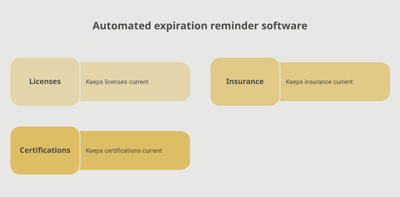
An automated tracking system solves these problems by centralizing all COI records in a single platform and sending proactive reminders well before expiration dates arrive. Tools like Expiration Reminder allow you to upload COIs, set custom reminder schedules, and receive automated notifications so you always know the status of every certificate in your system. Instead of chasing vendors for updated documents at the last minute, you can set up escalation reminders that go out 90, 60, and 30 days before expiration — giving everyone plenty of time to act.
Key features to look for in a COI tracking solution include:
- Automated email reminders sent to both your team and the certificate holder
- A centralized dashboard showing all tracked COIs and their current status
- The ability to attach and store certificate documents alongside expiration data
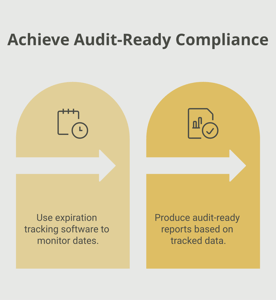
- Audit-ready reporting that can be generated on demand
- Custom fields for tracking specific coverage requirements per vendor or contract
Key Takeaways
- A Certificate of Insurance is a summary document that proves a business or individual carries active insurance coverage with specific limits and policy dates.
- COIs are required in most commercial contracts, lease agreements, and contractor relationships — making them essential for doing business.
- COI expiration typically aligns with the underlying insurance policy renewal, which is most commonly annual.
- Organizations that work with multiple vendors, subcontractors, or tenants need a systematic approach to tracking COI expiration dates across all parties.
- An expired COI means you have no documented proof that a third party is insured — potentially leaving your organization exposed to significant liability.
- Automated tracking systems replace manual spreadsheets and reduce the risk of certificates expiring unnoticed.
- Proactive COI management supports audit readiness, contract compliance, and stronger risk management practices.
Frequently Asked Questions
What happens if a Certificate of Insurance expires?
When a COI expires, it no longer serves as proof that the holder carries valid insurance. This does not necessarily mean the underlying policy has lapsed — it may simply mean an updated certificate has not been issued. However, without a current COI on file, your organization cannot verify coverage, which may violate contract terms and expose you to liability risk.
How long is a Certificate of Insurance valid?
A COI is valid for the duration of the insurance policy it represents, which is typically one year. Some project-specific policies may have shorter validity periods. The effective and expiration dates are printed directly on the certificate.
Who is responsible for providing a COI?
The party who holds the insurance policy is responsible for requesting a COI from their insurance agent or broker and providing it to the certificate holder. However, the requesting organization is responsible for verifying the coverage details and tracking the expiration date.
Can you work with a vendor whose COI has expired?
Allowing a vendor or contractor to continue working without a current COI means you have no documented proof of their insurance coverage. If an incident occurs, your organization may be held financially responsible. Most contracts require that work be suspended until updated insurance documentation is provided.
How far in advance should you request an updated COI?
Best practice is to send the first reminder 60 to 90 days before the COI expiration date. This gives the certificate holder enough time to renew their policy and request an updated certificate from their agent. A second reminder at 30 days and a final notice at 14 days ensures follow-through.
What is the difference between a COI and an insurance policy?
A COI is a summary document that confirms coverage exists. It is not the policy itself and does not confer any rights or coverage to the certificate holder. The actual insurance policy is the full legal contract between the insured and the insurer, containing all terms, conditions, and exclusions.
Does a COI guarantee that the policyholder's insurance will not be cancelled?
No. A COI reflects the status of a policy at the time it was issued. The policyholder can cancel or modify their policy after the certificate is issued. This is one reason ongoing tracking and periodic re-verification are important.
What does it mean to be listed as an Additional Insured on a COI?
Being listed as an Additional Insured means that the certificate holder's organization is covered under the policyholder's liability policy for claims arising from the policyholder's work. This endorsement must be added to the actual policy — simply listing a party on the COI does not automatically extend coverage.
Conclusion
Certificates of Insurance may not be the most exciting topic in business operations, but they are among the most consequential. A single expired COI can stall a project, void a contract, or leave your organization financially exposed in the event of a claim. The good news is that staying on top of COI tracking does not have to be a constant source of stress.
By establishing clear processes for collecting, verifying, and monitoring COIs across your vendor and contractor relationships, you build a foundation of compliance and risk management that supports everything your organization does. And with tools like Expiration Reminder, you can automate the entire tracking process — from initial collection to renewal reminders to audit-ready reporting — so that no certificate slips through the cracks.
Take the time to review your current COI tracking practices today. Your future self — and your risk management team — will thank you.
Make sure your company is compliant
Say goodbye to outdated spreadsheets and hello to centralized credential management. Avoid fines and late penalties by managing your employee certifications with Expiration Reminder.