
Read time:
5
min

COI Tracking Checklist for Risk Managers

Table of Contents

Share this article
Subscribe
Thank you! Your submission has been received!
Oops! Something went wrong while submitting the form.

COI Tracking Checklist for Risk Managers: Your Complete Compliance Guide

Jonathan, the risk manager at a mid-sized construction firm, prided himself on staying organized. He kept every Certificate of Insurance in a carefully labeled filing system, tracked renewals on a shared spreadsheet, and set quarterly calendar reminders to check expiration dates.

Then came the incident. A subcontractor's worker was injured on-site. When Jonathan pulled the file to verify coverage, his stomach dropped—the general liability certificate had expired three weeks earlier. The subcontractor hadn't renewed, and Jonathan's quarterly check wasn't due for another month.

The company faced a lawsuit that could have been avoided. The legal fees alone exceeded $75,000, not to mention the reputational damage and the sleepless nights wondering what else might have slipped through the cracks. Jonathan's system wasn't broken—it just wasn't built for the complexity his growing company faced.

If you're a risk manager juggling dozens or hundreds of vendor certificates, you know the stakes. A comprehensive COI tracking checklist isn't just administrative overhead—it's your first line of defense against liability exposure, compliance gaps, and financial loss.

Why COI Tracking Deserves Your Full Attention

Certificate of Insurance tracking sits at the intersection of vendor management, risk mitigation, and regulatory compliance. When executed well, it protects your organization from exposure. When handled poorly, it becomes a ticking time bomb.

The numbers tell the story. According to industry research, companies with well-implemented COI tracking systems can reduce general insurance-related incidents by up to 50%. Meanwhile, nearly 30% of businesses encounter liabilities due to inadequate insurance coverage verification.

For risk managers, COI tracking isn't optional—it's essential infrastructure.

The Real Cost of COI Gaps

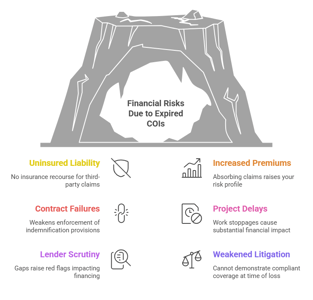
The consequences of lapsed or inadequate vendor insurance extend far beyond a single incident:

  • Direct financial liability: When a vendor's insurance lapses, your organization may be held responsible for claims, accidents, or damages
  • Regulatory penalties: Many industries face compliance requirements mandating verification of third-party insurance
  • Project delays: Discovering an expired COI mid-project can halt work until coverage is restored
  • Contractual breaches: Failure to maintain required insurance often violates vendor agreements, creating legal exposure
  • Reputational damage: Incidents involving uninsured vendors reflect poorly on your risk management practices

Why Traditional Tracking Methods Fail

Most organizations start with spreadsheets and manual calendar reminders. This approach works fine when you're tracking five vendors. It breaks down catastrophically at fifty.

The fundamental challenges include:

  • Lack of real-time visibility: Spreadsheets show a snapshot, not the current status
  • No proactive alerts: Someone must remember to check; nothing prompts action
  • Version control chaos: Multiple team members editing creates conflicting information
  • Time-intensive verification: Manual review of each certificate consumes hours weekly
  • Human error: A single oversight—a mistyped date, a missed email—can have serious consequences

According to the Federal Reserve's guidance on third-party risk management, organizations should implement systematic processes for monitoring vendor compliance throughout the relationship lifecycle.

The Essential COI Tracking Checklist for Risk Managers

Building an effective COI tracking system requires methodical attention to every stage of the vendor relationship. Use this comprehensive checklist to audit your current processes and identify gaps.

Pre-Engagement: Setting Requirements

Before any vendor relationship begins, establish clear insurance requirements aligned with your risk exposure.

  1. Define minimum coverage requirements for each vendor category (contractors, consultants, service providers, etc.)
  2. Specify required insurance types: general liability, professional liability, workers' compensation, auto liability, umbrella/excess coverage
  3. Set appropriate policy limits based on contract value and risk assessment
  4. Determine necessary endorsements (additional insured status, waiver of subrogation, primary and non-contributory language)
  5. Establish acceptable insurance carriers (minimum financial ratings from A.M. Best or similar)
  6. Create standardized COI submission requirements including format, delivery method, and timelines
  7. Document requirements in vendor contracts with specific language requiring continuous coverage

These requirements should be memorialized in a vendor risk management policy that applies consistently across your organization. The SDRMA Insurance Requirements in Contracts Manual provides detailed guidance on selecting appropriate insurance specifications.

Collection: Gathering Certificates Systematically

Once requirements are established, implement a reliable collection process.

  1. Request COIs before work begins—make insurance verification a condition precedent to engagement
  2. Align COI collection with vendor onboarding to ensure nothing starts without proper coverage
  3. Provide vendors with clear submission instructions including where to send, required format, and contact information
  4. Create a centralized repository for all COI documents (cloud storage, document management system, or dedicated software)
  5. Assign ownership for collection to specific individuals based on vendor type or business unit
  6. Set collection deadlines with sufficient buffer before work commences
  7. Establish an escalation path for vendors who don't submit on time

Best practice is to make COI submission a non-negotiable step in your procurement workflow. No approved certificate means no purchase order, no site access, and no contract execution.

Verification: Reviewing Every Detail

Simply collecting certificates isn't enough—each one must be thoroughly verified against your requirements. This is where many organizations stumble.

  1. Verify the certificate holder name matches your organization's legal entity exactly as specified in contracts
  2. Confirm policy limits meet or exceed your contractual requirements for each coverage type
  3. Check policy effective and expiration dates align with the contract period (coverage should extend through the entire engagement)
  4. Validate that all required endorsements are listed (additional insured, waiver of subrogation, primary/non-contributory)
  5. Verify the insurance carrier's financial rating meets your standards (typically A- VII or better from A.M. Best)
  6. Check for coverage exclusions that might impact the work being performed
  7. Confirm the certificate is an ACORD form or equivalent industry-standard format
  8. Look for certificate cancellation notice provisions (typically 30 days minimum)
  9. Verify deductibles and Self-Insured Retentions (SIRs) are acceptable
  10. Validate that umbrella/excess policies provide follow-form coverage over primary policies

Each element matters. According to industry best practices, risk managers should create verification checklists specific to their requirements and train anyone reviewing COIs to spot common red flags: mismatched names, insufficient limits, missing endorsements, or coverage gaps.

Documentation: Maintaining Audit-Ready Records

Proper recordkeeping protects you during audits, claims, and litigation. Your documentation system should answer any question about coverage at any point in time.

  1. Store the complete certificate in a searchable, secure system with backup
  2. Record the verification date and reviewer to establish accountability
  3. Document any exceptions or waivers granted with executive approval and justification
  4. Attach supporting documents (policy declarations pages, endorsement copies, correspondence)
  5. Create a certificate log tracking vendor name, policy types, limits, dates, and status
  6. Maintain historical records of expired certificates for the required retention period (typically 5-7 years)
  7. Note any deficiencies found and remediation steps taken
  8. Track communication with vendors regarding insurance requirements and updates

Your documentation should tell the complete story of each vendor's insurance compliance, from initial submission through any renewals or modifications.

Monitoring: Tracking Expiration Dates Proactively

This is where most manual systems collapse. With dozens or hundreds of policies expiring at different times, reactive checking isn't enough—you need continuous monitoring.

  1. Enter every policy expiration date into your tracking system immediately upon receipt
  2. Set up multi-tier reminder alerts: 90 days, 60 days, 30 days, and 7 days before expiration
  3. Assign responsibility for following up on each upcoming expiration
  4. Monitor for mid-term policy cancellations (if carriers send notices directly to you)
  5. Track vendor response rates to renewal requests and identify chronic late responders
  6. Flag vendors with multiple coverage types expiring on different dates for extra attention
  7. Create dashboard visibility showing upcoming expirations for executive reporting
  8. Implement automatic escalation if vendors don't respond to initial renewal requests

Companies employing thorough COI monitoring processes experience a 30% reduction in unexpected claims and liabilities, according to industry research on risk assessment models.

Renewal: Managing the Update Cycle

Policy renewals are the highest-risk moment in COI tracking. Gaps in coverage often occur during this transition.

  1. Initiate renewal requests 60-90 days before expiration to give vendors adequate time
  2. Send renewal reminders through multiple channels (email, phone, vendor portal)
  3. Require updated certificates at least 15 days before expiration to allow review time
  4. Suspend vendor access or work authorization if renewed certificates aren't received before expiration
  5. Verify that renewed policies maintain required coverage (vendors sometimes reduce limits or add exclusions)
  6. Update your tracking system immediately with new expiration dates upon receipt
  7. Communicate coverage lapses to relevant stakeholders (project managers, procurement, legal)
  8. Document the renewal process including all correspondence and dates

Never assume a vendor will renew automatically or that coverage continues uninterrupted. Require proof before the expiration date passes.

Tracking dozens of vendor expiration dates manually? Expiration Reminder monitors every certificate automatically and sends multi-tier alerts before coverage lapses. Start your free trial and eliminate the spreadsheet chaos.

Non-Compliance: Addressing Gaps Immediately

When certificates expire or vendors fail to meet requirements, swift action protects your organization.

  1. Implement immediate work stoppages for expired or deficient coverage until resolved
  2. Notify the vendor in writing of the specific deficiency and required corrections
  3. Set a firm deadline for compliance (typically 5-10 business days)
  4. Escalate to vendor management and executive leadership as appropriate
  5. Assess risk exposure from the coverage gap and document potential liabilities
  6. Consider terminating vendor relationships for repeated non-compliance
  7. Report the gap to legal and risk management committees for visibility
  8. Document all remediation efforts to demonstrate good-faith risk management

According to the Occupational Safety and Health Administration, employers have a general duty to maintain safe workplaces, which includes ensuring contractors maintain proper insurance coverage.

Reporting: Creating Visibility and Accountability

Effective COI management requires regular reporting to stakeholders and continuous process improvement.

  1. Generate monthly compliance reports showing percentage of vendors with current, valid coverage
  2. Track Key Performance Indicators (KPIs): on-time renewal rates, average response time, number of coverage gaps
  3. Report upcoming expirations to relevant department heads weekly
  4. Maintain an executive dashboard showing overall COI compliance status
  5. Conduct quarterly reviews of the COI tracking program with recommendations for improvement
  6. Benchmark against industry standards and best practices
  7. Present annual risk assessments to boards or executive committees including COI compliance metrics
  8. Document lessons learned from any incidents or near-misses involving vendor insurance

Data-driven reporting transforms COI tracking from administrative paperwork into strategic risk management intelligence.

Technology Solutions: Moving Beyond Spreadsheets

While the checklist above can be executed manually, the reality is that spreadsheet-based tracking doesn't scale efficiently or safely. Modern COI tracking software like Expiration Reminder reduces administrative time by 80% and decreases delays from missing documents by 50%, according to industry analyses.

What to Look for in COI Tracking Software

Purpose-built solutions eliminate the failure points of manual systems. When evaluating technology options, prioritize these capabilities:

  • Centralized certificate repository with secure cloud storage and unlimited document capacity
  • Automated expiration monitoring that continuously checks dates without manual intervention
  • Configurable reminder workflows that alert multiple stakeholders on custom schedules
  • Vendor self-service portals where suppliers can upload certificates directly
  • Automated compliance verification against your specific requirements
  • Document version control tracking every certificate update with audit trails
  • Role-based access controls ensuring the right people see the right information
  • Integration with existing systems (procurement, ERP, vendor management platforms)
  • Customizable reporting and dashboards for different stakeholder needs
  • Mobile access for field teams and remote workers
  • AI-powered document scanning to extract key data automatically
  • Workflow management routing certificates for review and approval

The right technology doesn't just digitize your current process—it fundamentally transforms how you manage vendor insurance risk.

Implementation Best Practices

When deploying a new COI tracking system, follow these steps to ensure successful adoption:

  1. Conduct a current-state assessment of all existing certificates and their status
  2. Clean up your data before migration—correct errors, standardize formats, eliminate duplicates
  3. Configure requirements for each vendor category within the new system
  4. Set up automated reminder schedules aligned with your risk tolerance
  5. Train all users on the new system with role-specific guidance
  6. Communicate with vendors about new submission processes or portals
  7. Run parallel systems briefly during transition to catch any gaps
  8. Monitor adoption metrics and provide ongoing support to drive usage
  9. Continuously refine workflows based on user feedback and lessons learned

Common COI Tracking Mistakes (and How to Avoid Them)

Even experienced risk managers fall into these traps. Learn from others' mistakes:

Accepting Certificates at Face Value

The mistake: Filing certificates without thorough verification because they look legitimate.

Why it's dangerous: Certificates can be fraudulent, outdated, or contain errors. The ACORD certificate itself isn't proof of coverage—it's simply evidence that coverage allegedly existed on the date issued.

The fix: Verify every critical element against your requirements. For high-risk vendors, consider requesting declarations pages or calling the insurance agent directly for confirmation.

Ignoring Mid-Term Cancellations

The mistake: Assuming coverage continues through the policy period listed on the certificate.

Why it's dangerous: Policies can be cancelled mid-term for non-payment or other reasons. Your valid certificate suddenly means nothing.

The fix: Require that your organization be listed to receive cancellation notices. Build relationships with vendors' insurance agents who can alert you to potential issues.

Treating All Vendors Equally

The mistake: Applying the same level of scrutiny and tracking effort to every vendor regardless of risk level.

Why it's dangerous: This wastes resources on low-risk relationships while potentially under-serving high-risk vendors who need extra attention.

The fix: Implement risk-based tiering. High-risk vendors (construction, healthcare services, anything involving site access or sensitive data) get enhanced monitoring. Lower-risk desk-based vendors might receive standard tracking.

Relying on Quarterly Manual Reviews

The mistake: Checking expiration dates only during scheduled quarterly reviews.

Why it's dangerous: A certificate expiring one day after your review goes unnoticed for three months—plenty of time for an incident.

The fix: Implement continuous monitoring with automated alerts. Technology should check every single day and notify you well in advance of any expiration.

Storing Certificates in Email or Network Drives

The mistake: Keeping COIs scattered across email inboxes, shared drives, and personal folders.

Why it's dangerous: You can't quickly find certificates during emergencies or audits. People leave, emails get deleted, and files get buried.

The fix: Centralize everything in a single, searchable repository with appropriate access controls and backup systems.

Building a Culture of COI Compliance

Technology and checklists only work when your entire organization values COI compliance. Creating this culture requires executive support and cross-functional coordination.

Gaining Leadership Buy-In

Present COI tracking as strategic risk management, not administrative burden:

  • Quantify potential liability exposure from inadequate vendor insurance
  • Highlight near-misses or incidents from your industry involving uninsured vendors
  • Demonstrate cost savings from preventing claims versus paying them
  • Show how streamlined processes reduce staff time and increase productivity
  • Connect COI compliance to broader enterprise risk management initiatives

Cross-Department Collaboration

Effective COI tracking requires coordination across multiple functions:

  • Procurement: Integrate insurance verification into vendor onboarding workflows
  • Legal: Ensure contracts include appropriate insurance language and enforcement provisions
  • Operations/Project Management: Verify coverage before authorizing vendor work to begin
  • Accounting/AP: Consider withholding payment to non-compliant vendors
  • IT/Security: Ensure data security for sensitive vendor insurance information
  • Executive Leadership: Provide visibility into compliance status and approve policy exceptions

Your COI Tracking Action Plan: Start Today

Improving your COI tracking doesn't require a complete overhaul overnight. Start with these immediate steps:

  1. Conduct an inventory of all current vendors who should have COIs on file
  2. Identify gaps where certificates are missing, expired, or haven't been reviewed recently
  3. Prioritize high-risk vendors for immediate verification and remediation
  4. Document your current COI requirements if you haven't already created a formal policy
  5. Set up a basic tracking system that at minimum captures: vendor name, coverage types, policy limits, expiration dates, and status
  6. Create calendar reminders for the next 10 upcoming expirations as a short-term safety net
  7. Draft standardized templates for vendor communications about insurance requirements and renewals
  8. Schedule monthly COI compliance reviews until you have an automated system in place
  9. Research dedicated tracking software to replace manual processes
  10. Assign clear ownership for COI management so accountability doesn't diffuse

Even incremental improvements reduce your risk exposure significantly. Every certificate you verify, every expiration you catch before it lapses, is one less potential liability.

Key Takeaways

  • Comprehensive COI tracking reduces insurance-related incidents by up to 50% and protects against financial liability, regulatory penalties, and project delays
  • Effective systems address seven critical stages: setting requirements, collection, verification, documentation, monitoring, renewal, and non-compliance management
  • Manual spreadsheet tracking fails to scale and introduces dangerous gaps—automated solutions reduce admin time by 80% while improving accuracy
  • Every certificate must be thoroughly verified against specific requirements: correct names, adequate limits, proper dates, required endorsements, and acceptable carriers
  • Proactive monitoring with multi-tier alerts (90, 60, 30, 7 days before expiration) prevents coverage gaps that expose your organization to risk
  • Risk-based vendor tiering focuses resources appropriately—high-risk vendors need enhanced tracking while lower-risk relationships receive standard monitoring
  • Cross-functional collaboration among risk management, procurement, legal, operations, and executive leadership creates a culture of COI compliance throughout your organization

Frequently Asked Questions

What's the difference between a Certificate of Insurance and an actual insurance policy?

A Certificate of Insurance (COI) is a summary document showing that insurance coverage allegedly exists. It's issued by an insurance agent or broker as evidence of the underlying policy. The COI itself does not provide coverage—it's simply a snapshot of the policy on the date issued. Think of it as a receipt or reference document. The actual insurance policy is the legal contract between the insured and the insurance carrier that provides coverage. For high-risk vendors or critical projects, risk managers sometimes request copies of actual policy declarations pages or endorsements in addition to the ACORD certificate to verify coverage details.

How far in advance should I request certificate renewals from vendors?

Best practice is to initiate renewal requests 60-90 days before the policy expiration date. This gives the vendor adequate time to work with their insurance agent, allows for potential delays or complications, and provides you sufficient time to review the renewed certificate before the current one expires. Send follow-up reminders at 60 days, 30 days, and 15 days. Require that updated certificates be submitted at least 15 days before expiration so you can review them and address any deficiencies before coverage lapses. Never accept a gap in coverage—if a vendor cannot provide proof of renewal before expiration, suspend their authorization to work until coverage is confirmed.

What should I do if a vendor refuses to provide the insurance coverage I require?

First, have a conversation to understand the objection. Sometimes vendors don't understand the requirement or believe it's more expensive than reality. Explain why the coverage is necessary based on the work being performed and your risk assessment. If cost is the concern, help them understand that insurance is a normal business expense that should be factored into their pricing. If the vendor still refuses, you have three options: (1) accept the risk and document the exception with executive approval, (2) find an alternative vendor who meets requirements, or (3) provide your own insurance to cover the gap (though this is typically more expensive and administratively complex). In most cases, the best approach is to make adequate insurance a non-negotiable requirement and select vendors accordingly. Your contracts should clearly state that failure to maintain required insurance is grounds for termination.

Can I accept a certificate that names the wrong certificate holder or has an incorrect address?

No. The certificate holder name must match your organization's legal entity exactly as specified in the vendor contract. Incorrect names or addresses can create ambiguity about whether you're actually covered as an additional insured, potentially voiding your protection if a claim occurs. Even seemingly minor differences—abbreviations, missing punctuation, or old addresses—should be corrected. Request a revised certificate with the correct information before accepting the vendor's insurance as compliant. This is not administrative nitpicking; legal disputes over insurance coverage often hinge on precisely these details. Insurance carriers may deny claims based on naming discrepancies, leaving you exposed to liability you thought was covered.

How long should I retain expired certificates and insurance documentation?

Retain expired COIs and related insurance documents for a minimum of 5-7 years after the coverage period ends, though longer retention is often advisable. Claims can be filed years after an incident occurs, especially for construction defects, professional liability, or latent injuries. You may need historical certificates to prove that coverage existed at the time of an incident. Many organizations adopt a 10-year retention policy for high-risk vendor categories. Your legal counsel can advise on appropriate retention periods based on statutes of limitations in your jurisdiction and industry-specific requirements. Store historical certificates in the same centralized system as current ones, clearly marked as expired, so they're accessible when needed for claims or litigation support.

What are the most important endorsements to require on vendor certificates?

The three most critical endorsements are: (1) Additional Insured status, which extends the vendor's liability coverage to protect your organization, typically required on general liability and auto liability policies; (2) Waiver of Subrogation, which prevents the insurance carrier from suing you to recover claim payments made on behalf of the vendor; and (3) Primary and Non-Contributory language, which ensures the vendor's insurance pays claims first before your insurance is triggered, preventing you from subsidizing vendor claims. Additionally, require 30-day advance notice of cancellation or material change so you're alerted if coverage terminates mid-contract. These endorsements must be specifically listed on the certificate or provided as separate endorsement forms. Their absence significantly reduces your protection and should be considered a deficiency requiring immediate correction.

Conclusion

Certificate of Insurance tracking is one of those risk management functions that seems straightforward until you're managing dozens or hundreds of vendors with overlapping renewal cycles, varying requirements, and constant changes. A comprehensive COI tracking checklist transforms this complexity into manageable, systematic processes that protect your organization.

The checklist approach ensures nothing falls through the cracks. By addressing each stage—from setting requirements through monitoring renewals and managing non-compliance—you build a resilient system that scales with your vendor relationships and stands up to audit scrutiny.

But here's the reality: checklists only work when someone executes them consistently. Manual COI tracking requires vigilance, discipline, and time that most risk managers simply don't have. That's why leading organizations are moving beyond spreadsheets to automated platforms that turn the checklist into continuous, reliable processes.

The best COI tracking system is the one you'll actually use every day—the one that alerts you before problems occur, centralizes information for instant access, and gives you confidence that every vendor meets your requirements. Whether you implement these improvements manually or with technology, start today. Every certificate you verify, every expiration you catch early, reduces your exposure and protects your organization.

Ready to eliminate COI tracking stress? Expiration Reminder automates the entire process—from collecting certificates to sending renewal reminders and maintaining audit-ready records. Start your free trial and see how much time you save when the system does the monitoring for you.

P.S. A single missed certificate renewal can cost tens of thousands in legal fees and liability exposure. Expiration Reminder ensures every vendor's insurance stays current with automated reminders you can trust. Book a 15-minute demo to see exactly how it protects your organization—no credit card required.
Share this article
Subscribe
Thank you! Your submission has been received!
Oops! Something went wrong while submitting the form.

Table of Contents

Share this article

COI Tracking Checklist for Risk Managers: Your Complete Compliance Guide

Jonathan, the risk manager at a mid-sized construction firm, prided himself on staying organized. He kept every Certificate of Insurance in a carefully labeled filing system, tracked renewals on a shared spreadsheet, and set quarterly calendar reminders to check expiration dates.

Then came the incident. A subcontractor's worker was injured on-site. When Jonathan pulled the file to verify coverage, his stomach dropped—the general liability certificate had expired three weeks earlier. The subcontractor hadn't renewed, and Jonathan's quarterly check wasn't due for another month.

The company faced a lawsuit that could have been avoided. The legal fees alone exceeded $75,000, not to mention the reputational damage and the sleepless nights wondering what else might have slipped through the cracks. Jonathan's system wasn't broken—it just wasn't built for the complexity his growing company faced.

If you're a risk manager juggling dozens or hundreds of vendor certificates, you know the stakes. A comprehensive COI tracking checklist isn't just administrative overhead—it's your first line of defense against liability exposure, compliance gaps, and financial loss.

Why COI Tracking Deserves Your Full Attention

Certificate of Insurance tracking sits at the intersection of vendor management, risk mitigation, and regulatory compliance. When executed well, it protects your organization from exposure. When handled poorly, it becomes a ticking time bomb.

The numbers tell the story. According to industry research, companies with well-implemented COI tracking systems can reduce general insurance-related incidents by up to 50%. Meanwhile, nearly 30% of businesses encounter liabilities due to inadequate insurance coverage verification.

For risk managers, COI tracking isn't optional—it's essential infrastructure.

The Real Cost of COI Gaps

The consequences of lapsed or inadequate vendor insurance extend far beyond a single incident:

  • Direct financial liability: When a vendor's insurance lapses, your organization may be held responsible for claims, accidents, or damages
  • Regulatory penalties: Many industries face compliance requirements mandating verification of third-party insurance
  • Project delays: Discovering an expired COI mid-project can halt work until coverage is restored
  • Contractual breaches: Failure to maintain required insurance often violates vendor agreements, creating legal exposure
  • Reputational damage: Incidents involving uninsured vendors reflect poorly on your risk management practices

Why Traditional Tracking Methods Fail

Most organizations start with spreadsheets and manual calendar reminders. This approach works fine when you're tracking five vendors. It breaks down catastrophically at fifty.

The fundamental challenges include:

  • Lack of real-time visibility: Spreadsheets show a snapshot, not the current status
  • No proactive alerts: Someone must remember to check; nothing prompts action
  • Version control chaos: Multiple team members editing creates conflicting information
  • Time-intensive verification: Manual review of each certificate consumes hours weekly
  • Human error: A single oversight—a mistyped date, a missed email—can have serious consequences

According to the Federal Reserve's guidance on third-party risk management, organizations should implement systematic processes for monitoring vendor compliance throughout the relationship lifecycle.

The Essential COI Tracking Checklist for Risk Managers

Building an effective COI tracking system requires methodical attention to every stage of the vendor relationship. Use this comprehensive checklist to audit your current processes and identify gaps.

Pre-Engagement: Setting Requirements

Before any vendor relationship begins, establish clear insurance requirements aligned with your risk exposure.

  1. Define minimum coverage requirements for each vendor category (contractors, consultants, service providers, etc.)
  2. Specify required insurance types: general liability, professional liability, workers' compensation, auto liability, umbrella/excess coverage
  3. Set appropriate policy limits based on contract value and risk assessment
  4. Determine necessary endorsements (additional insured status, waiver of subrogation, primary and non-contributory language)
  5. Establish acceptable insurance carriers (minimum financial ratings from A.M. Best or similar)
  6. Create standardized COI submission requirements including format, delivery method, and timelines
  7. Document requirements in vendor contracts with specific language requiring continuous coverage

These requirements should be memorialized in a vendor risk management policy that applies consistently across your organization. The SDRMA Insurance Requirements in Contracts Manual provides detailed guidance on selecting appropriate insurance specifications.

Collection: Gathering Certificates Systematically

Once requirements are established, implement a reliable collection process.

  1. Request COIs before work begins—make insurance verification a condition precedent to engagement
  2. Align COI collection with vendor onboarding to ensure nothing starts without proper coverage
  3. Provide vendors with clear submission instructions including where to send, required format, and contact information
  4. Create a centralized repository for all COI documents (cloud storage, document management system, or dedicated software)
  5. Assign ownership for collection to specific individuals based on vendor type or business unit
  6. Set collection deadlines with sufficient buffer before work commences
  7. Establish an escalation path for vendors who don't submit on time

Best practice is to make COI submission a non-negotiable step in your procurement workflow. No approved certificate means no purchase order, no site access, and no contract execution.

Verification: Reviewing Every Detail

Simply collecting certificates isn't enough—each one must be thoroughly verified against your requirements. This is where many organizations stumble.

  1. Verify the certificate holder name matches your organization's legal entity exactly as specified in contracts
  2. Confirm policy limits meet or exceed your contractual requirements for each coverage type
  3. Check policy effective and expiration dates align with the contract period (coverage should extend through the entire engagement)
  4. Validate that all required endorsements are listed (additional insured, waiver of subrogation, primary/non-contributory)
  5. Verify the insurance carrier's financial rating meets your standards (typically A- VII or better from A.M. Best)
  6. Check for coverage exclusions that might impact the work being performed
  7. Confirm the certificate is an ACORD form or equivalent industry-standard format
  8. Look for certificate cancellation notice provisions (typically 30 days minimum)
  9. Verify deductibles and Self-Insured Retentions (SIRs) are acceptable
  10. Validate that umbrella/excess policies provide follow-form coverage over primary policies

Each element matters. According to industry best practices, risk managers should create verification checklists specific to their requirements and train anyone reviewing COIs to spot common red flags: mismatched names, insufficient limits, missing endorsements, or coverage gaps.

Documentation: Maintaining Audit-Ready Records

Proper recordkeeping protects you during audits, claims, and litigation. Your documentation system should answer any question about coverage at any point in time.

  1. Store the complete certificate in a searchable, secure system with backup
  2. Record the verification date and reviewer to establish accountability
  3. Document any exceptions or waivers granted with executive approval and justification
  4. Attach supporting documents (policy declarations pages, endorsement copies, correspondence)
  5. Create a certificate log tracking vendor name, policy types, limits, dates, and status
  6. Maintain historical records of expired certificates for the required retention period (typically 5-7 years)
  7. Note any deficiencies found and remediation steps taken
  8. Track communication with vendors regarding insurance requirements and updates

Your documentation should tell the complete story of each vendor's insurance compliance, from initial submission through any renewals or modifications.

Monitoring: Tracking Expiration Dates Proactively

This is where most manual systems collapse. With dozens or hundreds of policies expiring at different times, reactive checking isn't enough—you need continuous monitoring.

  1. Enter every policy expiration date into your tracking system immediately upon receipt
  2. Set up multi-tier reminder alerts: 90 days, 60 days, 30 days, and 7 days before expiration
  3. Assign responsibility for following up on each upcoming expiration
  4. Monitor for mid-term policy cancellations (if carriers send notices directly to you)
  5. Track vendor response rates to renewal requests and identify chronic late responders
  6. Flag vendors with multiple coverage types expiring on different dates for extra attention
  7. Create dashboard visibility showing upcoming expirations for executive reporting
  8. Implement automatic escalation if vendors don't respond to initial renewal requests

Companies employing thorough COI monitoring processes experience a 30% reduction in unexpected claims and liabilities, according to industry research on risk assessment models.

Renewal: Managing the Update Cycle

Policy renewals are the highest-risk moment in COI tracking. Gaps in coverage often occur during this transition.

  1. Initiate renewal requests 60-90 days before expiration to give vendors adequate time
  2. Send renewal reminders through multiple channels (email, phone, vendor portal)
  3. Require updated certificates at least 15 days before expiration to allow review time
  4. Suspend vendor access or work authorization if renewed certificates aren't received before expiration
  5. Verify that renewed policies maintain required coverage (vendors sometimes reduce limits or add exclusions)
  6. Update your tracking system immediately with new expiration dates upon receipt
  7. Communicate coverage lapses to relevant stakeholders (project managers, procurement, legal)
  8. Document the renewal process including all correspondence and dates

Never assume a vendor will renew automatically or that coverage continues uninterrupted. Require proof before the expiration date passes.

Tracking dozens of vendor expiration dates manually? Expiration Reminder monitors every certificate automatically and sends multi-tier alerts before coverage lapses. Start your free trial and eliminate the spreadsheet chaos.

Non-Compliance: Addressing Gaps Immediately

When certificates expire or vendors fail to meet requirements, swift action protects your organization.

  1. Implement immediate work stoppages for expired or deficient coverage until resolved
  2. Notify the vendor in writing of the specific deficiency and required corrections
  3. Set a firm deadline for compliance (typically 5-10 business days)
  4. Escalate to vendor management and executive leadership as appropriate
  5. Assess risk exposure from the coverage gap and document potential liabilities
  6. Consider terminating vendor relationships for repeated non-compliance
  7. Report the gap to legal and risk management committees for visibility
  8. Document all remediation efforts to demonstrate good-faith risk management

According to the Occupational Safety and Health Administration, employers have a general duty to maintain safe workplaces, which includes ensuring contractors maintain proper insurance coverage.

Reporting: Creating Visibility and Accountability

Effective COI management requires regular reporting to stakeholders and continuous process improvement.

  1. Generate monthly compliance reports showing percentage of vendors with current, valid coverage
  2. Track Key Performance Indicators (KPIs): on-time renewal rates, average response time, number of coverage gaps
  3. Report upcoming expirations to relevant department heads weekly
  4. Maintain an executive dashboard showing overall COI compliance status
  5. Conduct quarterly reviews of the COI tracking program with recommendations for improvement
  6. Benchmark against industry standards and best practices
  7. Present annual risk assessments to boards or executive committees including COI compliance metrics
  8. Document lessons learned from any incidents or near-misses involving vendor insurance

Data-driven reporting transforms COI tracking from administrative paperwork into strategic risk management intelligence.

Technology Solutions: Moving Beyond Spreadsheets

While the checklist above can be executed manually, the reality is that spreadsheet-based tracking doesn't scale efficiently or safely. Modern COI tracking software like Expiration Reminder reduces administrative time by 80% and decreases delays from missing documents by 50%, according to industry analyses.

What to Look for in COI Tracking Software

Purpose-built solutions eliminate the failure points of manual systems. When evaluating technology options, prioritize these capabilities:

  • Centralized certificate repository with secure cloud storage and unlimited document capacity
  • Automated expiration monitoring that continuously checks dates without manual intervention
  • Configurable reminder workflows that alert multiple stakeholders on custom schedules
  • Vendor self-service portals where suppliers can upload certificates directly
  • Automated compliance verification against your specific requirements
  • Document version control tracking every certificate update with audit trails
  • Role-based access controls ensuring the right people see the right information
  • Integration with existing systems (procurement, ERP, vendor management platforms)
  • Customizable reporting and dashboards for different stakeholder needs
  • Mobile access for field teams and remote workers
  • AI-powered document scanning to extract key data automatically
  • Workflow management routing certificates for review and approval

The right technology doesn't just digitize your current process—it fundamentally transforms how you manage vendor insurance risk.

Implementation Best Practices

When deploying a new COI tracking system, follow these steps to ensure successful adoption:

  1. Conduct a current-state assessment of all existing certificates and their status
  2. Clean up your data before migration—correct errors, standardize formats, eliminate duplicates
  3. Configure requirements for each vendor category within the new system
  4. Set up automated reminder schedules aligned with your risk tolerance
  5. Train all users on the new system with role-specific guidance
  6. Communicate with vendors about new submission processes or portals
  7. Run parallel systems briefly during transition to catch any gaps
  8. Monitor adoption metrics and provide ongoing support to drive usage
  9. Continuously refine workflows based on user feedback and lessons learned

Common COI Tracking Mistakes (and How to Avoid Them)

Even experienced risk managers fall into these traps. Learn from others' mistakes:

Accepting Certificates at Face Value

The mistake: Filing certificates without thorough verification because they look legitimate.

Why it's dangerous: Certificates can be fraudulent, outdated, or contain errors. The ACORD certificate itself isn't proof of coverage—it's simply evidence that coverage allegedly existed on the date issued.

The fix: Verify every critical element against your requirements. For high-risk vendors, consider requesting declarations pages or calling the insurance agent directly for confirmation.

Ignoring Mid-Term Cancellations

The mistake: Assuming coverage continues through the policy period listed on the certificate.

Why it's dangerous: Policies can be cancelled mid-term for non-payment or other reasons. Your valid certificate suddenly means nothing.

The fix: Require that your organization be listed to receive cancellation notices. Build relationships with vendors' insurance agents who can alert you to potential issues.

Treating All Vendors Equally

The mistake: Applying the same level of scrutiny and tracking effort to every vendor regardless of risk level.

Why it's dangerous: This wastes resources on low-risk relationships while potentially under-serving high-risk vendors who need extra attention.

The fix: Implement risk-based tiering. High-risk vendors (construction, healthcare services, anything involving site access or sensitive data) get enhanced monitoring. Lower-risk desk-based vendors might receive standard tracking.

Relying on Quarterly Manual Reviews

The mistake: Checking expiration dates only during scheduled quarterly reviews.

Why it's dangerous: A certificate expiring one day after your review goes unnoticed for three months—plenty of time for an incident.

The fix: Implement continuous monitoring with automated alerts. Technology should check every single day and notify you well in advance of any expiration.

Storing Certificates in Email or Network Drives

The mistake: Keeping COIs scattered across email inboxes, shared drives, and personal folders.

Why it's dangerous: You can't quickly find certificates during emergencies or audits. People leave, emails get deleted, and files get buried.

The fix: Centralize everything in a single, searchable repository with appropriate access controls and backup systems.

Building a Culture of COI Compliance

Technology and checklists only work when your entire organization values COI compliance. Creating this culture requires executive support and cross-functional coordination.

Gaining Leadership Buy-In

Present COI tracking as strategic risk management, not administrative burden:

  • Quantify potential liability exposure from inadequate vendor insurance
  • Highlight near-misses or incidents from your industry involving uninsured vendors
  • Demonstrate cost savings from preventing claims versus paying them
  • Show how streamlined processes reduce staff time and increase productivity
  • Connect COI compliance to broader enterprise risk management initiatives

Cross-Department Collaboration

Effective COI tracking requires coordination across multiple functions:

  • Procurement: Integrate insurance verification into vendor onboarding workflows
  • Legal: Ensure contracts include appropriate insurance language and enforcement provisions
  • Operations/Project Management: Verify coverage before authorizing vendor work to begin
  • Accounting/AP: Consider withholding payment to non-compliant vendors
  • IT/Security: Ensure data security for sensitive vendor insurance information
  • Executive Leadership: Provide visibility into compliance status and approve policy exceptions

Your COI Tracking Action Plan: Start Today

Improving your COI tracking doesn't require a complete overhaul overnight. Start with these immediate steps:

  1. Conduct an inventory of all current vendors who should have COIs on file
  2. Identify gaps where certificates are missing, expired, or haven't been reviewed recently
  3. Prioritize high-risk vendors for immediate verification and remediation
  4. Document your current COI requirements if you haven't already created a formal policy
  5. Set up a basic tracking system that at minimum captures: vendor name, coverage types, policy limits, expiration dates, and status
  6. Create calendar reminders for the next 10 upcoming expirations as a short-term safety net
  7. Draft standardized templates for vendor communications about insurance requirements and renewals
  8. Schedule monthly COI compliance reviews until you have an automated system in place
  9. Research dedicated tracking software to replace manual processes
  10. Assign clear ownership for COI management so accountability doesn't diffuse

Even incremental improvements reduce your risk exposure significantly. Every certificate you verify, every expiration you catch before it lapses, is one less potential liability.

Key Takeaways

  • Comprehensive COI tracking reduces insurance-related incidents by up to 50% and protects against financial liability, regulatory penalties, and project delays
  • Effective systems address seven critical stages: setting requirements, collection, verification, documentation, monitoring, renewal, and non-compliance management
  • Manual spreadsheet tracking fails to scale and introduces dangerous gaps—automated solutions reduce admin time by 80% while improving accuracy
  • Every certificate must be thoroughly verified against specific requirements: correct names, adequate limits, proper dates, required endorsements, and acceptable carriers
  • Proactive monitoring with multi-tier alerts (90, 60, 30, 7 days before expiration) prevents coverage gaps that expose your organization to risk
  • Risk-based vendor tiering focuses resources appropriately—high-risk vendors need enhanced tracking while lower-risk relationships receive standard monitoring
  • Cross-functional collaboration among risk management, procurement, legal, operations, and executive leadership creates a culture of COI compliance throughout your organization

Frequently Asked Questions

What's the difference between a Certificate of Insurance and an actual insurance policy?

A Certificate of Insurance (COI) is a summary document showing that insurance coverage allegedly exists. It's issued by an insurance agent or broker as evidence of the underlying policy. The COI itself does not provide coverage—it's simply a snapshot of the policy on the date issued. Think of it as a receipt or reference document. The actual insurance policy is the legal contract between the insured and the insurance carrier that provides coverage. For high-risk vendors or critical projects, risk managers sometimes request copies of actual policy declarations pages or endorsements in addition to the ACORD certificate to verify coverage details.

How far in advance should I request certificate renewals from vendors?

Best practice is to initiate renewal requests 60-90 days before the policy expiration date. This gives the vendor adequate time to work with their insurance agent, allows for potential delays or complications, and provides you sufficient time to review the renewed certificate before the current one expires. Send follow-up reminders at 60 days, 30 days, and 15 days. Require that updated certificates be submitted at least 15 days before expiration so you can review them and address any deficiencies before coverage lapses. Never accept a gap in coverage—if a vendor cannot provide proof of renewal before expiration, suspend their authorization to work until coverage is confirmed.

What should I do if a vendor refuses to provide the insurance coverage I require?

First, have a conversation to understand the objection. Sometimes vendors don't understand the requirement or believe it's more expensive than reality. Explain why the coverage is necessary based on the work being performed and your risk assessment. If cost is the concern, help them understand that insurance is a normal business expense that should be factored into their pricing. If the vendor still refuses, you have three options: (1) accept the risk and document the exception with executive approval, (2) find an alternative vendor who meets requirements, or (3) provide your own insurance to cover the gap (though this is typically more expensive and administratively complex). In most cases, the best approach is to make adequate insurance a non-negotiable requirement and select vendors accordingly. Your contracts should clearly state that failure to maintain required insurance is grounds for termination.

Can I accept a certificate that names the wrong certificate holder or has an incorrect address?

No. The certificate holder name must match your organization's legal entity exactly as specified in the vendor contract. Incorrect names or addresses can create ambiguity about whether you're actually covered as an additional insured, potentially voiding your protection if a claim occurs. Even seemingly minor differences—abbreviations, missing punctuation, or old addresses—should be corrected. Request a revised certificate with the correct information before accepting the vendor's insurance as compliant. This is not administrative nitpicking; legal disputes over insurance coverage often hinge on precisely these details. Insurance carriers may deny claims based on naming discrepancies, leaving you exposed to liability you thought was covered.

How long should I retain expired certificates and insurance documentation?

Retain expired COIs and related insurance documents for a minimum of 5-7 years after the coverage period ends, though longer retention is often advisable. Claims can be filed years after an incident occurs, especially for construction defects, professional liability, or latent injuries. You may need historical certificates to prove that coverage existed at the time of an incident. Many organizations adopt a 10-year retention policy for high-risk vendor categories. Your legal counsel can advise on appropriate retention periods based on statutes of limitations in your jurisdiction and industry-specific requirements. Store historical certificates in the same centralized system as current ones, clearly marked as expired, so they're accessible when needed for claims or litigation support.

What are the most important endorsements to require on vendor certificates?

The three most critical endorsements are: (1) Additional Insured status, which extends the vendor's liability coverage to protect your organization, typically required on general liability and auto liability policies; (2) Waiver of Subrogation, which prevents the insurance carrier from suing you to recover claim payments made on behalf of the vendor; and (3) Primary and Non-Contributory language, which ensures the vendor's insurance pays claims first before your insurance is triggered, preventing you from subsidizing vendor claims. Additionally, require 30-day advance notice of cancellation or material change so you're alerted if coverage terminates mid-contract. These endorsements must be specifically listed on the certificate or provided as separate endorsement forms. Their absence significantly reduces your protection and should be considered a deficiency requiring immediate correction.

Conclusion

Certificate of Insurance tracking is one of those risk management functions that seems straightforward until you're managing dozens or hundreds of vendors with overlapping renewal cycles, varying requirements, and constant changes. A comprehensive COI tracking checklist transforms this complexity into manageable, systematic processes that protect your organization.

The checklist approach ensures nothing falls through the cracks. By addressing each stage—from setting requirements through monitoring renewals and managing non-compliance—you build a resilient system that scales with your vendor relationships and stands up to audit scrutiny.

But here's the reality: checklists only work when someone executes them consistently. Manual COI tracking requires vigilance, discipline, and time that most risk managers simply don't have. That's why leading organizations are moving beyond spreadsheets to automated platforms that turn the checklist into continuous, reliable processes.

The best COI tracking system is the one you'll actually use every day—the one that alerts you before problems occur, centralizes information for instant access, and gives you confidence that every vendor meets your requirements. Whether you implement these improvements manually or with technology, start today. Every certificate you verify, every expiration you catch early, reduces your exposure and protects your organization.

Ready to eliminate COI tracking stress? Expiration Reminder automates the entire process—from collecting certificates to sending renewal reminders and maintaining audit-ready records. Start your free trial and see how much time you save when the system does the monitoring for you.

P.S. A single missed certificate renewal can cost tens of thousands in legal fees and liability exposure. Expiration Reminder ensures every vendor's insurance stays current with automated reminders you can trust. Book a 15-minute demo to see exactly how it protects your organization—no credit card required.

Excel in your subscriptions management
You can eliminate challenges if you have a strong organizational development blueprint.
Read time:
This is some text inside of a div block.
min

Heading

Table of Contents

Share this article
Subscribe
Thank you! Your submission has been received!
Oops! Something went wrong while submitting the form.

What’s a Rich Text element?

What’s a Rich Text element?

The rich text element allows you to create and format headings, paragraphs, blockquotes, images, and video all in one place instead of having to add and format them individually. Just double-click and easily create content.

The rich text element allows you to create and format headings, paragraphs, blockquotes, images, and video all in one place instead of having to add and format them individually. Just double-click and easily create content.

Static and dynamic content editing

Static and dynamic content editing

A rich text element can be used with static or dynamic content. For static content, just drop it into any page and begin editing. For dynamic content, add a rich text field to any collection and then connect a rich text element to that field in the settings panel. Voila!

A rich text element can be used with static or dynamic content. For static content, just drop it into any page and begin editing. For dynamic content, add a rich text field to any collection and then connect a rich text element to that field in the settings panel. Voila!

How to customize formatting for each rich text

How to customize formatting for each rich text

Headings, paragraphs, blockquotes, figures, images, and figure captions can all be styled after a class is added to the rich text element using the "When inside of" nested selector system.

Headings, paragraphs, blockquotes, figures, images, and figure captions can all be styled after a class is added to the rich text element using the "When inside of" nested selector system.
Share this article
Subscribe
Thank you! Your submission has been received!
Oops! Something went wrong while submitting the form.

Keep on reading