

Picture this: it's Monday morning, and your operations manager opens an email from a major client. They're asking for an updated certificate of insurance before Friday's project kickoff. She checks the shared drive, finds the COI, and her stomach drops — it expired three weeks ago. Now the week becomes a scramble of broker calls, apology emails, and a kickoff pushed to the following Monday.
Nobody did anything wrong, exactly. The renewal date was written down somewhere. The problem is that "somewhere" was a spreadsheet one person maintained, and that person was on parental leave.
This is the gap a company-wide reminder system closes. Not a personal to-do app, not calendar invites scattered across inboxes, but a single shared system that tracks every expiration date your business depends on and tells the right people before deadlines hit. In this guide, we'll walk through the best practices for setting one up — from inventorying your dates to assigning ownership, setting escalation rules, and keeping the system trustworthy over time.
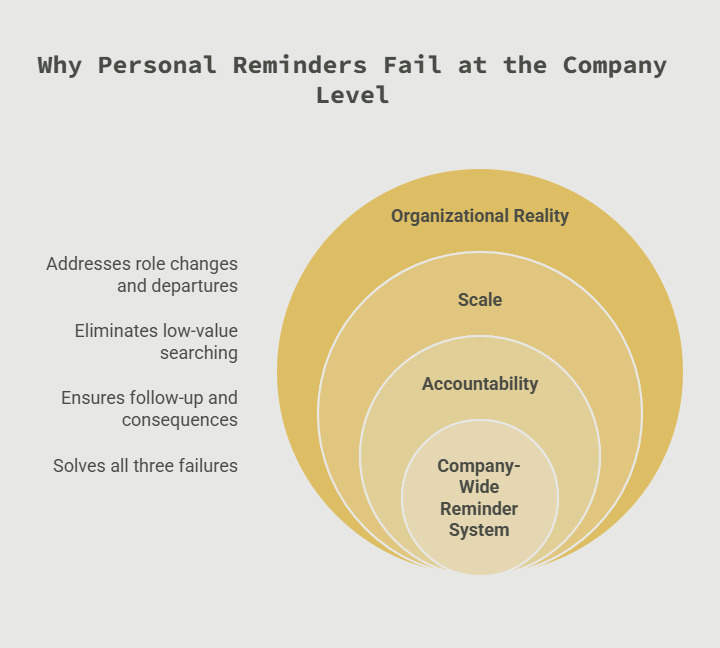
Why Personal Reminders Fail at the Company Level
Most professionals already use reminders. Calendar alerts, phone notifications, sticky notes on monitors. So why do organizations still miss renewals?
The answer is that personal systems don't survive organizational reality. People change roles, go on leave, and leave the company. When the reminder lives in one person's calendar, the knowledge leaves with them.
There's also a scale problem. Research compiled by Cottrill Research found that workers spend on average 1.8 hours every day searching for and gathering information. Similarly, Slack's workforce research found desk workers spend roughly a third of their day on low-value tasks. Hunting down renewal dates across inboxes, spreadsheets, and filing cabinets is exactly this kind of low-value, high-risk work.
Finally, personal reminders have no accountability layer. If a calendar alert fires and the person dismisses it, nothing happens. No one else knows the deadline existed, and no one follows up until the consequence arrives.
A company-wide reminder system fixes all three failures: the data is shared, the searching is eliminated, and the follow-up is automatic.
Best Practice 1: Start With a Complete Date Inventory
You can't track what you haven't listed. Before choosing tools or workflows, build a complete inventory of every date-sensitive item in the business.
Most organizations are surprised by how long this list gets. Common categories include:
- Licenses and permits: business licenses, professional licenses, operating permits, health permits
- Insurance: general liability policies, workers' comp, vendor and subcontractor COIs
- Employee credentials: certifications, training renewals, CPR cards, driver's licenses, background check refreshes
- Contracts and agreements: vendor contracts, leases, SaaS subscriptions, NDAs with renewal or termination windows
- Equipment and safety: inspection dates, calibration schedules, fire extinguisher checks, vehicle registrations
- Regulatory filings: annual reports, tax registrations, accreditation renewals
For regulated items, the inventory isn't optional. OSHA's recordkeeping requirements obligate employers to maintain records of workplace injuries and illnesses, and many individual standards carry their own training documentation rules. For example, respiratory protection under 29 CFR 1910.134 requires annual fit testing and training, while powered industrial truck operators must be re-evaluated at least every three years under 29 CFR 1910.178.
A practical way to run the inventory: ask every department head to list their date-sensitive items in one week, then consolidate. Expect the first pass to miss things. Plan a second sweep 30 days later to catch what surfaced in the meantime.
Best Practice 2: Centralize Into a Single Source of Truth
Once you have the inventory, resist the urge to "organize" it into multiple department spreadsheets. Fragmentation is what caused the problem in the first place.
Everything goes into one system. One place where anyone with permission can answer, in seconds, questions like: Which COIs expire this quarter? Whose forklift certification lapses next month? When does the elevator inspection come due?
Centralization pays off in three ways. First, it eliminates duplicate tracking — no more three versions of the truth. Second, it makes audits dramatically easier, because the documentation trail lives in one place. As SHRM notes, OSHA-related documents need to be produced during inspections, and retention periods vary by document type — a centralized system handles those variations far better than human memory. Third, it survives turnover. When the system holds the knowledge, a departure doesn't create a blind spot.
Attach the actual documents to their records whenever possible. A renewal date is useful; a renewal date with the certificate, the issuing contact, and the renewal instructions attached is a complete answer.
Best Practice 3: Assign an Owner to Every Date
A reminder without an owner is a notification, not a system. Every tracked item needs a named person responsible for acting when the reminder fires.
Good ownership design follows a few rules:
- One primary owner per item. Shared ownership means no ownership. Pick one name.
- A backup owner for critical items. The system should notify the backup if the primary doesn't act — or is out of office.
- Role-based, not just person-based. When the safety manager changes, reassigning fifty items should take minutes, not a migration project.
- Owners see only what's theirs. Flooding everyone with every reminder trains people to ignore the system. Relevance preserves trust.
This is also where accountability becomes visible. Managers should be able to see which renewals are pending, which are overdue, and who's responsible — without sending a single "just checking in" email.
Best Practice 4: Layer Your Reminder Timing
One reminder is a coin flip. The best practice is a laddered sequence matched to how long the renewal actually takes.
A useful default ladder looks like this:
- 90 days out: First notice. Enough lead time for renewals that involve third parties — insurance carriers, licensing boards, training providers.
- 60 days out: Action window. The owner should have started the renewal by now.
- 30 days out: Urgency. If nothing has happened, the backup owner gets copied.
- 14 and 7 days out: Escalation. A manager joins the notification chain.
- Day of / overdue: Daily alerts until resolved.
Adjust the ladder to the item. A professional license that requires continuing education credits might need a 120-day first notice, because the owner needs time to complete coursework. A monthly fire extinguisher check might need only a 7-day notice. The principle is the same: the first reminder must arrive while there's still comfortably enough time to act.
Escalation is the piece most homegrown systems skip. If a reminder can be ignored indefinitely without anyone else finding out, the system will eventually fail exactly when it matters. Automatic escalation turns a missed email into a visible, recoverable event instead of a silent lapse.
Best Practice 5: Meet People Where They Already Work
Reminders only work if people see them. The more channels your system can use, the fewer deadlines slip through.
Email remains the backbone, but consider layering:
- SMS or push notifications for time-critical items and field teams who don't live in their inbox
- Team chat integrations so renewals appear where daily conversation happens
- Dashboards for managers who want a weekly scan rather than item-by-item alerts
- Calendar feeds for people who plan their week from their calendar
One subtle but important practice: write reminder messages that contain everything needed to act. "Your certification expires in 30 days" is weaker than "Your OSHA forklift evaluation expires June 30. Schedule with TrainingCo at this link. Last completed: June 2023." Every extra lookup step is a place where action stalls.
Best Practice 6: Make Updating the System Effortless
Here's where most reminder initiatives quietly die: the renewal happens, but nobody updates the record. Six months later the system is full of stale data, people stop trusting it, and everyone drifts back to personal spreadsheets.
Prevent this by making the update step as small as possible:
- Let owners confirm a renewal and attach the new document directly from the reminder itself.
- Auto-calculate the next expiration where renewal cycles are fixed (annual licenses, biennial inspections).
- Run a monthly exception report: items expired but not updated, items missing documents, items with no owner. Fifteen minutes of review keeps the data honest.
Treat the system like a living asset. A reminder platform with accurate data is a compliance program; one with stale data is a liability dressed up as a dashboard.
Best Practice 7: Review and Expand Quarterly
Set a quarterly review with a simple agenda. What did we almost miss, and why? What new date-sensitive items entered the business — new vendors, new equipment, new hires, new regulations? Which reminders fired too late or too often?
Most teams find their inventory grows 10–20% in the first year as departments realize the system can carry things they'd been tracking in their heads. That's a good sign. Each item moved into the shared system is one less thing that depends on an individual's memory.
How to Measure Whether Your Reminder System Is Working
Launching the system is the start, not the finish. A handful of simple metrics will tell you whether it's actually reducing risk or just generating notifications.
Track these monthly:
- On-time renewal rate: the percentage of items renewed before expiration. This is your headline number. Healthy systems run above 95% within two quarters of launch.
- Escalation rate: how often reminders had to climb past the primary owner. A rising escalation rate points to ownership problems — wrong owners, overloaded owners, or unclear renewal instructions.
- Data freshness: the count of items with expired dates that haven't been updated. This should trend toward zero; if it climbs, your update loop is broken.
- Time-to-evidence: how long it takes to produce a current document when someone asks. Under two minutes means your audit story is solid.
Share these numbers in whatever operations review already exists. Visibility does two things: it keeps leadership invested in the system, and it gently reminds owners that renewals are being watched. Most teams find the on-time rate improves fastest in the first ninety days, then plateaus — and the plateau is where the quarterly review earns its keep, catching the structural issues that metrics alone won't fix.
Building It: Spreadsheet, Calendar, or Dedicated Software?
You can start a reminder system in a spreadsheet, and for a handful of dates that's fine. But be honest about the failure modes: spreadsheets don't send escalating notifications, don't store documents well, don't log who did what, and depend entirely on someone remembering to look at them.
Shared calendars are better at notifying but worse at everything else — no document storage, no ownership model, no audit trail, and recurring events quietly drift out of sync with reality.
Dedicated expiration tracking software exists precisely to close these gaps: automated reminder ladders, escalation, document storage, ownership, and reporting in one place. If your inventory passed fifty items or touches anything regulated, purpose-built tooling almost always costs less than the first incident it prevents. You can see how this works in practice on our document expiration tracking features page or explore how automated reminders work.
Ready to stop tracking renewals by memory? Start a free trial and have your first reminders running in under an hour — no credit card required.
Key Takeaways
- Personal reminders fail at the company level because they don't survive turnover, create accountability, or scale — a shared system does all three.
- Start with a complete inventory of every date-sensitive item: licenses, insurance, credentials, contracts, inspections, and filings.
- Centralize everything into a single source of truth with documents attached, rather than scattering spreadsheets across departments.
- Every tracked date needs one named owner, a backup, and escalation rules so a missed reminder becomes visible instead of silent.
- Ladder reminders to the renewal's real lead time — 90/60/30/14/7 days is a strong default for most business documents.
- Make updates effortless and run monthly exception reports, because stale data kills trust in any reminder system.
- Review quarterly and expect the inventory to grow as teams move tracked items out of their heads and into the system.
Frequently Asked Questions
What is a company-wide reminder system?
It's a centralized system that tracks every expiration date and deadline an organization depends on — licenses, certifications, insurance, contracts, inspections — and automatically notifies the responsible people in advance. Unlike personal calendars or to-do apps, it's shared, has ownership and escalation built in, and survives staff turnover.
How far in advance should renewal reminders be sent?
Match the lead time to the renewal process. A good default is a laddered sequence at 90, 60, 30, 14, and 7 days before expiration, with escalation to a manager if nothing happens. Items that require third parties — insurance carriers, licensing boards, continuing education — often need the first notice 90 to 120 days out.
Can we just use a spreadsheet to track expiration dates?
For a handful of dates, yes. But spreadsheets can't send escalating notifications, store documents, or show who acted on what. Once you're tracking more than about fifty items, or anything with regulatory consequences, the manual overhead and risk of a missed update usually outweigh the savings.
Who should own the reminder system?
Day-to-day ownership of individual items belongs to the people closest to them — the safety manager owns inspections, HR owns credentials. Overall system ownership usually sits with operations, compliance, or HR. The critical rule is one named owner per item, with a backup and escalation path.
How do we get employees to actually respond to reminders?
Three things drive response rates: relevance (people only receive reminders for items they own), completeness (the reminder contains everything needed to act, including links and documents), and escalation (ignored reminders become visible to a manager). Systems that blast everyone with everything get ignored within months.
What's the most common mistake when setting up a reminder system?
Skipping the update loop. Teams launch with clean data, but renewals happen and records don't get updated, so the system decays. Make confirming a renewal a one-click step and review exceptions monthly.
Implementation Checklist: Set Up Your System This Month
- Week 1: Ask each department head to inventory every date-sensitive item they're responsible for. Provide the category list above as a prompt.
- Week 1: Choose your platform — and be realistic about whether a spreadsheet can do escalation, documents, and audit trails.
- Week 2: Consolidate the inventory into the system. Attach current documents and note issuing contacts and renewal instructions.
- Week 2: Assign a primary and backup owner to every item. Confirm each owner knows what action the reminder will require.
- Week 3: Configure reminder ladders by item type — 90/60/30/14/7 for most documents, longer for credential renewals requiring coursework.
- Week 3: Set escalation rules so overdue items automatically notify backups and managers.
- Week 4: Run a pilot with one department, gather feedback on timing and message clarity, and adjust.
- Week 4: Schedule the monthly exception report and the quarterly review. Put both on the calendar now, before launch momentum fades.
- Day 30: Do the second inventory sweep and add everything the first pass missed.
P.S. Every missed renewal starts the same way — a date someone knew about, written down somewhere no one looked in time. Automating those reminders takes an afternoon to set up and removes that entire category of risk for good.