
Reducing Compliance Risk with Automated Alerts
Introduction
It was 3:47 PM on a Thursday when Sarah's phone lit up. The construction project manager had just been asked—for the third time that week—to produce proof that all subcontractors had current insurance certificates. She opened her laptop with that familiar knot forming in her stomach.
Three hours and countless spreadsheet tabs later, she found it: a Certificate of Insurance that had expired six weeks ago. The subcontractor's team had been on-site that entire time. The project was now exposed to liability, the client relationship was at risk, and Sarah faced the very real possibility of a work stoppage order.
This near-miss could have ended her career. Instead, it changed everything about how her company handled compliance.
If you're responsible for tracking expiring documents—contracts, licenses, certifications, permits, insurance policies—you know Sarah's panic. One missed renewal can trigger regulatory fines, halt operations, damage your reputation, and in the worst cases, create serious safety or legal exposure. Yet most organizations still rely on manual tracking methods that practically guarantee something will slip through.
Reducing compliance risk with automated alerts isn't just about convenience. It's about building a reliable system that catches expirations before they become crises, protects your organization from preventable violations, and gives compliance teams the confidence that nothing critical will expire unnoticed.
In this guide, you'll discover exactly how automated expiration tracking eliminates compliance gaps, what features transform reactive scrambling into proactive management, and how to implement a system that keeps your organization audit-ready without the overwhelm.

The Hidden Costs of Manual Compliance Tracking
Before we explore automated solutions, let's be honest about what manual tracking actually costs your organization.
Time Lost to Spreadsheet Management
Spreadsheet-based tracking consumes far more hours than most leaders realize. Every week, someone must:
- Open multiple files to check upcoming expirations
- Manually calculate how many days remain until each deadline
- Send individual emails or calls to document owners
- Update cells when renewals arrive
- Cross-reference related documents across different tabs or files
For a mid-sized organization tracking 200+ expiring items, this easily consumes 10-15 hours weekly. That's nearly half of one full-time employee's capacity spent on administrative busywork rather than strategic compliance work.
The Compliance Violation Exposure
Manual methods create systematic gaps. According to research on compliance automation, organizations relying on periodic manual audits miss violations that automated real-time monitoring catches immediately.
The consequences are measurable and severe. Non-compliance costs organizations an average of $14-40 million per incident, according to regulatory compliance research. These costs include:
- Direct regulatory fines and penalties
- Legal fees and settlement costs
- Operational disruptions and work stoppages
- Reputation damage and lost business opportunities
- Increased insurance premiums
- Executive time spent on remediation
Even more concerning: 95% of regulatory deadline misses stem from alert backlogs and delayed notification systems, according to AML compliance studies.
Error-Prone Processes
Human error is inevitable in manual tracking systems. Common mistakes include:
- Entering the wrong expiration date
- Forgetting to update the spreadsheet when a renewal occurs
- Missing email notifications buried in crowded inboxes
- Failing to account for processing time before deadlines
- Losing track of who's responsible for each renewal
One healthcare compliance study found that automated alerts increased documentation compliance from 76% to 88%, demonstrating the significant gap manual processes leave open.
Audit Anxiety
When an audit request arrives, manual tracking systems create panic. Teams must:
- Scramble to verify that every document is actually current
- Search through email chains and file folders to prove renewal dates
- Create reports from scratch, manually compiling data
- Hope nothing expired without being noticed
This audit preparation can consume weeks of staff time and still leaves uncertainty about whether everything is truly compliant.
How Automated Alerts Reduce Compliance Risk
Automation fundamentally changes compliance management from reactive to proactive. Here's how automated alert systems eliminate the gaps manual tracking creates.
Real-Time Monitoring and Instant Detection
Automated compliance monitoring systems provide continuous oversight rather than periodic spot-checks. They scan every tracked item daily, comparing expiration dates against current dates and your configured alert thresholds.
The difference is dramatic. While manual reviews might occur weekly or monthly, automated systems detect upcoming expirations instantly. Research shows that automated breach detection identifies violations within seconds, compared to 5-day delays in manual processes.
This real-time monitoring means you discover potential compliance issues when there's still plenty of time to renew, not when it's already too late.
Multi-Channel Proactive Notifications
Automated alert systems don't just detect upcoming expirations—they actively notify the right people through multiple channels:
- Email alerts that arrive in the inboxes of document owners, managers, and compliance teams
- SMS text messages for urgent items requiring immediate attention
- Dashboard notifications that provide visual status updates
- Escalation alerts that notify supervisors if items remain unaddressed
These notifications are configurable and intelligent. You can set up alert sequences that notify people 90 days out, then 60 days, 30 days, one week, and daily as the deadline approaches.
Unlike calendar reminders that users must manually set and maintain, automated alerts require no ongoing effort. Once configured, they work continuously.
Customizable Alert Schedules
Different documents require different alert timing. A complex commercial insurance policy might need 90 days' notice to shop for quotes and complete the renewal process. An employee certification might only need 30 days.
Automated systems let you customize alert schedules based on:
- Document type
- Renewal complexity
- Processing time requirements
- Internal approval workflows
- Regulatory notice requirements
This flexibility ensures every stakeholder receives timely notifications with enough runway to complete renewals without last-minute scrambles.
Automatic Escalation Workflows
One of the most powerful risk-reduction features is automatic escalation. If a document owner doesn't respond to initial alerts, the system can automatically:
- Send reminder notifications at increasing frequency
- Escalate to the document owner's supervisor
- Notify the compliance team of potential gaps
- Flag the item as "at risk" on compliance dashboards
These escalation workflows ensure nothing falls through the cracks, even if the original responsible party is on vacation, has changed roles, or simply overlooked the notification.
Centralized Visibility and Accountability
Automated systems create a single source of truth for all expiring documents. Every stakeholder can access the same information:
- What's expiring and when
- Who's responsible for each renewal
- What alerts have been sent
- Which items have been renewed vs. which are still pending
This transparency eliminates the "I thought someone else was handling it" problem that plagues spreadsheet systems. Clear ownership and visible status make accountability automatic.
The Data Behind Automation's Impact
The compliance automation research reveals compelling evidence of automated alerts' effectiveness:
Time and Resource Savings
The efficiency gains are equally impressive:
- Automated Suspicious Activity Report documentation reduces processing time by 70%
- One retail bank saved 11,769 investigation hours annually after implementing AI-enhanced compliance automation
- Compliance teams achieve 50% productivity gains by automating verification and tracking tasks
These time savings let compliance professionals focus on strategic risk management rather than administrative tracking.
Financial Impact
The financial case for automation is clear:
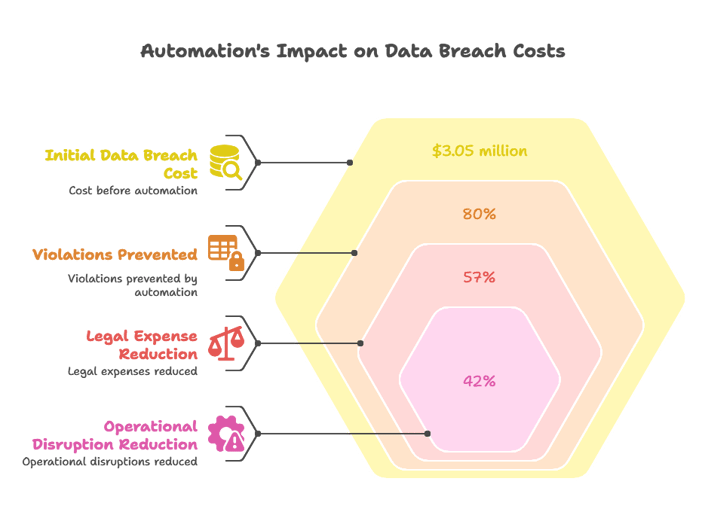
- Organizations save $3.05 million per data breach through automated monitoring that detects issues early
- Automation prevents 80% of violations by enabling real-time gap detection
- Legal expenses decrease by 57% and operational disruptions drop by 42% compared to manual processes
When you consider that non-compliance incidents average $14-40 million in total costs, even a single prevented violation delivers massive ROI on automated alert systems.
Key Features of Effective Automated Alert Systems
Not all automated alert systems deliver equal value. Here are the essential capabilities to look for:
Comprehensive Document Support
Your system should handle every type of expiring document your organization tracks:
- Contracts and agreements (vendor contracts, service agreements, leases)
- Insurance policies (general liability, professional liability, workers' compensation, COIs)
- Licenses and permits (business licenses, construction permits, health department permits)
- Employee certifications (professional licenses, safety training, CPR certification)
- Equipment inspections (vehicle registrations, elevator certifications, fire extinguisher inspections)
- Regulatory filings (annual reports, compliance submissions)
Fragmented systems that only handle certain document types force you to maintain multiple tracking methods, defeating the purpose of automation. Expiration Reminder handles all of the above and more.
Intelligent Alert Configuration
Look for systems that offer:
- Multiple alert thresholds (90 days, 60 days, 30 days, etc.)
- Recurring reminder options (weekly, daily as deadline approaches)
- Custom alert messages with document-specific instructions
- Role-based notification routing (different alerts for owners, managers, compliance teams)
- Flexible delivery channels (email, SMS, dashboard, mobile app notifications)
This configurability ensures alerts arrive at the right time, to the right people, with the right information to take action.
Audit-Ready Reporting
Compliance isn't just about preventing expirations—it's about proving compliance when auditors arrive. Your automated system should provide:
- One-click compliance reports showing all tracked items and their status
- Expiration date reports filterable by department, document type, or date range
- Alert history reports documenting when notifications were sent and to whom
- Renewal documentation storage that links new documents to expiration records
- Compliance gap reports highlighting any items approaching expiration
When an auditor requests proof of compliance, you should be able to generate comprehensive reports in minutes, not days.
Integration Capabilities
Your alert system shouldn't be an island. Look for integration with:
- Email platforms for seamless notification delivery
- Calendar applications to sync deadlines with team calendars
- HR systems to automatically pull employee certification data
- Document management systems to link alerts with stored files
- Project management tools to create renewal tasks automatically
These integrations let automated alerts fit naturally into your team's existing workflows rather than requiring new processes.
Security and Compliance Standards
Since you're tracking sensitive documents, your alert system must meet rigorous security requirements:
- HIPAA compliance for healthcare organizations handling protected health information
- SOC 2 certification demonstrating security, availability, and confidentiality controls
- GDPR compliance for organizations handling European data
- Role-based access controls ensuring people only see documents they're authorized to access
- Audit trail logging tracking every system access and change
These security standards protect both the sensitive information in your system and your organization's compliance posture.
Implementation: Your Action Plan for Automated Compliance Alerts
Ready to move from manual tracking to automated alerts? Follow this step-by-step implementation plan:
Step 1: Inventory All Expiring Documents
Before you can automate, you need to know what you're tracking. Create a comprehensive inventory:
- Gather all existing tracking spreadsheets, shared drives, and email folders
- List every type of document with an expiration date
- Identify who currently "owns" each document type
- Note the current process for renewals (who does what, when)
- Estimate the volume of each document type (e.g., 50 vendor COIs, 200 employee certifications)
This inventory reveals the full scope of your compliance tracking and helps you configure your automated system correctly from day one.
Step 2: Define Alert Requirements by Document Type
Not all expirations need the same alert schedule. For each document type, determine:
- How much advance notice is needed? (Consider renewal processing time, internal approval workflows, and vendor/agency response times)
- Who needs to be notified? (Document owner, their supervisor, compliance team, finance team)
- What action should alerts trigger? (Start renewal process, request updated documentation, schedule inspection)
- How urgent are late-stage alerts? (Some items may need daily reminders in the final week, others may not)
This planning ensures your alert configuration matches real-world renewal needs.
Step 3: Choose Your Automated Alert Platform
Evaluate solutions based on:
- Support for your specific document types and industry requirements
- Alert configuration flexibility (thresholds, channels, escalation)
- Reporting capabilities that meet your audit needs
- Integration with your existing systems (email, calendar, HR, document storage)
- Security certifications matching your compliance requirements (HIPAA, SOC 2, GDPR)
- Ease of use for both administrators and end users
- Customer support and implementation assistance
Request demos focused on your specific use cases and ask vendors to show you exactly how alerts would work for your document types.
Step 4: Configure Alert Rules and Workflows
Once you've selected a platform, set up your alert system:
- Create alert templates for each document type with appropriate thresholds
- Assign document owners and notification recipients
- Configure escalation workflows (e.g., if no action after 7 days, notify supervisor)
- Set up custom alert messages with renewal instructions
- Test alert delivery across all channels (email, SMS) to verify they're working
Most platforms let you clone alert configurations, so once you've set up one document type perfectly, you can replicate that setup for similar items.
Step 5: Import Your Existing Data
Transfer your current tracking information into the automated system:
- Upload existing expiration data (most platforms accept CSV/Excel imports)
- Attach relevant documents to each record
- Verify that dates imported correctly (watch for date format issues)
- Double-check that owners and notification recipients are assigned
- Review the upcoming alerts report to confirm everything is configured correctly
Many organizations do a phased import, starting with the most critical document types and adding others over subsequent weeks.
Step 6: Train Your Team
The best system is useless if your team doesn't know how to use it. Provide training on:
- How to respond when they receive an expiration alert
- Where to upload renewed documents
- How to check the status of their assigned items
- Who to contact if they have questions about a renewal
- What happens if they don't respond to alerts (escalation process)
Create simple quick-reference guides and record brief tutorial videos. Most platforms are intuitive, so training can be quick.
Step 7: Monitor and Refine
After launch, continuously improve your system:
- Review which alerts are being acted on promptly vs. which get ignored
- Adjust alert timing if people consistently respond too early or too late
- Add new document types as you identify tracking gaps
- Gather feedback from document owners about alert frequency and usefulness
- Run monthly compliance reports to verify nothing is falling through the cracks
Automated alerts are not "set it and forget it"—they're "set it and optimize it" to continually improve compliance outcomes.
Common Implementation Challenges and Solutions
Organizations often encounter these obstacles when implementing automated alerts. Here's how to address them:
Challenge: "We Have Too Many Documents to Migrate"
Solution: Start with your highest-risk document types rather than trying to automate everything at once. Focus first on items where expiration creates immediate operational, legal, or safety risk:
- Contractor insurance certificates
- Employee professional licenses required for job duties
- Regulatory permits needed to operate
- Critical vendor contracts
Once these high-risk items are automated, add other document types incrementally. Even partial automation dramatically reduces risk.
Challenge: "Our Team Is Resistant to New Systems"
Solution: Frame automation as eliminating busywork, not adding complexity. Show your team:
- How much time they currently spend manually tracking expirations
- How alerts will remind them automatically instead of requiring them to check spreadsheets
- How the system will protect them from career-damaging missed renewals
- Real examples of organizations where missed expirations caused serious problems
Resistance typically fades once people see how much easier their lives become.
Challenge: "We're Not Sure Who Owns Each Document"
Solution: Use implementation as an opportunity to clarify accountability. For each document type, ask:
- Who currently handles renewals (even if it's informal)?
- Who would be impacted if this document expired?
- Who has the authority to approve renewal expenditures?
- Who has the expertise to review renewal terms?
Document these ownership decisions in your automated system and get management sign-off. Clear ownership is a compliance improvement in itself.
Challenge: "Alert Fatigue—People Might Ignore Too Many Notifications"
Solution: Configure alerts thoughtfully to avoid noise:
- Use longer alert intervals for items with simple renewals (60 days, 30 days, 1 week only)
- Reserve SMS alerts for truly urgent situations
- Group related alerts when possible ("You have 3 items expiring next month" rather than 3 separate emails)
- Use escalation to ensure managers only get involved when document owners haven't responded
Well-designed alerts are informative, not overwhelming. Most users appreciate timely reminders that help them avoid emergencies.
Real-World Outcomes: What Success Looks Like
Organizations that implement automated compliance alerts consistently report transformational results:
From Reactive Panic to Proactive Planning
Instead of discovering expirations after they've occurred, teams now plan renewals weeks in advance. The shift from "emergency mode" to "routine process" reduces stress, improves outcomes, and gives teams leverage to negotiate better renewal terms.
From Scattered Information to Centralized Truth
When everyone accesses the same system, confusion disappears. No more "I thought you were handling that" or "I checked the wrong spreadsheet." One dashboard shows exactly what's expiring, who's responsible, and what's been completed.
From Audit Anxiety to Audit Confidence
When audit requests arrive, teams generate comprehensive compliance reports in minutes. They can prove not only that items are current but also that they have robust processes to prevent expirations—demonstrating mature compliance management to auditors and regulators.
From Hidden Risk to Visible Accountability
Managers gain visibility into compliance status across their entire organization. Dashboard views show:
- How many items are expiring in the next 30, 60, 90 days
- Which departments have the most pending renewals
- Which document owners are consistently responsive vs. which need support
- Trend data showing whether compliance is improving over time
This visibility enables proactive management rather than reactive firefighting.
Why Expiration Reminder Is Purpose-Built for Compliance Risk Reduction
Generic calendar apps and task managers weren't designed for compliance tracking. Expiration Reminder is purpose-built to eliminate compliance risk through intelligent automation:
Centralized Tracking for Every Expiring Document
Track contracts, insurance certificates, licenses, certifications, permits, inspections, and any other expiring item in one secure platform. No more scattered spreadsheets or fragmented systems.
Intelligent, Customizable Alert Sequences
Configure multi-stage alert workflows with unlimited thresholds. Set up 90-day, 60-day, 30-day, 1-week, and daily alerts for critical items. Route notifications to document owners, supervisors, and compliance teams automatically.
Automatic Escalation That Ensures Nothing Falls Through
If a document owner doesn't respond to initial alerts, Expiration Reminder automatically escalates to their supervisor and flags the item as at-risk. This automated accountability ensures compliance gaps get addressed.
Audit-Ready Reports in Seconds
Generate comprehensive compliance reports with one click. Show auditors exactly what's being tracked, when alerts were sent, who's responsible, and which items are current vs. pending. Transform audit preparation from weeks of work to minutes.
Enterprise-Grade Security and Compliance
Expiration Reminder maintains HIPAA, SOC 2, and GDPR compliance, with role-based access controls and complete audit trails. Your sensitive documents are protected with the same security standards banks and healthcare organizations require.
Seamless Integration with Your Workflow
Connect with email platforms, calendars, HR systems, and document management tools. Expiration Reminder fits naturally into your existing processes rather than requiring new workflows.
Over a thousand organizations trust Expiration Reminder to protect them from missed renewals and compliance violations. The platform transforms compliance from a source of constant anxiety into a reliable, automated process you can trust.
See How Automated Alerts Eliminate Compliance Risk
Stop relying on spreadsheets that guarantee something will slip through. See exactly how Expiration Reminder's automated alert system keeps your organization compliant without the overwhelm.
Book a free demo or start your free trial today.
Key Takeaways
- Manual compliance tracking creates systematic gaps that lead to missed renewals, regulatory violations, and costs averaging $14-40 million per incident.
- Automated alert systems provide real-time monitoring and proactive notifications that detect upcoming expirations when there's still time to renew, not after it's too late.
- Organizations using automated compliance monitoring reduce costs by 40%, cut audit preparation time by 80%, and prevent 94.4% of compliance breaches through early intervention.
- Effective automated alert systems include multi-channel notifications (email, SMS, dashboard), customizable alert schedules, automatic escalation workflows, and centralized visibility.
- Implementation success requires inventorying all expiring documents, defining alert requirements by document type, configuring workflows thoughtfully, and continuously refining based on team feedback.
- The shift from reactive to proactive compliance management eliminates audit anxiety, creates clear accountability, and gives teams confidence that nothing critical will expire unnoticed.
- Purpose-built compliance platforms like Expiration Reminder offer enterprise-grade security, unlimited customization, audit-ready reporting, and seamless integration with existing workflows.
Frequently Asked Questions
How far in advance should automated alerts notify us about upcoming expirations?
Alert timing should match your renewal process complexity. For simple renewals (like an annual subscription that requires just a credit card payment), 30 days' notice may be sufficient. For complex renewals requiring vendor quotes, internal approvals, or lengthy processing (like commercial insurance policies or major contracts), start alerts 90-120 days before expiration.
Best practice: Configure multiple alert thresholds (90 days, 60 days, 30 days, 1 week, and daily in the final days) so responsible parties receive early notice but also regular reminders as deadlines approach. This multi-stage approach gives ample time for complex renewals while ensuring nothing gets forgotten.
What happens if the person assigned to a document is on vacation when an alert goes out?
Quality automated alert systems include escalation workflows specifically for this scenario. If the primary document owner doesn't respond to alerts within a defined timeframe (e.g., 7 days), the system automatically escalates to their supervisor or a backup contact.
You can also configure concurrent notifications that alert both the document owner and their manager from the start for critical items. Additionally, good systems provide dashboard visibility so compliance teams can monitor pending items and intervene if they notice someone hasn't responded to alerts.
Can automated alerts integrate with our existing calendar and email systems?
Yes, most modern compliance alert platforms integrate with common business tools. Email integration is standard—alerts arrive in recipients' regular inboxes alongside their other messages. Many platforms also sync with calendar applications (Google Calendar, Outlook, Apple Calendar) so expiration deadlines appear on team calendars automatically.
More advanced platforms integrate with HR systems (to pull employee certification data), document management systems (to link alerts with stored files), and project management tools (to automatically create renewal tasks). These integrations ensure alerts fit naturally into your team's existing workflows rather than requiring them to check another separate system.
How do automated alerts help during audits?
Automated alert systems maintain comprehensive records of all notifications sent, actions taken, and current compliance status. When auditors arrive, you can instantly generate reports showing:
- Complete inventory of all tracked items and their expiration dates
- Alert history proving when notifications were sent and to whom
- Documentation of who's responsible for each renewal
- Current status of all items (compliant, pending, at-risk)
- Attached renewal documents and certificates
This audit trail demonstrates not just that you're currently compliant, but that you have robust, documented processes to maintain compliance continuously. Auditors view automated tracking systems as evidence of mature compliance management, which can lead to more favorable audit outcomes. Organizations report reducing audit preparation time by 80% with automated systems.
What's the ROI of implementing automated compliance alerts?
ROI comes from three sources:
- Risk avoidance: Non-compliance incidents cost organizations $14-40 million on average. Preventing even one violation delivers massive ROI. Organizations using automation report preventing 80% of violations through early detection.
- Time savings: Compliance teams achieve 50% productivity gains by eliminating manual tracking tasks. For an organization where compliance tracking consumes 15 hours weekly, automation recovers 390 hours annually—nearly 10 work weeks that can be redirected to strategic initiatives.
- Reduced incident costs: Organizations save $3.05 million per data breach through early detection, and reduce legal expenses by 57% and operational disruptions by 42% through proactive compliance management.
Most organizations see positive ROI within the first year, even accounting for platform costs and implementation time. The combination of prevented violations, recovered staff time, and reduced incident response costs typically far exceeds implementation investment.
How difficult is it to migrate from spreadsheets to an automated alert system?
Most modern platforms make migration straightforward. The typical process takes 1-2 weeks for mid-sized organizations:
- Export your existing data from spreadsheets (most platforms accept CSV/Excel uploads)
- Map your fields (expiration date, document type, owner, etc.) to the new system
- Import the data in bulk
- Configure alert rules for each document type
- Test alerts with a small group before rolling out organization-wide
Many providers offer implementation assistance, data migration support, and training resources. The key is starting with your highest-risk document types rather than trying to migrate everything at once. Even migrating 20% of your documents (the highest-risk items) delivers immediate value while you incrementally add the rest.
Teams consistently report that the migration effort is far smaller than they anticipated, and the immediate reduction in stress and manual work makes the investment worthwhile within the first month.
P.S. Every day you rely on manual tracking, you're one missed spreadsheet check away from a compliance violation. Automated alerts work 24/7 so nothing expires unnoticed—and implementation is easier than you think. See how Expiration Reminder can eliminate your compliance risk: Start your free trial or book a personalized demo today.